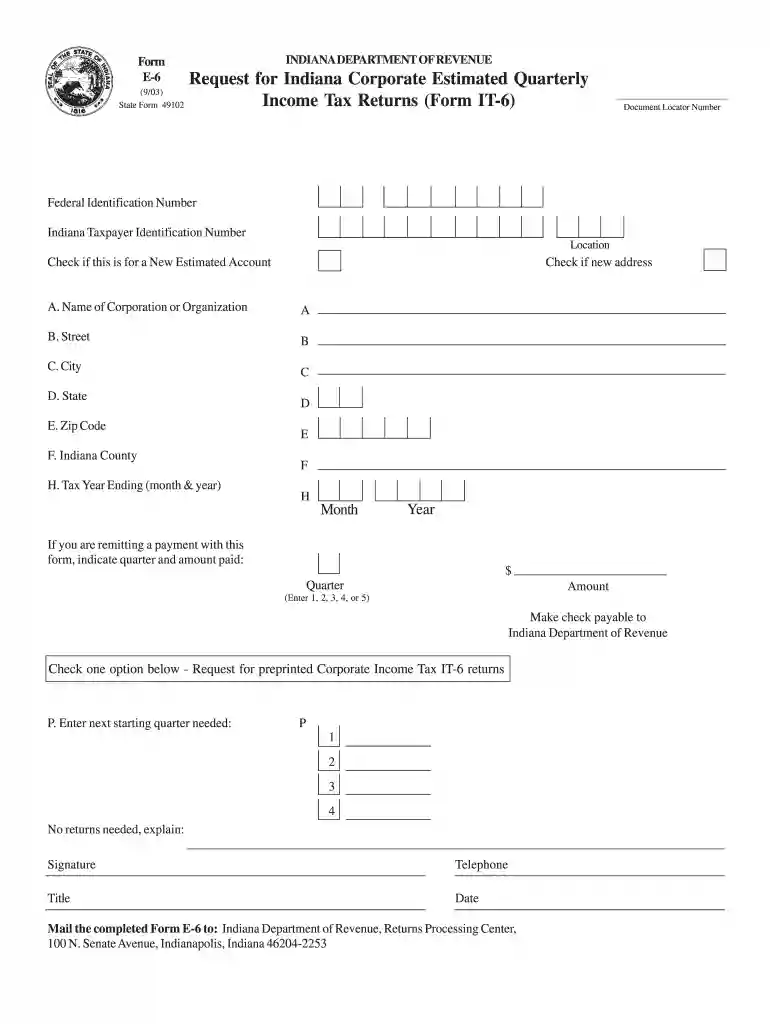
Indiana fillable e 6 2003 form-2026

Get Form
Indiana fillable e 6 2003 form Preview on Page 1

Here's how it works

01. Edit your form online
Type text, add images, blackout confidential details, add comments, highlights and more.

02. Sign it in a few clicks
Draw your signature, type it, upload its image, or use your mobile device as a signature pad.

03. Share your form with others
Send it via email, link, or fax. You can also download it, export it or print it out.

How to use or fill out Indiana fillable e 6 2003 form with DocHub

Form edit decoration
9.5
Ease of Setup
DocHub User Ratings on G2
9.0
Ease of Use
DocHub User Ratings on G2
  1. Click ‘Get Form’ to open the Indiana fillable e 6 2003 form in our editor.
  2. Begin by entering your Document Locator Number and Federal Identification Number in the designated fields.
  3. Fill in your Indiana Taxpayer Identification Number, along with your corporation's name, street address, city, state, zip code, and county.
  4. Indicate the tax year ending by selecting the month and year from the dropdown menus provided.
  5. If you are submitting a payment, specify the quarter and amount paid in the appropriate sections.
  6. Check if this is for a new estimated account or if there is a new address that needs to be updated.
  7. Complete any additional information required, such as your signature, telephone number, title, and date.
  8. Once completed, save your form and follow the instructions to mail it to the Indiana Department of Revenue at the specified address.

Start using our platform today to easily fill out your Indiana Corporate Estimated Quarterly Income Tax Returns!

See more Indiana fillable e 6 2003 form versions

We've got more versions of the Indiana fillable e 6 2003 form form. Select the right Indiana fillable e 6 2003 form version from the list and start editing it straight away!
Versions Form popularity Fillable & printable
2020 4.8 Satisfied (187 Votes)
2019 4.3 Satisfied (110 Votes)
2017 4.4 Satisfied (130 Votes)
2012 4.3 Satisfied (209 Votes)
2011 4 Satisfied (38 Votes)
2008 4.2 Satisfied (95 Votes)
2003 4.3 Satisfied (64 Votes)
be ready to get more

Complete this form in 5 minutes or less

Get form

Got questions?

We have answers to the most popular questions from our customers. If you can't find an answer to your question, please contact us.
Contact us
You may find the current year tax Indiana Individual forms online by going to .in.gov/dor/tax-forms/ and selecting the Individual Tax Forms download bar. To find individual tax forms online for prior years, go to .in.gov/dor/tax-forms/indiana-state-prior-year-tax-forms/ and select the year you need.
At the end of each year, all Indiana employers are required to complete and file Form WH-3, Annual Withholding Reconciliation Form, by Jan. 31 of the following year. The WH-3 is a reconciliation form for the amount of state and county income taxes withheld throughout the year.
The Indiana credit (reverse credit) is the amount of income tax actually paid to the taxpayers resident state but only on income derived from Indiana sources, or two percent (2%) of such income, whichever is less.
Indiana requires pass-through entities to file composite adjusted gross income tax returns on behalf of all nonresident owners with limited exceptions. Pass-through entities subject to this requirement include S corporations filing Form IT-20S, partnerships filing Form IT-65, and estates and trusts filing Form IT-41.

Security and compliance

At DocHub, your data security is our priority. We follow HIPAA, SOC2, GDPR, and other standards, so you can work on your documents with confidence.

Learn more
ccpa2
pci-dss
gdpr-compliance
hipaa
soc-compliance
be ready to get more

Complete this form in 5 minutes or less

Get form