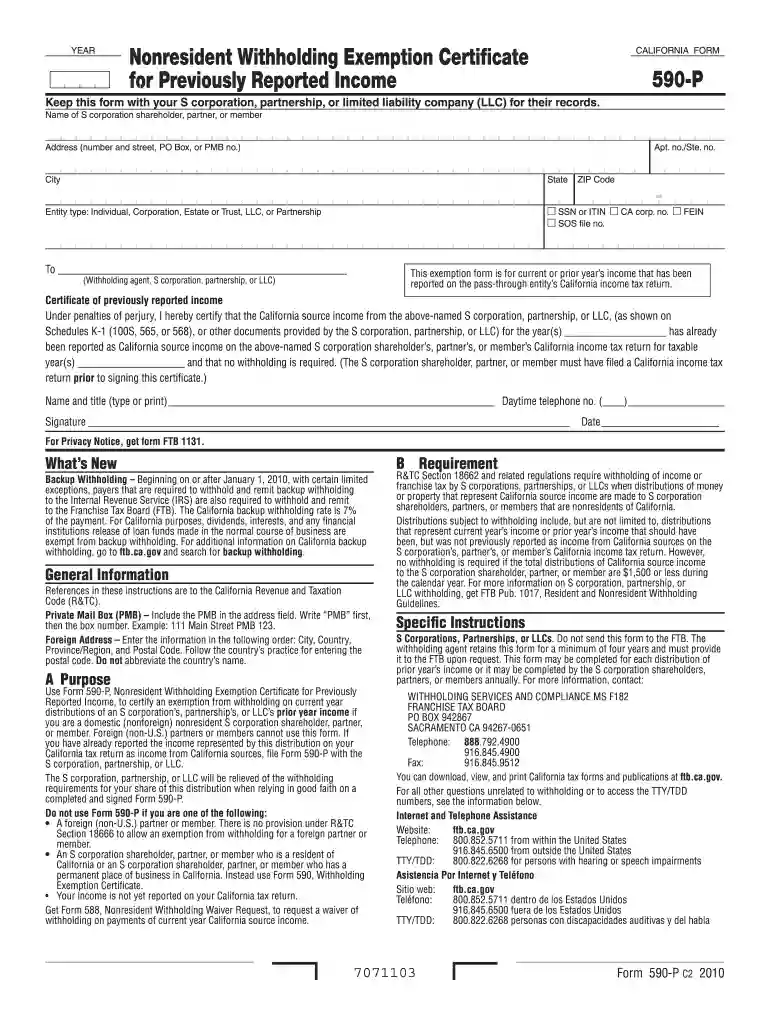
Form 590 p 2011-2026

Get Form
ca 590 form 2022 Preview on Page 1

Here's how it works

01. Edit your ca 590 form 2022 online
Type text, add images, blackout confidential details, add comments, highlights and more.

02. Sign it in a few clicks
Draw your signature, type it, upload its image, or use your mobile device as a signature pad.

03. Share your form with others
Send it via email, link, or fax. You can also download it, export it or print it out.

How to use or fill out form 590 p 2011 with our platform

Form edit decoration
9.5
Ease of Setup
DocHub User Ratings on G2
9.0
Ease of Use
DocHub User Ratings on G2
  1. Click ‘Get Form’ to open it in the editor.
  2. Begin by entering the name of the S corporation shareholder, partner, or member in the designated field.
  3. Fill in the address section, including street number, PO Box (if applicable), apartment or suite number, city, state, and ZIP code.
  4. Select the entity type from the options provided: Individual, Corporation, Estate or Trust, LLC, or Partnership.
  5. Indicate your identification number by checking the appropriate box for SSN/ITIN, CA corp. no., FEIN, or SOS file no.
  6. In the section for withholding agent details, enter the name of the S corporation, partnership, or LLC that is providing this exemption.
  7. Certify that you have reported California source income on your tax return by filling in the year(s) and signing at the bottom of the form.

Start using our platform today to easily complete and manage your forms for free!

See more form 590 p 2011 versions

We've got more versions of the form 590 p 2011 form. Select the right form 590 p 2011 version from the list and start editing it straight away!
Versions Form popularity Fillable & printable
2022 4.2 Satisfied (37 Votes)
2021 4.8 Satisfied (91 Votes)
2020 4.2 Satisfied (96 Votes)
2019 4.4 Satisfied (171 Votes)
2018 4.3 Satisfied (111 Votes)
2016 4.4 Satisfied (424 Votes)
2015 4.1 Satisfied (51 Votes)
2014 4.1 Satisfied (47 Votes)
2013 4 Satisfied (52 Votes)
2011 4.3 Satisfied (68 Votes)
be ready to get more

Complete this form in 5 minutes or less

Get form

Got questions?

We have answers to the most popular questions from our customers. If you can't find an answer to your question, please contact us.
Contact us
Use Form 590 to docHub an exemption from nonresident withholding. Complete and present Form 590 to the withholding agent.
Purpose. Use Form 590, Withholding Exemption Certificate, to docHub an exemption from nonresident withholding. Form 590 does not apply to payments of backup withholding. For more information, go to ftb.ca.gov and search for backup withholding.
Form 590 is certified (completed and signed) by the payee. California residents or entities exempt from the withholding requirement should complete Form 590 and submit it to the withholding agent before payment is made.
A: Form 593 imposes a withholding obligation on the buyer. The buyer is responsible for withholding a portion of the total sales price and remitting it to the California Franchise Tax Board (FTB).
Use Form 588, Nonresident Withholding Waiver Request, to request a waiver from withholding on payments of California source income to nonresident payees. Do not use Form 588 to request a waiver if you are a foreign (non-U.S.) partner or member.
be ready to get more

Complete this form in 5 minutes or less

Get form

People also ask

Who is subject to the California exit tax? While California doesnt have an official exit tax, the term refers to ongoing tax obligations for those leaving the state with docHub financial ties. This primarily affects high-net-worth individuals and long-term residents.

Related links