




Here's how it works



How to use or fill out universal water flow test summary sheet with our platform

- Click ‘Get Form’ to open the universal water flow test summary sheet in the editor.
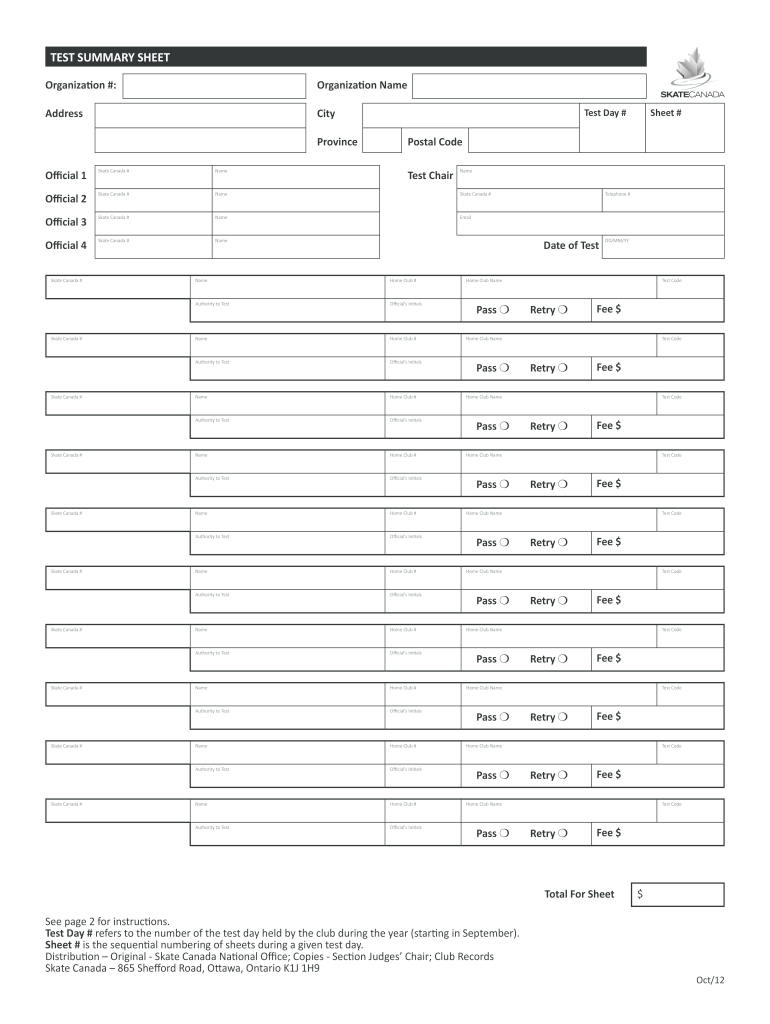
- Begin by filling in the organization details, including Organization #, Name, Address, City, Province, and Postal Code. Ensure accuracy for proper identification.
- In the 'Test Day #' section, assign a number corresponding to the test day hosted by your club. This should start from 1 for the first test day of the membership year.
- Fill in each official's details under their respective sections. Include names and Skate Canada numbers for accurate record-keeping.
- For each skater listed, ensure you enter their Skate Canada Registration number and Home Club number exactly as they appear on their membership card.
- Complete the 'Authority to Test' section by listing the responsible person's name and check off the appropriate results for each test taken.
- Finally, review all entries for completeness and accuracy before saving or exporting your document for submission.
Start using our platform today to streamline your document editing and form completion process!
It's free
See more universal water flow test summary sheet versions
Got questions?
Can I complete and sign my nfpa 291 recommended practice for fire flow testing and marking of hydrants pdf free download online?
Sure, and it’s really straightforward! DocHub is a web-based PDF editor with advanced document processing functions that allow you promptly adjust your forms, complete empty fields and drop new ones for others to fill out, and create electronic signatures in several ways. Import your nfpa 291 recommended practice for fire flow testing and marking of hydrants pdf free download, give information as required, and decide how you want to eSign your template - by typing your name, drawing your signature, uploading its image, or using a QR code.
Do I need to install software to edit my hydrant flow test chart calculator?
When you edit your hydrant flow test chart calculator with DocHub, you merely require a steady web connection and virtually any web browser installed on your device. No need to install any third-party software or study guides. Simply open a tab with DocHub, drag and drop your file, and edit it immediately.
How do you determine the capacity of a hydrant?
What is fire flow?
How do you make a fire flow?
Security and compliance
At DocHub, your data security is our priority. We follow HIPAA, SOC2, GDPR, and other standards, so you can work on your documents with confidence.
Learn more


