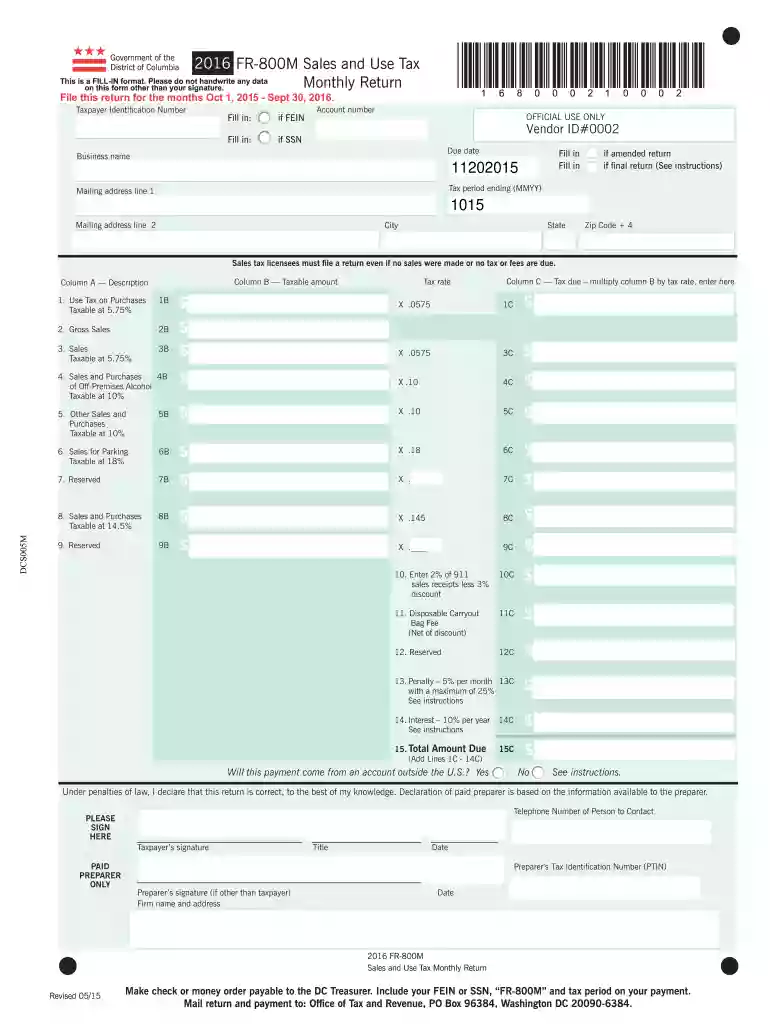
Dc form fr 800m 2016-2026

Get Form
fr 800m Preview on Page 1

Here's how it works

01. Edit your fr 800m online
Type text, add images, blackout confidential details, add comments, highlights and more.

02. Sign it in a few clicks
Draw your signature, type it, upload its image, or use your mobile device as a signature pad.

03. Share your form with others
Send it via email, link, or fax. You can also download it, export it or print it out.

How to use or fill out dc form fr 800m 2016 with our platform

Form edit decoration
9.5
Ease of Setup
DocHub User Ratings on G2
9.0
Ease of Use
DocHub User Ratings on G2
  1. Click ‘Get Form’ to open the dc form fr 800m 2016 in the editor.
  2. Begin by entering your Taxpayer Identification Number at the top of the form. If you have a Federal Employer Identification Number (FEIN), fill that in; otherwise, provide your Social Security Number (SSN).
  3. Fill in your business name and mailing address, ensuring all fields are completed accurately for effective communication.
  4. In the sections labeled 'Column A', describe your taxable sales and purchases. For each item, enter the corresponding amounts in 'Column B'.
  5. Calculate the tax due for each category by multiplying the taxable amount by the applicable tax rate, and enter these figures in 'Column C'.
  6. Complete any additional fields as required, including penalties or interest if applicable, before reviewing your entries for accuracy.
  7. Finally, sign and date the form at the bottom to validate your submission.

Start using our platform today to fill out your dc form fr 800m 2016 easily and for free!

See more dc form fr 800m 2016 versions

We've got more versions of the dc form fr 800m 2016 form. Select the right dc form fr 800m 2016 version from the list and start editing it straight away!
Versions Form popularity Fillable & printable
2017 4.8 Satisfied (157 Votes)
2016 4.4 Satisfied (353 Votes)
2015 4.2 Satisfied (78 Votes)
2014 3.9 Satisfied (41 Votes)
2013 4.2 Satisfied (69 Votes)
2012 4.1 Satisfied (42 Votes)
be ready to get more

Complete this form in 5 minutes or less

Get form

Got questions?

We have answers to the most popular questions from our customers. If you can't find an answer to your question, please contact us.
Contact us
Obtain the DC FR-800M form from the official website or local tax office. Fill out your personal information in the designated sections, including your name, address, and Social Security number. Provide information about your income for the tax year, including wages, investment income, and any other sources.
Locations to Pickup Individual Income Tax Forms *OTR Customer Service Administration. 1101 4th Street, SW, Suite W270. 8:15 am to 5:30 pm. John A. Wilson Building. Judiciary Square. 441 4th Street, NW, lobby. Martin Luther King Memorial Library. 901 G Street, NW. Reeves Center. 2000 14th Street, NW.
DC FR-500 is a registration form required for new businesses in Washington, D.C. The purpose of this form is to gather information on the business, such as ownership, location, and type of business, which is needed to determine the employing units liability to pay taxes in the District of Columbia.
What is the purpose of DC FR-800M? The purpose of DC FR-800M is to ensure that financial institutions report their income and pay the appropriate amount of taxes owed to the District of Columbia.
Residents of the District requesting refunds of income tax must file Form D-40.

Security and compliance

At DocHub, your data security is our priority. We follow HIPAA, SOC2, GDPR, and other standards, so you can work on your documents with confidence.

Learn more
ccpa2
pci-dss
gdpr-compliance
hipaa
soc-compliance
be ready to get more

Complete this form in 5 minutes or less

Get form

People also ask

Any non-resident of DC claiming a refund of DC income tax with- held or paid by estimated tax payments must file a D-40B. A non-resident is anyone whose permanent home was outside DC during all of 2024 and who did not maintain a place of abode in DC for a total of 183 days or more during 2024.

Related links