Type text, add images, blackout confidential details, add comments, highlights and more.
02. Sign it in a few clicks
Draw your signature, type it, upload its image, or use your mobile device as a signature pad.
03. Share your form with others
Send health form ls 562 via email, link, or fax. You can also download it, export it or print it out.
How to use or fill out child performer permit 2014 with our platform
Ease of Setup
DocHub User Ratings on G2
Ease of Use
DocHub User Ratings on G2
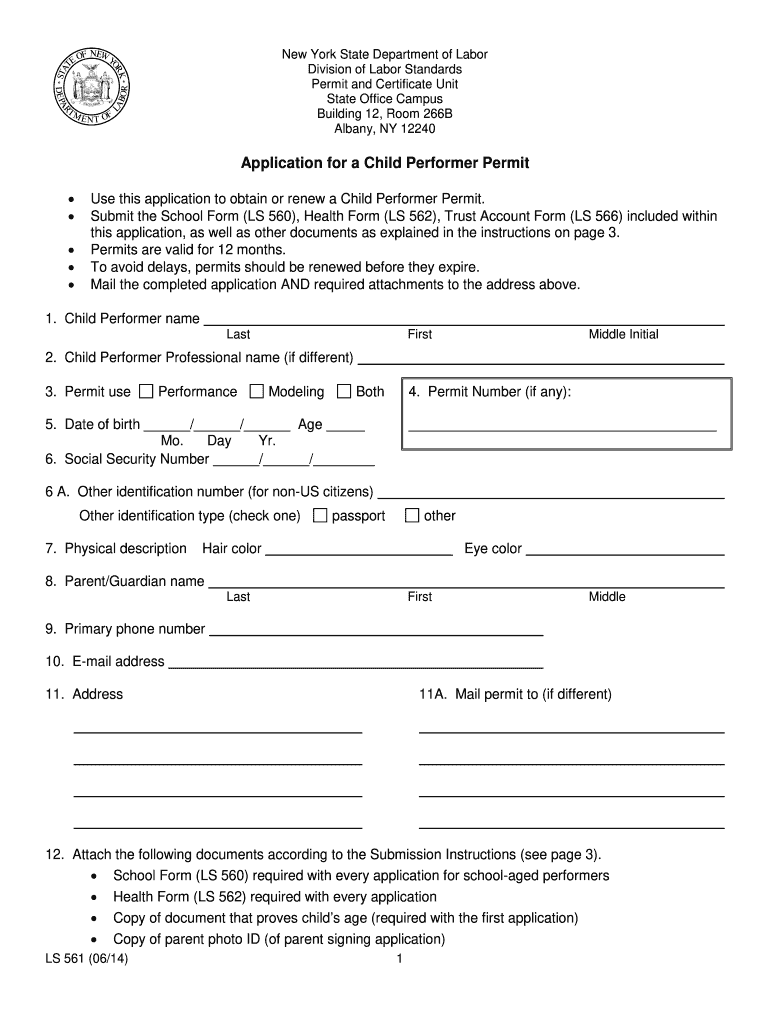
Click ‘Get Form’ to open the Child Performer Permit application in the editor.
Begin by entering the Child Performer’s name, including last, first, and middle initial. If they have a professional name, include that as well.
Indicate the purpose of the permit by selecting from options: Performance, Modeling, or Both.
Fill in the Permit Number if applicable, along with the date of birth and age of the child performer.
Provide the Social Security Number and any other identification number for non-U.S. citizens.
Complete the physical description section by noting hair color and eye color.
Enter parent/guardian details including their name, primary phone number, email address, and mailing address for the permit.
Attach required documents such as School Form (LS 560), Health Form (LS 562), proof of age, and identification for parents/guardians as specified in the instructions.
Review all information for accuracy before signing and dating the application at the end.
Start filling out your Child Performer Permit application online for free today!
Fill out child performer permit 2014 online It's free
We've got more versions of the child performer permit 2014 form. Select the right child performer permit 2014 version from the list and start editing it straight away!
AB 1660 Child Performer Services Permit. Title 8, California Code of Notice of regular rulemaking: 10/03/2014. 1st 15 day comment period: 08/28Read more
Hollywood at Home: Applying Federal Child Labor Laws to
by SK McGrath 2023 Cited by 10 See Hajjaji, supra note 7 (stating that current laws intended to protect child performers do not extend to protect children who are part ofRead more
Cookie consent notice
This site uses cookies to enhance site navigation and personalize your experience.
By using this site you agree to our use of cookies as described in our Privacy Notice.
You can modify your selections by visiting our Cookie and Advertising Notice.