




01. Edit your form online
Type text, add images, blackout confidential details, add comments, highlights and more.

Type text, add images, blackout confidential details, add comments, highlights and more.

Draw your signature, type it, upload its image, or use your mobile device as a signature pad.

Send it via email, link, or fax. You can also download it, export it or print it out.
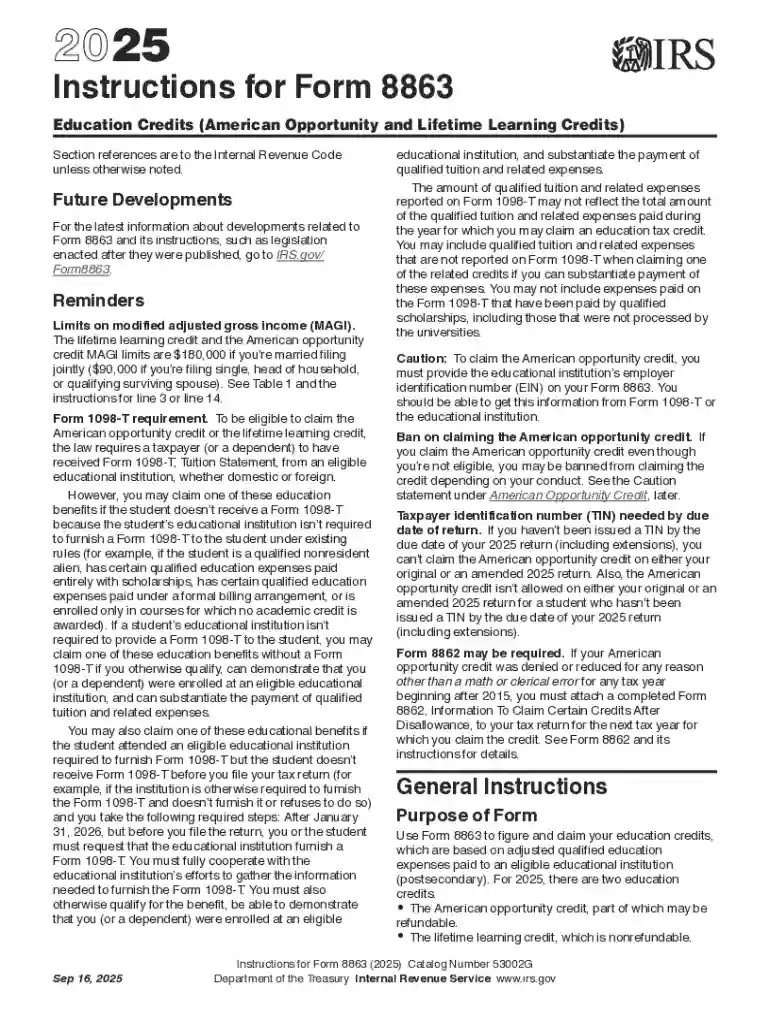
Form 8863 is used to claim education credits, specifically the American Opportunity Credit and the Lifetime Learning Credit on your federal income tax return. These credits offer financial relief to taxpayers who have paid for higher education costs. Taxpayers primarily utilize this form to reduce their tax liability by claiming eligible education expenses for themselves, their spouse, or their dependents.
To claim education credits using Form 8863, taxpayers need to report their qualified educational expenses. Begin by identifying the eligible expenses, such as tuition and required fees. Then, calculate the credits using the instructions provided in the form.
Gather Required Documents: Obtain Form 1098-T (Tuition Statement) from the educational institution.
Fill Out Personal Information: Enter taxpayer and student details on Form 8863.
Calculate Credits:
Attach Form 8863: Include with your federal tax return for submission.
Using Form 8863 reduces the total amount of tax owed by claiming applicable credits. Both credits incentivize educational pursuit by lowering costs associated with higher education.
To claim these credits, specific criteria must be met:


Form 8863 is divided into several critical sections that guide taxpayers through the process of claiming credits. Key elements include:
Follow IRS guidelines to ensure compliance when filling out Form 8863. It is crucial to:
Ensure you have:
The IRS offers both digital and paper versions of Form 8863, which can be submitted according to your preference.
Digital Filing: Using tax software like TurboTax can simplify the process with automated calculations and submissions.
Paper Filing: Ensure all forms, including Form 8863, are correctly filled out and mailed timely.
Primarily used by:
Popular tax software, such as TurboTax, is compatible with Form 8863, facilitating an easier filing process.
Self-employed taxpayers and students benefit significantly by optimizing their education expenses through these available credits, making TurboTax and other tax software indispensable tools.
We've got more versions of the Use Form 8863 to Claim Education Credits - The TurboTax Blog form. Select the right Use Form 8863 to Claim Education Credits - The TurboTax Blog version from the list and start editing it straight away!
| Versions | Form popularity | Fillable & printable |
|---|---|---|
| 2025 | 4.5 Satisfied (51 Votes) | |
| 2024 | 4.9 Satisfied (54 Votes) | |
| 2023 | 4.3 Satisfied (45 Votes) | |
| 2022 | 4.6 Satisfied (60 Votes) | |
| 2021 | 4.8 Satisfied (200 Votes) | |
| 2020 | 4.3 Satisfied (104 Votes) | |
| 2019 | 4.4 Satisfied (121 Votes) | |
| 2018 | 4.1 Satisfied (35 Votes) | |
| 2017 | 4.4 Satisfied (136 Votes) | |
| 2016 | 4.3 Satisfied (127 Votes) | |
| 2015 | 4.3 Satisfied (183 Votes) | |
| 2013 | 4.3 Satisfied (72 Votes) | |
| 2012 | 4.3 Satisfied (109 Votes) | |
| 2011 | 4.3 Satisfied (55 Votes) | |
| 2009 | 4 Satisfied (22 Votes) |
At DocHub, your data security is our priority. We follow HIPAA, SOC2, GDPR, and other standards, so you can work on your documents with confidence.

Mar 13, 2018 However, students do qualify for credits. Form 8863 can help you find available credits. Other Deductions and Tax Credits for College Students.
related penalty for their failure to claim a $4,500 nonrefundable AOC on their Form 1040 but instead for their claim of such a credit on their Form 8863.


