




01. Edit your form online
Type text, add images, blackout confidential details, add comments, highlights and more.

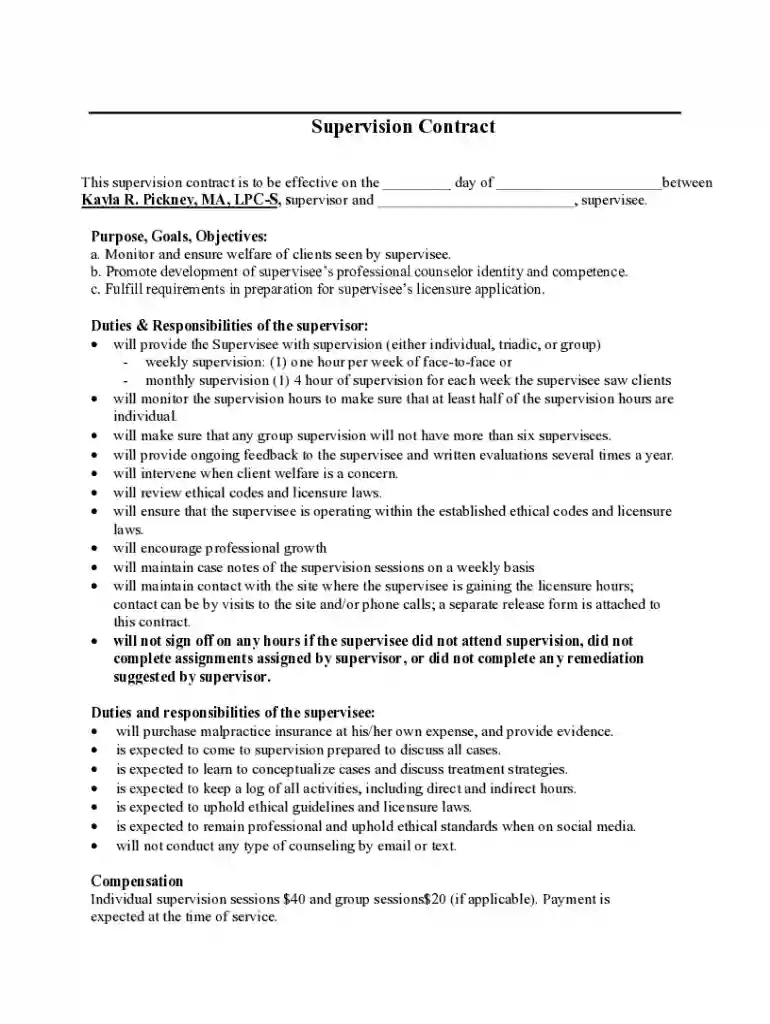
Type text, add images, blackout confidential details, add comments, highlights and more.

Draw your signature, type it, upload its image, or use your mobile device as a signature pad.

Send it via email, link, or fax. You can also download it, export it or print it out.
A supervision contract is a formal agreement between a supervisor and a supervisee, particularly in the context of professional counseling or therapeutic practice. This legally binding document outlines the terms, roles, and responsibilities of both parties during the supervision period. It serves to ensure that both the supervisor and the supervisee are clear on their duties, the expectations for performance, and the ethical standards to be upheld. Typically, the contract will detail how the supervisor will monitor client welfare, provide feedback, ensure ethical compliance, and clarify the confidentiality requirements.
The supervision contract typically includes several critical elements that define the professional relationship:
Responsibilities of the Supervisee: This section outlines the duties of the supervisee, such as maintaining professionalism, keeping detailed records of their practice, and actively seeking feedback.
Role of the Supervisor: Details the supervisor's responsibilities, such as providing guidance, conducting regular supervision sessions, and giving constructive feedback.
Confidentiality Provisions: Includes clauses that protect client information as per legal and ethical standards, ensuring both parties understand privacy obligations.
Compensation Details: Specifies the financial terms of the supervision relationship, including agreed-upon fees and payment schedules.
Termination Conditions: Describes the circumstances under which the contract can be terminated, specifying notice periods or breaches that could lead to early termination.
Supervision contracts are primarily used in professions requiring ongoing professional development and oversight, such as:
Licensed Professional Counselors (LPCs): Counselors undergoing mandatory supervised practice often enter into these contracts to fulfill licensing requirements.
Social Workers and Therapists: These professionals may engage in supervision to enhance clinical skills, complete required supervised hours, or gain board certification.
Clinical Psychologists: Professionals working towards licensure may use this contract to outline supervision terms with their clinical advisors.


Completing a supervision contract involves several steps to ensure all necessary details are addressed:
Review Each Party’s Expectations: Discuss roles, responsibilities, and goals for the supervision period.
Include Legal and Ethical Standards: Integrate the legal requirements and ethical standards that guide the professional practice.
Outline Supervision Schedule and Compensation: Agree on a regular schedule for supervision sessions and detail the compensation structure.
Clarify Confidentiality Clauses: Ensure sections respecting client confidentiality are clear and legally compliant.
Modify as Necessary: Make amendments to the contract to better suit the specific needs of the supervisee and the supervisor.
Sign and Finalize: Both parties sign the document to formalize the agreement, making it legally binding.
The supervision contract functions as a legal safeguard for both the supervisor and supervisee, offering protection by:
Ensuring Professional Accountability: Establishes a clear accountability structure for supervisee performance and supervisor responsibilities.
Demonstrating Compliance: The contract serves as evidence of adherence to professional guidelines and board requirements, which is crucial for licensure.
Providing Legal Recourse: In case of disputes, the contract can be used in legal settings to resolve misunderstandings or breaches of agreement.
While supervision contracts follow a general framework, state-specific rules may apply:
Licensing Board Regulations: Each state’s licensing board may have unique requirements for the content and structure of supervision contracts.
Differences in Required Supervision Hours: States may differ in the number of supervised practice hours required for licensure.
Variations in Ethical Guidelines: State professional boards may have specific ethical guidelines that need to be included in the contract.
Mandatory Reporting Requirements: Differing state laws on mandatory reporting of client issues need acknowledgment in contracts.
Various scenarios highlight the application of supervision contracts:
Newly Licensed Counselors: A recent graduate working under supervision for licensing frequently uses a supervision contract to outline terms with an approved supervisor.
Experienced Therapists Seeking Certification: Therapists aiming for further specialization or certification may use supervision contracts for additional supervised experience.
Interns in Mental Health Fields: Students in practical internships often sign such contracts to delineate responsibilities and gain practical experience under professional supervision.
Understanding specific terminology is crucial for effective use of supervision contracts:
Supervisor: A licensed and experienced professional responsible for overseeing the practice of the supervisee.
Supervisee: The individual—often a trainee or less experienced professional—receiving guidance and mentorship.
Confidentiality Agreement: A section in the contract emphasizing the protection of client information.
Scope of Supervision: Defines the areas of professional practice covered under the agreement, such as therapeutic techniques or client management skills.
By understanding and implementing these comprehensive aspects of a supervision contract, both parties can ensure a structured, legal, and ethical framework for professional development in counseling and therapy practices.
At DocHub, your data security is our priority. We follow HIPAA, SOC2, GDPR, and other standards, so you can work on your documents with confidence.






For periods of absence of three (3) days or less, a supervisor may accept an employees certification as reason for an absence. The language of the Collective
This contract establishes parameters of supervision, assists in supervisee professional development, describes the evaluation process, and provides clarity inSee more
Sep 8, 2021 Supervisor will be responsible to monitor and oversee practice while providing direct and clinical supervision. This agreement was made and


