







Definition & Meaning
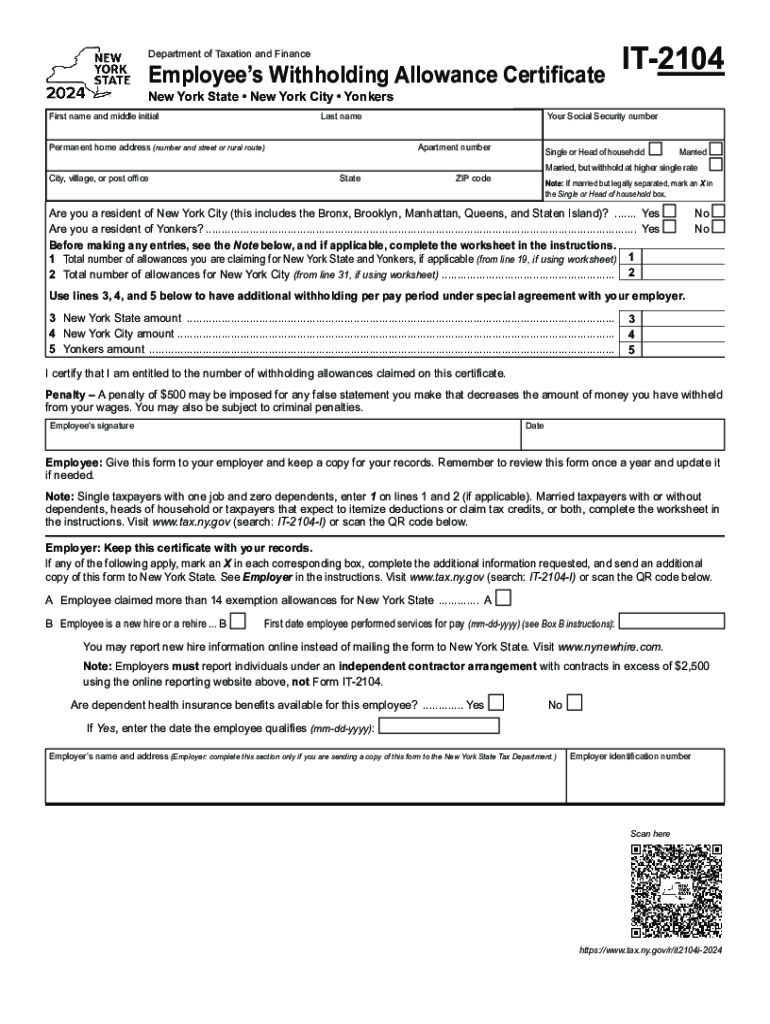
The Form IT-2104 Employee's Withholding Allowance Certificate is a critical document issued by the New York State Department of Taxation and Finance for the tax year 2024. This form allows employees in New York to declare their withholding allowances for state and local taxes. It essentially helps in determining the correct amount of income tax to be withheld from an employee’s paycheck. Understanding the form's function is pivotal for ensuring accurate tax withholding, which impacts an individual's annual tax return.
How to Use the Form IT-2104
Using the Form IT-2104 involves accurately reporting your personal information, residency status, and the number of withholding allowances you claim. This information is vital for your employer to calculate the proper amount of taxes to withhold from your paycheck.
- Personal Information: Start by filling in your name, Social Security number, and address. Ensure accuracy to prevent processing delays.
- Residency Status: Indicate whether you are a New York State resident, a nonresident, or a part-year resident. This affects how state taxes are withheld.
- Withholding Allowances: Calculate the number of allowances you are entitled to claim based on your financial situation and personal circumstances.
Steps to Complete the Form IT-2104
Filling out the Form IT-2104 requires careful attention to detail. Follow these steps:
- Gather Necessary Information: Before starting, have your Social Security number, personal details, and previous year’s tax return on hand.
- Fill in Personal Details: Enter your name, Social Security number, and address at the top of the form.
- Complete the Residency Section: Indicate your residency status carefully, as this affects tax calculations.
- Calculate Withholding Allowances: Use the worksheet provided with the form to determine the number of allowances you can claim in the various sections.
- Submit the Completed Form: Once filled, submit the form to your employer, who will use it to adjust your withholding.
Key Elements of the Form IT-2104
Several critical details must be accurately completed on the form to ensure appropriate tax withholding:
- Personal Information Section: Must include accurate and current data.
- Residency Status: This influences the calculation of state and local taxes.
- Withholding Allowance Calculation: Based on your dependents, other income, and deductions.
Why Use Form IT-2104?
Filling out the Form IT-2104 is important because it:
- Ensures Accurate Withholding: Helps avoid underpayment or overpayment of state taxes.
- Prevents Surprise Tax Liabilities: By adjusting withholdings, employees can avoid unexpected tax liabilities at the end of the year.
- Facilitates Tax Planning: Employees can use the form to plan their financial year strategically by optimizing deductions.
Who Typically Uses the Form IT-2104?
This form is primarily used by:
- Employees in New York State: Required for anyone working for a wage or salary in New York.
- New Hires: Must fill out the form upon starting a new job in New York State.
- Individuals Experiencing Life Changes: Those who had changes in marital status, number of dependents, or income type need to update their withholding allowances.

State-Specific Rules for Form IT-2104
New York State has its own specific requirements for this form:
- Local Tax Adjustments: Includes provisions for New York City and Yonkers tax calculations.
- Residency Categories: New York State, City, and nonresidents are subject to different withholding rules.
- Annual Updates: Employees should review and update the form annually, especially if any major life changes occur.
Important Terms Related to the Form IT-2104
Understanding some key terms can aid in completing the form correctly:
- Withholding Allowance: Reductions in the amount of tax your employer withholds, based on dependents and deductions.
- Standard Deduction: A standard deduction amount that can reduce your taxable income.
- Taxable Income: Income subject to income tax, after deductions and exemptions.
Required Documents
To complete the IT-2104 accurately, you may need:
- Previous Year's Tax Return: To calculate withholding allowances.
- Pay Stubs: To verify current income and withholdings.
- Dependent Information: For claiming appropriate allowances.
Ensuring that all relevant documents are available and properly organized can simplify the completion process, reduce errors, and ensure timely submission.




