
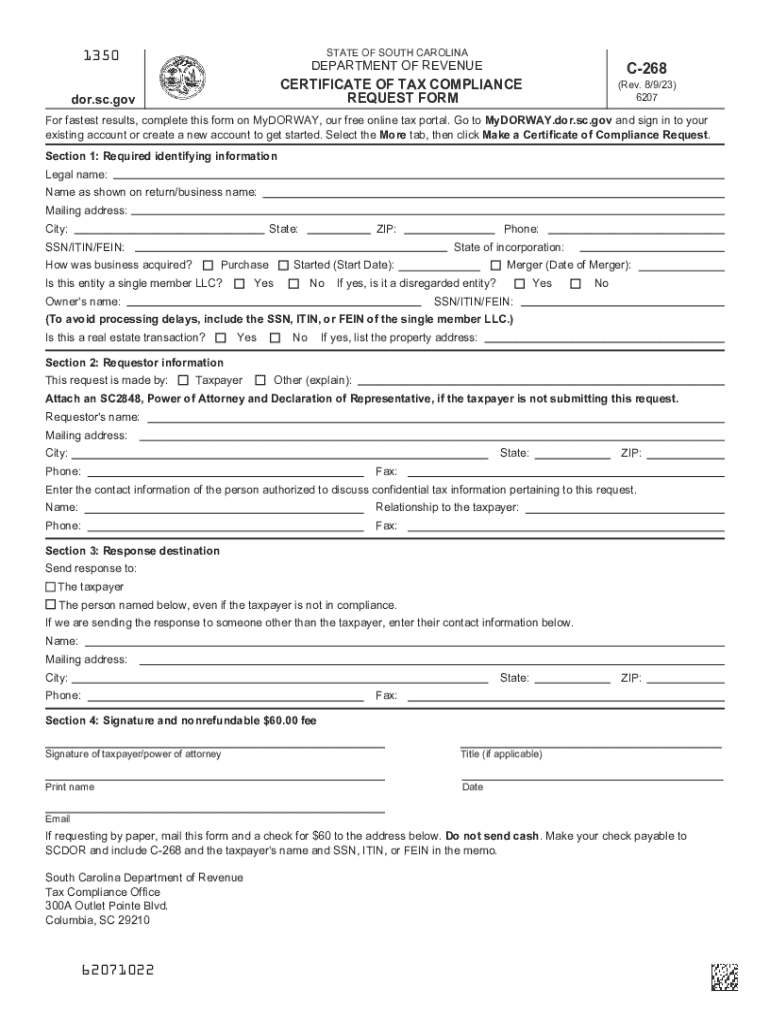







Definition & Purpose of the C-268 Form
The C-268 form, officially known as the Certificate of Tax Compliance Request Form, is issued by the South Carolina Department of Revenue. It serves as official proof that a taxpayer has fulfilled all tax obligations, including filing returns and paying due taxes. This certification is essential for both individuals and businesses when proving tax compliance, especially during events such as business acquisitions or when applying for certain permits.
How to Use the C-268 Form
The primary use of the C-268 form is to request documentation that confirms a taxpayer’s compliance with state tax laws. This form must be completed with precise detail to ensure accuracy and prevent delays. Taxpayers or their representatives often submit this form during business transitions or mergers to guarantee all tax matters are settled.
Common Uses
- During the sale or purchase of a business to assure buyers that taxes are up to date.
- When applying for a business license to verify compliance with tax obligations.
- For personal assurance of compliance with any state tax requirements.
Obtaining the C-268 Form
Access to the C-268 form is straightforward, with several options available to taxpayers:
- Online Access: The form can be downloaded directly from the South Carolina Department of Revenue’s website.
- Mail Request: Individuals can request the form via mail by contacting the department directly.
- In-Person Pickup: It is also possible to obtain the form in person at designated offices or tax centers.
Prerequisites for Obtaining
- Taxpayer identification numbers, such as EIN or SSN.
- Detailed business information if applicable.
- Payment method for the processing fee, typically $60.
Steps to Complete the C-268 Form
- Gather Required Information: Ensure you have all the necessary data, including taxpayer identification, business details, and contact information.
- Accurate Completion: Fill in the taxpayer section with precise information, including any relevant business acquisition data.
- Processing Fee: Include the $60 fee required for the processing of the request.
- Submission: Submit the completed form through one of several methods: online portal, mail, email, or fax.
Common Mistakes to Avoid
- Incomplete sections which can lead to processing delays.
- Incorrect tax identification numbers which may cause rejection.
- Failing to attach the processing fee will result in an incomplete request.
Importance of the C-268 Form
The C-268 form is critical for businesses and individuals needing to establish their compliance with state tax obligations. It plays a vital role in business transactions, helping to facilitate smooth transitions by ensuring tax verification is readily available. This form is often necessary for acquiring business permits and licenses.
Key Elements of the C-268 Form
The form encompasses several crucial components:
- Taxpayer Identification: Includes both personal and business-related identification numbers.
- Business Information: Details regarding the business operations or ownership, if applicable.
- Certifying Statement: A declaration of compliance with tax requirements.
- Applicable Fees: The processing fee which must be submitted with the form for approval.
Legal Use of the C-268 Form
The C-268 form’s legality is anchored in its role as a certificate proving tax compliance. It aligns with tax laws and regulations, ensuring that all provisions are met before certification. This form is often used in legal contexts to support due diligence processes in mergers and acquisitions.
Legal Implications
- Legally mandated during business sales to prevent future liabilities.
- Ensures continued compliance with state tax regulations.
- Important in legal disputes regarding tax liabilities or business ownership.
Examples of Using the C-268 Form
- Business Acquisition: A prospective buyer requests a C-268 to verify the seller’s tax compliance.
- Licensing Needs: A new business owner submits a C-268 form when applying for a specific operational license.
- Recurrent Verification: Established businesses periodically use the form to maintain good standing with tax authorities.
Case Scenarios
- A corporation acquiring a smaller firm requires a C-268 form to ensure no outstanding tax debts.
- An entrepreneur applying for a liquor license must submit a C-268 to local authorities.
Form Submission Methods
Submission flexibility allows taxpayers to choose the most convenient method for them:
- Online: Through the official state portal, offering immediate acknowledgment of receipt.
- Mail: For those preferring physical documentation or when digital access is limited.
- Email or Fax: As alternatives, ensuring prompt delivery without the need for traditional mailing methods.
Benefits and Drawbacks
- Online submission offers speed and immediate receipt confirmation, while mail ensures a physical record of submission.
- Email and fax offer balance, with digital tracking and tangible evidence of compliance.




