




01. Edit your form online
Type text, add images, blackout confidential details, add comments, highlights and more.

Type text, add images, blackout confidential details, add comments, highlights and more.

Draw your signature, type it, upload its image, or use your mobile device as a signature pad.

Send it via email, link, or fax. You can also download it, export it or print it out.
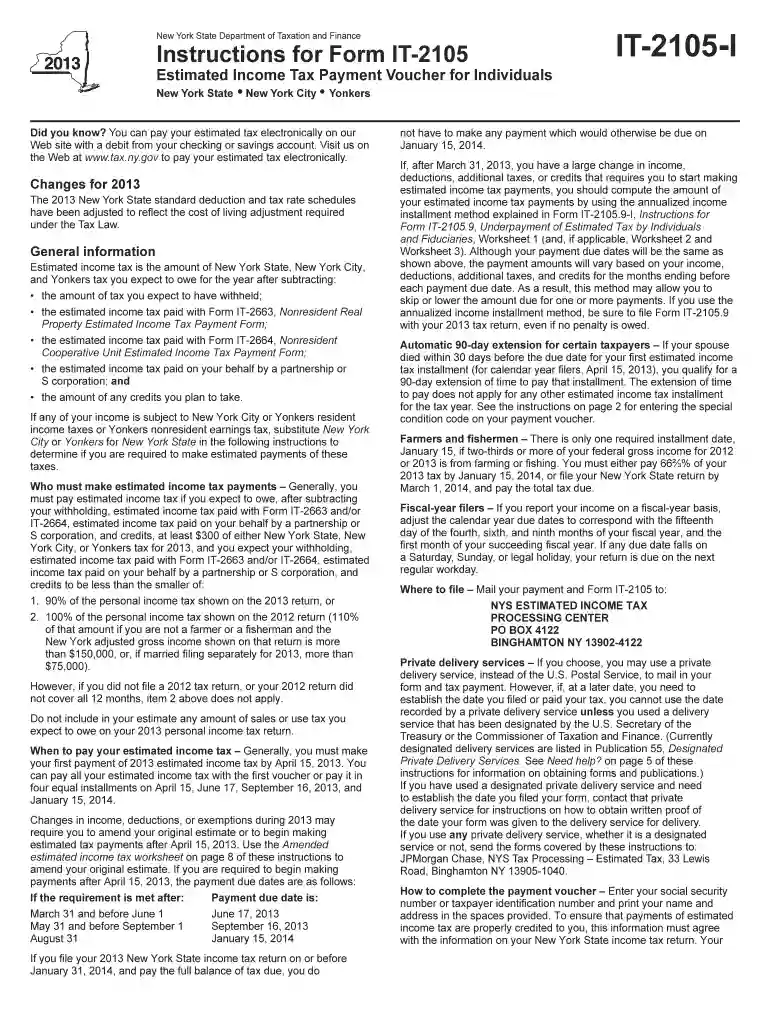
Form IT-2105-I:2013, officially known as the Instructions for Form IT-2105 Estimated Income Tax Payment Voucher for Individuals, is a document issued by the state of New York. It provides detailed guidelines on how to calculate and make estimated income tax payments for individuals. This form ensures that taxpayers can accurately prepay their taxes throughout the year if they expect to owe at least $300 in New York State taxes, avoiding potential penalties.
Gather Necessary Information: Before filling out the form, collect your estimated income, deductions, credits, and any other relevant financial documents.
Estimate Taxable Income: Use the worksheet provided with the instructions to estimate your total taxable income for the year. Include all sources of income such as wages, interest, dividends, and self-employment income.
Calculate Estimated Tax: Apply any credits and deductions to calculate your preliminary tax amount. The instructions include methods for adjusting tax based on previous payments or current rates.
Determine Payment Amounts: Divide the annual estimated tax by the number of periods (usually four) unless special conditions require different scheduling.
Fill Out the Voucher: Complete the fields on Form IT-2105 for each payment period, entering the calculated tax amount.
Submit Payments: Follow the submission guidelines, ensuring each payment is made on time to avoid penalties. Options include mailing a check with the voucher or using electronic payment methods.
Quarterly Deadlines: Estimated tax payments typically align with the quarterly schedule of April 15, June 15, September 15, and January 15 of the following year.
Annual Adjustments: Adjustments to payments may need scheduling if changes in income occur mid-year.
Consider marking these dates on your calendar to ensure timely payments and avoid penalties.
This form is primarily utilized by individuals in New York State who do not have sufficient taxes withheld through payroll, commonly including:
Failure to accurately calculate and remit estimated tax payments can lead to:
The form includes instructions on how to apply for a waiver of these penalties under specific circumstances, such as natural disasters affecting payment ability.
New York State has specific regulations for estimated tax calculations, including:
Always check for updated instructions and changes in tax law specific to the current filing year.


Typically, self-employed individuals must proactively manage their tax liabilities due to the absence of employer withholding. The IT-2105 form acts as a crucial tool for maintaining compliance and financial accountability.
Retirees often rely on the IT-2105 to manage taxes tied to pensions or social security benefits, ensuring regular tax contributions align with their passive income streams.
Students subject to estimated tax requirements can use the IT-2105 to handle income from part-time work or scholarships exceeding the taxable threshold.
Online Access: Visit the official New York State Department of Taxation and Finance website to download the form and instructions.
Physical Copies: Request printed copies through mail from the state’s tax department or pick them up at local administrative offices.
Tax Preparation Software: Many tax software platforms include New York forms, providing streamlined access during tax preparation. Ensure compatibility with platforms like TurboTax or QuickBooks.
While the IRS governs federal taxes, the IT-2105 forms a bridge at the state level. Understanding the integration between state guidelines and federal tax responsibilities is vital, particularly:
The document aligns with federal estimated tax expectations, supporting taxpayers in maintaining comprehensive compliance.
We've got more versions of the Form IT-2105-I:2013:Instructions for Form IT-2105 Estimated Income Tax Payment Voucher for Individua form. Select the right Form IT-2105-I:2013:Instructions for Form IT-2105 Estimated Income Tax Payment Voucher for Individua version from the list and start editing it straight away!
| Versions | Form popularity | Fillable & printable |
|---|---|---|
| 2026 | 4.1 Satisfied (48 Votes) | |
| 2025 | 4.4 Satisfied (53 Votes) | |
| 2024 | 4.2 Satisfied (58 Votes) | |
| 2023 | 4.7 Satisfied (25 Votes) | |
| 2022 | 4.8 Satisfied (36 Votes) | |
| 2021 | 4 Satisfied (48 Votes) | |
| 2020 | 4.4 Satisfied (60 Votes) | |
| 2019 | 4.1 Satisfied (68 Votes) | |
| 2018 | 4.2 Satisfied (42 Votes) | |
| 2017 | 4.3 Satisfied (48 Votes) | |
| 2015 | 4.2 Satisfied (47 Votes) | |
| 2014 | 4 Satisfied (32 Votes) | |
| 2013 | 4.3 Satisfied (48 Votes) | |
| 2012 | 4.7 Satisfied (53 Votes) |
At DocHub, your data security is our priority. We follow HIPAA, SOC2, GDPR, and other standards, so you can work on your documents with confidence.
Oct 1, 2017 The New Jersey Highway Safety Plan (HSP) is required by federal law to serve as a framework for setting performance goals and measures for
You can pay all your estimated income tax with the first voucher or pay it in four equal installments on April 15, June 17, September 16, 2013, and. January 15,


