
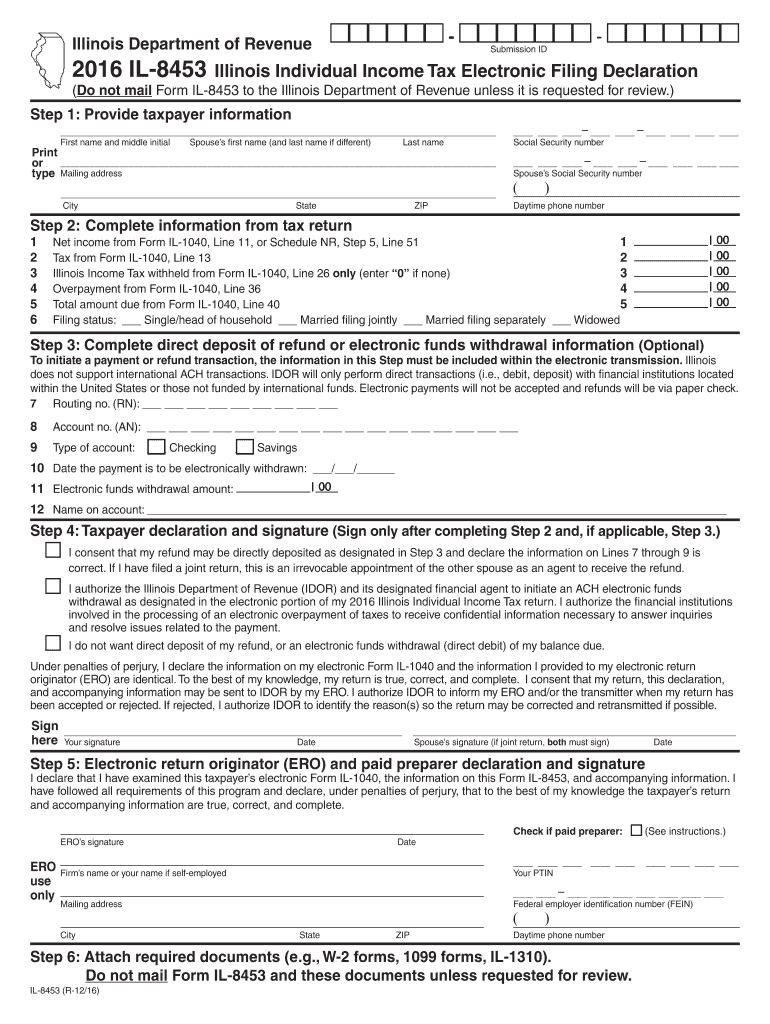







Definition & Meaning of the 2016 IL-8453
The 2016 IL-8453, Illinois Individual Income Tax Electronic Filing Declaration, is a key document for taxpayers in Illinois who wish to file their income tax returns electronically. This form serves as an authorization for the electronic return originator (ERO) to submit a taxpayer’s return and, when applicable, initiates a direct deposit or authorizes an electronic funds withdrawal for tax payments. Key elements of the form include taxpayer declaration sections, signature requirements, and specific instructions for EROs to ensure compliance with state tax regulations. It is a legal declaration essential for verifying the accuracy of electronically filed returns and ensuring that all necessary authorizations are in place.
How to Use the 2016 IL-8453
Utilizing the 2016 IL-8453 form effectively requires attention to detail and adherence to outlined instructions. Taxpayers need to provide accurate personal details, including their social security number and any necessary spouse information. The form must reflect the essential details of the taxpayer’s electronic tax return to ensure consistency and validity. Once the taxpayer completes their portion, they hand over the form to the ERO, who will complete their section and ensure all necessary information matches that submitted in the taxpayer's electronic file.
Procedure for Electronic Signatures
- Taxpayers can electronically sign the form using various tools, ensuring their signature is legally binding under the ESIGN Act.
- An ERO will then verify these signatures to proceed with the electronic submission of the tax return.
- After signing, taxpayers and EROs must keep a copy for their records, as the form should only be mailed upon request by tax authorities.
Steps to Complete the 2016 IL-8453
Completing the 2016 IL-8453 form involves several steps requiring accurate data entry and verification:
- Personal Information: Enter the taxpayer's and their spouse's names and social security numbers if filing jointly.
- Tax Return Information: Complete the sections capturing key figures such as total income, tax due, and refund amounts.
- Authorization and Declaration: Taxpayers must affirm the accuracy of the information and authorize the electronic filing.
- Signature Verification: Both the taxpayer and spouse, if applicable, must sign the declaration. The ERO also completes their part, certifying their role in facilitating the electronic filing.
- Submission Process: The completed form typically stays in possession of the taxpayer and ERO and should not be mailed unless specifically requested.
Important Terms Related to IL-8453
Understanding the terminology associated with the IL-8453 is vital:
- Electronic Return Originator (ERO): An authorized agent responsible for submitting electronic tax returns for clients.
- Direct Deposit/Electronic Funds Withdrawal: Options provided for taxpayers to receive tax refunds or pay owed taxes electronically.
- Taxpayer Declaration: A section where individuals affirm the accuracy of their provided information and agree to the e-filing process.
- Signature Authentication: Process ensuring that all parties have appropriately authorized the form's content through valid signatures.
Who Typically Uses the 2016 IL-8453
The 2016 IL-8453 is essential for various groups of taxpayers within Illinois, including:
- Individual Filers: These are taxpayers who need an official declaration to file their personal income taxes electronically rather than through mail.
- Joint Filers: Couples filing jointly must use this form to send their combined electronic return.
- Tax Professionals and EROs: Enabling tax professionals to facilitate e-filing on behalf of clients requires completing and maintaining this form for compliance purposes.


Filing Deadlines and Important Dates
Timeliness is crucial when handling tax forms:
- General Filing Deadline: The deadline for submitting the IL-8453 aligns with the April 15 deadline for filing federal and state tax returns, unless extended.
- Extensions and Penalties: Failing to complete or submit necessary documentation within this timeframe could result in fines or penalties.
Key Elements of the 2016 IL-8453
Sections of the Form
- Taxpayer Information: Collects basic identification data for the taxpayer and any co-filers.
- Tax and Financial Data: Outlines critical numbers related to income, deductions, and tax responsibilities.
- Declarations and Authorizations: Confirms tax details, providing explicit consent for electronic submission.
Risks of Non-Compliance and Penalties
Non-compliance with the IL-8453 requirements can have serious ramifications:
- Audit Risks: Discrepancies or failure to provide the form when requested by tax authorities can lead to audits.
- Penalties: Inaccuracies or omissions can attract financial penalties, impacting both taxpayers and EROs.
- Filing Complications: Without proper completion of the form, electronic filing could be delayed, affecting refunds and scheduled payments.
Software Compatibility
The IL-8453 form is compatible with several tax software products, enabling convenient digital handling:
- Common Platforms: Tools like TurboTax and QuickBooks streamline the process of inputting information and filing electronically.
- Document Integration: Many of these platforms are compatible with DocHub’s suite of tools, ensuring that forms can be filled out, signed, and managed efficiently within a digital ecosystem.
Understanding how to complete, use, and manage the 2016 IL-8453 form is essential for compliant and efficient electronic tax filing in Illinois. Following these guidelines will help taxpayers meet their obligations and minimize errors or penalties in their tax filing process.




