Type text, add images, blackout confidential details, add comments, highlights and more.
02. Sign it in a few clicks
Draw your signature, type it, upload its image, or use your mobile device as a signature pad.
03. Share your form with others
Send it via email, link, or fax. You can also download it, export it or print it out.
How to use or fill out 2014 IL-8453 form with our platform
Ease of Setup
DocHub User Ratings on G2
Ease of Use
DocHub User Ratings on G2
Click ‘Get Form’ to open the 2014 IL-8453 in the editor.
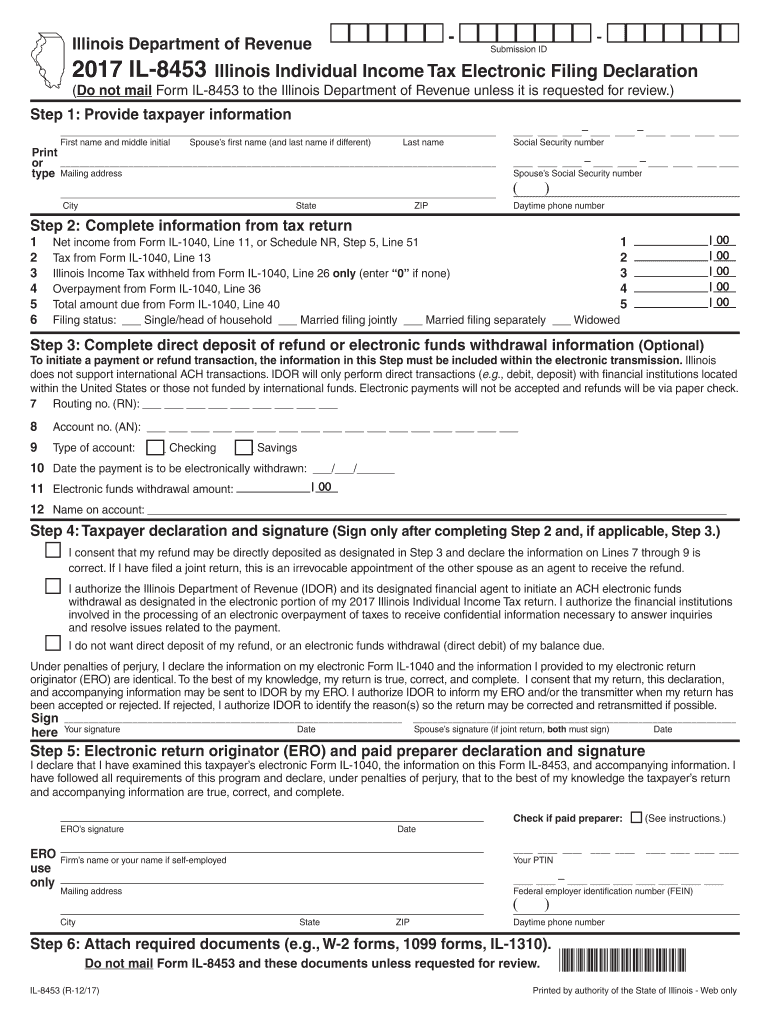
Begin by providing taxpayer information. Enter your first name, middle initial, last name, and spouse’s details if applicable. Ensure all names match those on your electronic Form IL-1040.
Complete the tax return information. Fill in net income from Form IL-1040, tax amount, Illinois income tax withheld, overpayment, and total amount due. Select your filing status accurately.
If opting for direct deposit or electronic withdrawal, provide routing and account numbers along with the type of account. Specify the date for withdrawal and the amount.
Sign the declaration section only after completing previous steps. Ensure both taxpayer and spouse (if applicable) sign where required.
Finally, attach any required documents such as W-2 forms as instructed. Do not mail unless requested.
Start using our platform today to fill out your 2014 IL-8453 form online for free!
Upon completion of the Form 8453, the taxpayer was required to sign the form by which the taxpayer represented, under penalty of perjury, that he had comparedRead more
Cookie consent notice
This site uses cookies to enhance site navigation and personalize your experience.
By using this site you agree to our use of cookies as described in our Privacy Notice.
You can modify your selections by visiting our Cookie and Advertising Notice.