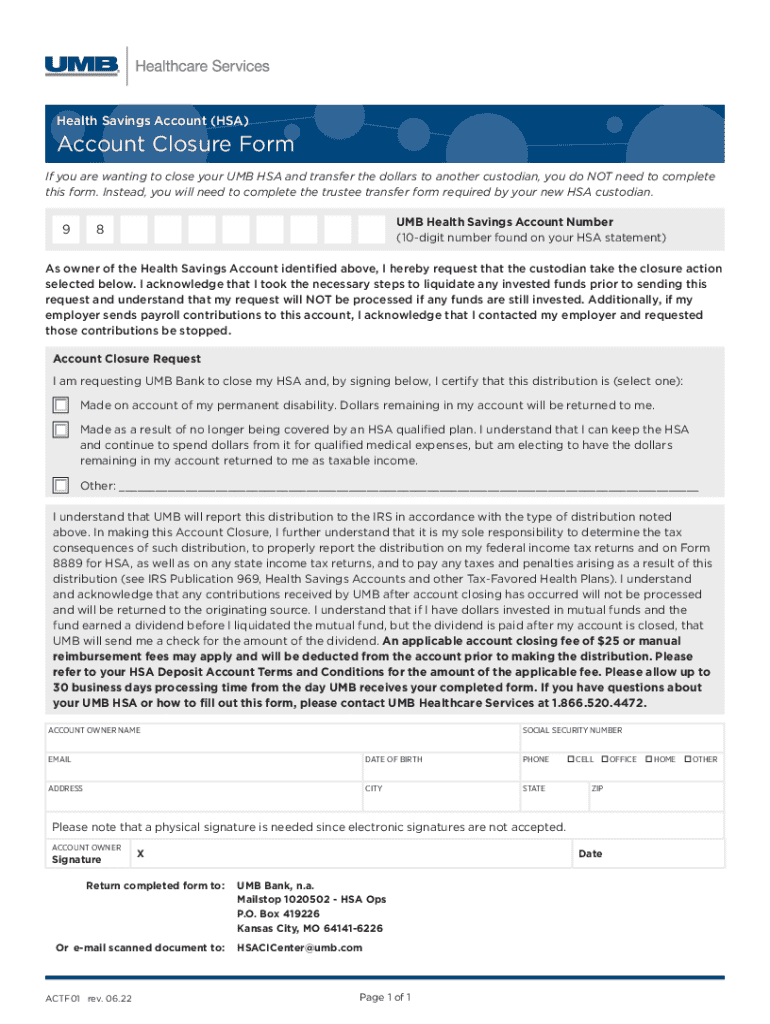
UMB BANK, N A HEALTH SAVINGS ACCOUNT 2026

Get Form
UMB BANK, N A HEALTH SAVINGS ACCOUNT Preview on Page 1

Here's how it works

01. Edit your form online
Type text, add images, blackout confidential details, add comments, highlights and more.
02. Sign it in a few clicks
Draw your signature, type it, upload its image, or use your mobile device as a signature pad.
03. Share your form with others
Send it via email, link, or fax. You can also download it, export it or print it out.

How to use or fill out UMB BANK, N A HEALTH SAVINGS ACCOUNT

Form edit decoration
9.5
Ease of Setup
DocHub User Ratings on G2
9.0
Ease of Use
DocHub User Ratings on G2
  1. Click ‘Get Form’ to open the UMB Health Savings Account Closure Form in the editor.
  2. Begin by entering your UMB Health Savings Account Number, which is a 10-digit number found on your HSA statement.
  3. Fill in your personal details including your name, Social Security Number, email, date of birth, phone number, and address.
  4. Select the reason for closing your account from the options provided: permanent disability, no longer covered by an HSA qualified plan, or other. Ensure you understand the tax implications of your choice.
  5. Sign the form physically as electronic signatures are not accepted. Make sure to date your signature.
  6. Return the completed form via mail or email it as a scanned document to the specified addresses provided at the bottom of the form.

Start using our platform today to easily fill out and manage your UMB Bank Health Savings Account forms for free!

See more UMB BANK, N A HEALTH SAVINGS ACCOUNT versions

We've got more versions of the UMB BANK, N A HEALTH SAVINGS ACCOUNT form. Select the right UMB BANK, N A HEALTH SAVINGS ACCOUNT version from the list and start editing it straight away!
Versions Form popularity Fillable & printable
2023 4.4 Satisfied (45 Votes)
2022 4.4 Satisfied (30 Votes)
2019 4.7 Satisfied (44 Votes)
2015 4.9 Satisfied (41 Votes)
be ready to get more

Complete this form in 5 minutes or less

Get form

Got questions?

We have answers to the most popular questions from our customers. If you can't find an answer to your question, please contact us.
Contact us

Yes, you can use DocHub for signing any business and private documentation, including your UMB BANK, N A HEALTH SAVINGS ACCOUNT. All eSignatures you generate with our tool are legally binding and court-admissible, as DocHub complies with criteria required by ESIGN and UETA. Save your accomplished document with a detailed Audit Trail if necessary.

When you edit your UMB BANK, N A HEALTH SAVINGS ACCOUNT with DocHub, you will not need to look for other software or services to eSign it. An electronic signature is part of DocHub’s extensive editing toolset, which allows you to implement changes in your form without switching between websites. Simply complete your form, double-check the correctness of the data and put your electronic signature at the end to make it submission-ready quickly.

However, to be eligible for an HSA, you must participate in a high deductible health plan (HDHP), which exposes you to potentially high medical bills. Another drawback is that HSAs can only be used for qualifying medical expenses, and violating that rule can mean steep penalties.
UMB Healthcare Services, a division of UMB Bank, n.a., delivers custodial services for health savings accounts (HSAs) and private-label, multipurpose debit cards to insurance carriers, third-party administrators, software companies, employers and financial institutions.
A Health Savings Account (HSA) is a type of personal savings account you can set up to pay certain health care costs. An HSA allows you to put money away and withdraw it tax free, as long as you use it for qualified medical expenses, like deductibles, copayments, coinsurance, and more.

Security and compliance

At DocHub, your data security is our priority. We follow HIPAA, SOC2, GDPR, and other standards, so you can work on your documents with confidence.

Learn more
ccpa2
pci-dss
gdpr-compliance
hipaa
soc-compliance

People also ask

You can take a distribution from your HSA at any time. A transfer of funds from your HSA Deposit Account to another investment made available through us is not considered a distribution, and remains part of your HSA custodial account at UMB Bank.
HSA Eligible Expenses Acupuncture. Alcoholism treatment. Ambulance service. Annual physical examination. Artificial Limb. Artificial Teeth. Bandages. Body Scan.
Youre getting close to age 65 or youre no longer eligible Once you hit 65, you can withdraw your HSA funds for non-medical expenses without penalty and pay only income taxes. But you may want to stop contributing then, too, since you may be eligible for Medicare.
However, the HSA has a distinct advantage over the 401k. Even though an HSA has a lower annual contribution limit, it offers more flexibility. The account can be used for immediate and long-term healthcare needs, and withdrawn funds are not taxed when used for qualified healthcare expenses, regardless of age.

Related links