Sc dept of revenue form st 389 2011-2026

Get Form
st 389 Preview on Page 1

Here's how it works

01. Edit your st 389 online
Type text, add images, blackout confidential details, add comments, highlights and more.

02. Sign it in a few clicks
Draw your signature, type it, upload its image, or use your mobile device as a signature pad.

03. Share your form with others
Send it via email, link, or fax. You can also download it, export it or print it out.

How to use or fill out SC Dept of Revenue Form ST-389 2011 with Our Platform

Form edit decoration
9.5
Ease of Setup
DocHub User Ratings on G2
9.0
Ease of Use
DocHub User Ratings on G2
  1. Click ‘Get Form’ to open the SC Dept of Revenue Form ST-389 in our editor.
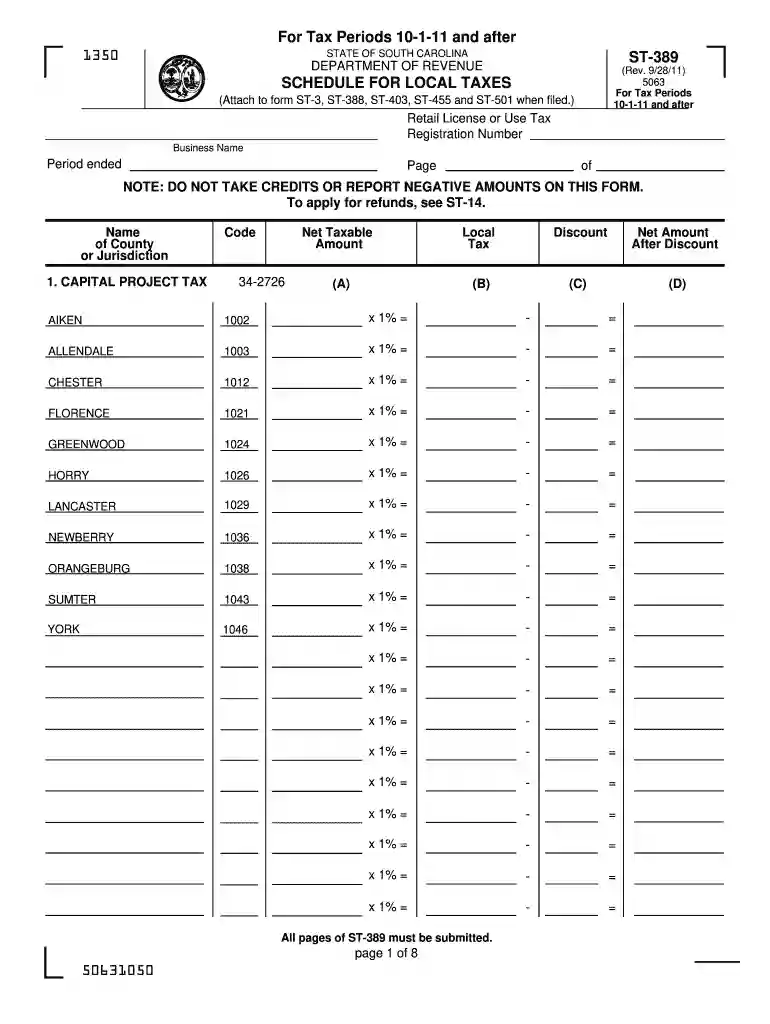
  2. Begin by entering your Retail License or Use Tax Registration Number and Business Name at the top of the form. Ensure that the Period Ended is correctly filled out.
  3. In the 'Name of County or Jurisdiction' section, select the appropriate county from the provided list. Fill in the corresponding code for each local tax type you are reporting.
  4. For each local tax category (e.g., Capital Project Tax, School District Tax), input the Net Taxable Amount. Calculate and enter any applicable discounts before determining the Net Amount After Discount.
  5. Complete all required sections on each page of the form, ensuring that totals are accurately calculated and entered in the summary section at the end.
  6. Review your entries for accuracy before saving or exporting your completed form directly from our platform.

Start using our platform today to fill out your SC Dept of Revenue Form ST-389 quickly and efficiently!

See more sc dept of revenue form st 389 2011 versions

We've got more versions of the sc dept of revenue form st 389 2011 form. Select the right sc dept of revenue form st 389 2011 version from the list and start editing it straight away!
Versions Form popularity Fillable & printable
2023 4.9 Satisfied (35 Votes)
2022 4.6 Satisfied (51 Votes)
2019 4.8 Satisfied (125 Votes)
2018 4.3 Satisfied (141 Votes)
2017 4.4 Satisfied (31 Votes)
2016 4.4 Satisfied (158 Votes)
2015 4 Satisfied (21 Votes)
2014 4.1 Satisfied (35 Votes)
2011 4.1 Satisfied (35 Votes)
2007 4 Satisfied (52 Votes)
be ready to get more

Complete this form in 5 minutes or less

Get form

Got questions?

We have answers to the most popular questions from our customers. If you can't find an answer to your question, please contact us.
Contact us

Sure, and it’s really straightforward! DocHub is a web-based PDF editor with advanced document management capabilities that allow you rapidly adjust your paperwork, complete empty fields and insert new ones for other people to fill out, and create eSignatures in several ways. Add your sc dept of revenue form st 389 2011, provide information as required, and choose how you want to eSign your template - by typing your name, drawing your signature, uploading its picture, or utilizing a QR code.

Using a swift editing system like DocHub, you do not require anything but a browser and connection to the internet to modify your sc dept of revenue form st 389 2011 online swiftly. Upload your document or find the appropriate form in DocHub’s catalog, open our editor with a single click, and finish it electronically. To edit your forms at any time, sign up a free account with DocHub.

If you made any out of state purchases from retailers via internet or mail order and brought them for use, storage or consumption Inside South Carolina and no taxes have been collected on these purchases, you may owe South Carolina Use Tax.
The Local Option Sales Tax (LOST) is authorized under S.C. Code Section 4-10-10. This tax is a general sales and use tax on retail sales that are taxable under the state sales and use tax. This tax is imposed to reduce the property tax burden on persons in the counties where this tax is imposed.
Us​​e Tax Use Tax applies when South Carolina Sales Tax hasnt been paid on an out-of-state purchase. Tangible goods that have been bought at retail to be used, stored, or consumed in South Carolina are subject to a statewide 6% Use Tax, plus any applicable Local Taxes.

Security and compliance

At DocHub, your data security is our priority. We follow HIPAA, SOC2, GDPR, and other standards, so you can work on your documents with confidence.

Learn more
ccpa2
pci-dss
gdpr-compliance
hipaa
soc-compliance

People also ask

South Carolina-South Carolina generally does not impose sales tax on digital products, except for certain streaming content like TV shows and music. Review South Carolinas tax policies on digital goods. South Dakota-Sales tax applies to digital products in South Dakota, such as software and streaming services.
South Carolina State Tax Payment Options Payment Type:Direct Online Payment via Bank Account. Payment Type:Credit Card Payment. Payment Type:Payment Plan. Payment Type:Check, Money Order, or Cashers Check. Payment Type:Estimated Tax Payment Options. Payment Type:Electronic Federal Tax Payment Options.
In a destination-based (or interstate) ecommerce transaction, the location where your customer takes possession of the product is the point of taxation. This is the shipping address, meaning your business would use this address to calculate sales tax, not the billing address.
Sales Use Taxes must be filed and paid on retail sales (including online sales).

Related links