St 389 2026

Get Form
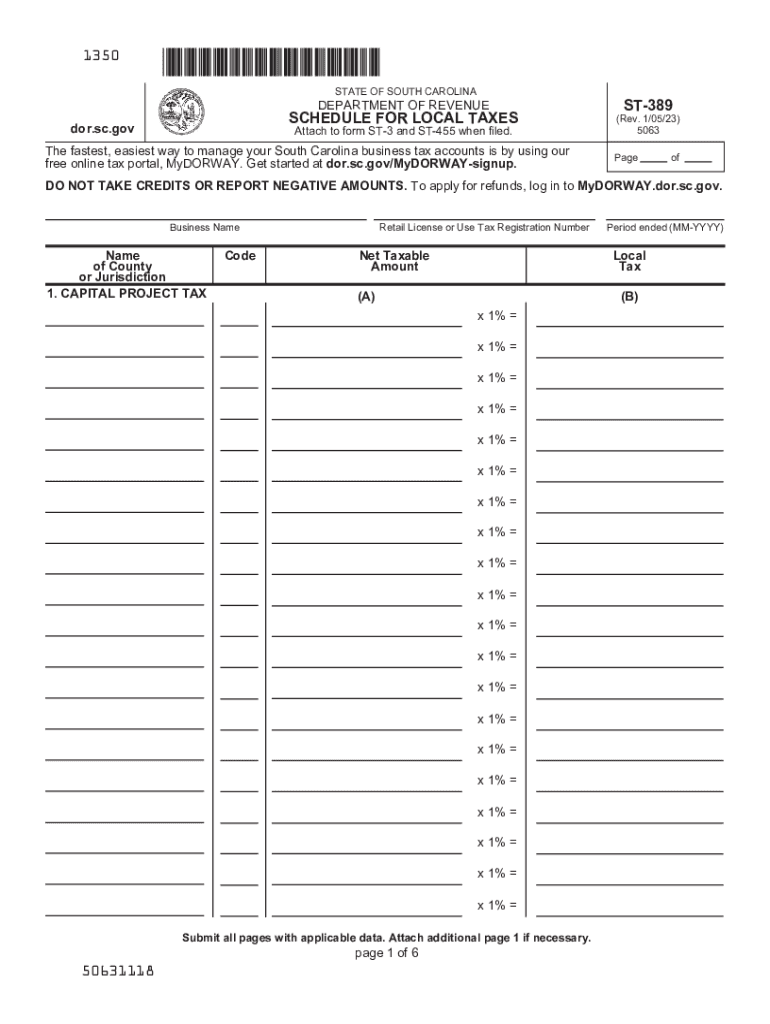
st 389 Preview on Page 1

Here's how it works

01. Edit your st 389 online
Type text, add images, blackout confidential details, add comments, highlights and more.
02. Sign it in a few clicks
Draw your signature, type it, upload its image, or use your mobile device as a signature pad.
03. Share your form with others
Send sc form st 389 via email, link, or fax. You can also download it, export it or print it out.

How to use or fill out st 389 with our platform

Form edit decoration
9.5
Ease of Setup
DocHub User Ratings on G2
9.0
Ease of Use
DocHub User Ratings on G2
  1. Click ‘Get Form’ to open the ST-389 in the editor.
  2. Begin by entering your Business Name and the Name of County or Jurisdiction at the top of the form.
  3. For each tax type listed (Capital Project Tax, School District Tax, etc.), input the Retail License or Use Tax Registration Number and Net Taxable Amount in the respective fields.
  4. Calculate the Local Tax by multiplying the Net Taxable Amount by the specified rate (e.g., x 1% for most taxes).
  5. Complete all pages of the ST-389, ensuring that you submit any additional pages if necessary. Review your entries for accuracy before finalizing.
  6. Finally, summarize your totals on page 5, entering total amounts from Column A and Column B as required.

Start using our platform today to streamline your ST-389 form completion for free!

See more st 389 versions

We've got more versions of the st 389 form. Select the right st 389 version from the list and start editing it straight away!
Versions Form popularity Fillable & printable
2023 4.9 Satisfied (35 Votes)
2022 4.6 Satisfied (51 Votes)
2019 4.8 Satisfied (125 Votes)
2018 4.3 Satisfied (141 Votes)
2017 4.4 Satisfied (31 Votes)
2016 4.4 Satisfied (158 Votes)
2015 4 Satisfied (21 Votes)
2014 4.1 Satisfied (35 Votes)
2011 4.1 Satisfied (35 Votes)
2007 4 Satisfied (52 Votes)
be ready to get more

Complete this form in 5 minutes or less

Get form

Got questions?

We have answers to the most popular questions from our customers. If you can't find an answer to your question, please contact us.
Contact us
Form ST3, Certificate of Exemption. Purchaser: Complete this certificate and give it to the seller. Seller: If this certificate is not completed, you must charge sales tax. Keep this certificate as part of your records. This is a blanket certificate, unless one of the boxes below is checked.
South Carolina Department of Revenue (SCDOR) Close your SCDOR accounts: Online at MyDORWAY.dor.sc.gov , or. Closing: By paper with the C-278 Account Closing Form . Changes: By paper with Form SC 8822B .
How to fill out the Form ST3 Certificate of Exemption Instructions? Collect necessary information about the purchaser and seller. Fill out the purchaser details including the tax ID number. Indicate the reason for exemption accurately. Sign the form to confirm the information is correct.
Tax-exempt goods Some goods are exempt from sales tax under South Carolina law. Examples include most non-prepared food items, prescription drugs, and medical supplies.

Security and compliance

At DocHub, your data security is our priority. We follow HIPAA, SOC2, GDPR, and other standards, so you can work on your documents with confidence.

Learn more
ccpa2
pci-dss
gdpr-compliance
hipaa
soc-compliance