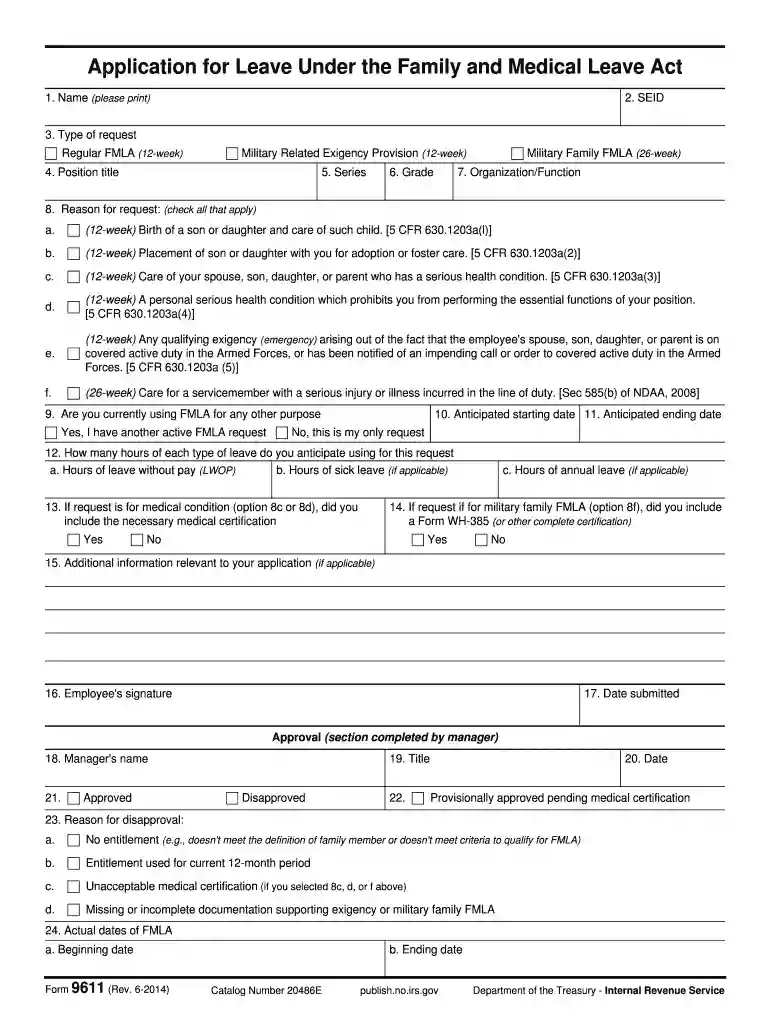
Form 9611 (Rev 6-2014) Application for Leave Under the Family and Medical Leave Act-2026

Get Form
fmla forms to print Preview on Page 1

Here's how it works

01. Edit your fmla forms to print online
Type text, add images, blackout confidential details, add comments, highlights and more.

02. Sign it in a few clicks
Draw your signature, type it, upload its image, or use your mobile device as a signature pad.

03. Share your form with others
Send leave fmla employee via email, link, or fax. You can also download it, export it or print it out.

How to use or fill out Form 9611 (Rev 6-2014) Application for Leave Under the Family and Medical Leave Act with DocHub

Form edit decoration
9.5
Ease of Setup
DocHub User Ratings on G2
9.0
Ease of Use
DocHub User Ratings on G2
  1. Click ‘Get Form’ to open it in the editor.
  2. Begin by entering your name in the first field. Ensure that you print clearly for legibility.
  3. Fill in your SEID, which is essential for identification purposes.
  4. Select the type of request you are making: Regular FMLA, Military Related Exigency Provision, or Military Family FMLA.
  5. Complete your position title, series, and grade to provide context about your employment status.
  6. Indicate your organization/function to help process your request efficiently.
  7. Check all applicable reasons for your leave request from the provided options, ensuring you select those that apply to your situation.
  8. Specify if you are currently using FMLA for any other purpose by selecting 'Yes' or 'No.'
  9. Enter anticipated starting and ending dates for your leave request.
  10. Detail how many hours of each type of leave you anticipate using for this request.
  11. If applicable, confirm whether you've included necessary medical certifications or additional documentation as required.
  12. Sign and date the form at the bottom before submitting it for approval from your manager.

Start filling out Form 9611 today on our platform for free and streamline your application process!

See more Form 9611 (Rev 6-2014) Application for Leave Under the Family and Medical Leave Act versions

We've got more versions of the Form 9611 (Rev 6-2014) Application for Leave Under the Family and Medical Leave Act form. Select the right Form 9611 (Rev 6-2014) Application for Leave Under the Family and Medical Leave Act version from the list and start editing it straight away!
Versions Form popularity Fillable & printable
2014 4.1 Satisfied (40 Votes)
1997 4.8 Satisfied (251 Votes)
be ready to get more

Complete this form in 5 minutes or less

Get form

Got questions?

We have answers to the most popular questions from our customers. If you can't find an answer to your question, please contact us.
Contact us

Yes, and it’s really easy! DocHub is an online PDF editor with advanced document processing capabilities that allow you quickly modify your forms, fill out blank fields and drop new ones for others to fill out, and create eSignatures in several ways. Import your fmla employee, give information as required, and decide how you want to eSign your document - by typing your name, drawing your signature, uploading its image, or utilizing a QR code.

In case your go-to email service is Gmail, it is simple to integrate your DocHub editor in your work. Edit your leave employer with DocHub instruments and connect it to your drafts in Gmail. See how easy it is to exchange documents and collaborate with a swift PDF editing solution at hand.

In order to be eligible to take leave under the FMLA, an employee must (1) work for a covered employer, (2) work 1,250 hours during the 12 months prior to the start of leave, (3) work at a location where 50 or more employees work at that location or within 75 miles of it, and (4) have worked for the employer for 12
The FMLA/CFRA entitles eligible employees up to twelve (12) workweeks of unpaid, job-protected leave each calendar year (January 1st December 31st) for specified family and medical reasons.
To take the leave, you must have recently had a child, have a serious health condition, or be taking care of a family member with a serious health condition.

Security and compliance

At DocHub, your data security is our priority. We follow HIPAA, SOC2, GDPR, and other standards, so you can work on your documents with confidence.

Learn more
ccpa2
pci-dss
gdpr-compliance
hipaa
soc-compliance
be ready to get more

Complete this form in 5 minutes or less

Get form

People also ask

In reality, while FMLA leave is unpaid, the employer must maintain the employees health benefits under the same conditions as if they were working. Other benefits, such as seniority or paid leave accrual, may not necessarily continue to accrue during the period of FMLA leave.
Please be advised that I hereby request an FMLA leave for a period of (number of weeks) in connection with my serious health condition. The leave is to start on (date). Attached is my medical note reflecting the need for FMLA leave. Please let me know whether you approve this leave at your earliest convenience.
Employees are eligible for leave if they have worked for their employer at least 12 months, at least 1,250 hours over the past 12 months, and work at a location where the company employs 50 or more employees within 75 miles.
FMLA Overview The Family Medical Leave Act provides eligible employees up to 12 weeks of unpaid, job-protected leave a year whether you are unable to work because of your own serious health condition or because you need to care for a family member with a serious health condition.
For Self: An employee can take FMLA time if they have a serious health condition that severely impacts their ability to work. Some common conditions that may qualify include depression and severe anxiety. For Family Members: An employee can take FMLA leave to provide care for their spouse, parent, or child.

fmla form 9611 pdf