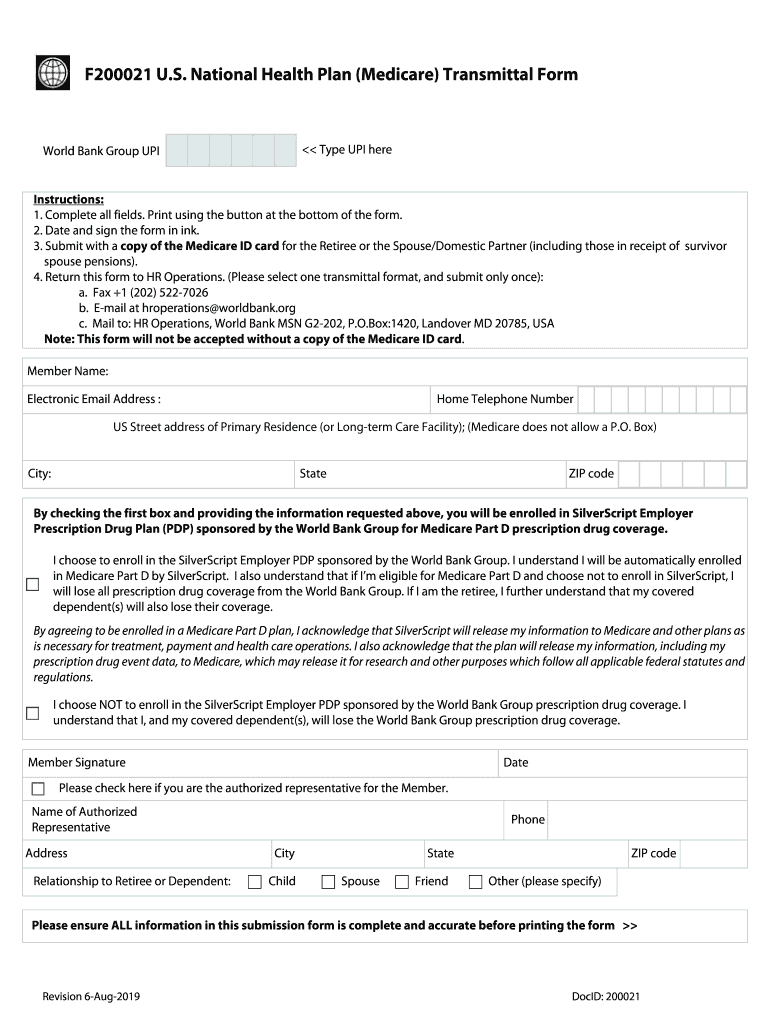
F200021 U S National Health Plan (Medicare) Transmittal 2026

Get Form
f200021 Preview on Page 1

Here's how it works

01. Edit your f200021 online
Type text, add images, blackout confidential details, add comments, highlights and more.
02. Sign it in a few clicks
Draw your signature, type it, upload its image, or use your mobile device as a signature pad.
03. Share your form with others
Send it via email, link, or fax. You can also download it, export it or print it out.

How to use or fill out F200021 U S National Health Plan (Medicare) Transmittal with our platform

Form edit decoration
9.5
Ease of Setup
DocHub User Ratings on G2
9.0
Ease of Use
DocHub User Ratings on G2
  1. Click ‘Get Form’ to open the F200021 U.S. National Health Plan (Medicare) Transmittal in the editor.
  2. Begin by entering your UPI in the designated field at the top of the form.
  3. Fill in your personal details, including Member Name, Electronic Email Address, Home Telephone Number, and US Street Address. Ensure that you do not use a P.O. Box for your address.
  4. Select whether you choose to enroll in the SilverScript Employer Prescription Drug Plan by checking the appropriate box and understanding the implications of your choice.
  5. If applicable, provide information for an authorized representative, including their name, address, relationship to you, and contact details.
  6. Review all entered information for accuracy before printing using the button at the bottom of the form.
  7. Sign and date the form in ink. Remember to attach a copy of your Medicare ID card before submission.
  8. Submit your completed form via fax, email, or mail as per the instructions provided.

Start filling out your F200021 U.S. National Health Plan (Medicare) Transmittal today for free on our platform!

See more F200021 U S National Health Plan (Medicare) Transmittal versions

We've got more versions of the F200021 U S National Health Plan (Medicare) Transmittal form. Select the right F200021 U S National Health Plan (Medicare) Transmittal version from the list and start editing it straight away!
Versions Form popularity Fillable & printable
2019 4.7 Satisfied (48 Votes)
2018 4.3 Satisfied (56 Votes)
be ready to get more

Complete this form in 5 minutes or less

Get form

Got questions?

We have answers to the most popular questions from our customers. If you can't find an answer to your question, please contact us.
Contact us

Of course, it is possible with DocHub. This secure and compliant online solution features a phone-based signing option. Once you log in to your DocHub account and add your F200021 U S National Health Plan (Medicare) Transmittal to our editor, complete all empty fields and utilize the Sign tool on the top barf. Click on Create your signature and select Phone from the available options. Here, you scan a QR code with your smartphone and draw your signature on your phone display, as you usually do when approving hard copies. If you access DocHub right from your mobile device, you can eSign your document by drawing your electronic signature, uploading its photo, or simply with a typed name.

You can easily fill out, modify, and even eSign your F200021 U S National Health Plan (Medicare) Transmittal utilizing DocHub. Create a new account and start your free trial. After that, you can add the file with the form and simply make all the required edits. No need to print on paper or use a third-party application to sign it, as you can put your electronic signature on your document faster through DocHub.

Security and compliance

At DocHub, your data security is our priority. We follow HIPAA, SOC2, GDPR, and other standards, so you can work on your documents with confidence.

Learn more
ccpa2
pci-dss
gdpr-compliance
hipaa
soc-compliance
be ready to get more

Complete this form in 5 minutes or less

Get form