




01. Edit your st lawrence county reduction form online
Type text, add images, blackout confidential details, add comments, highlights and more.

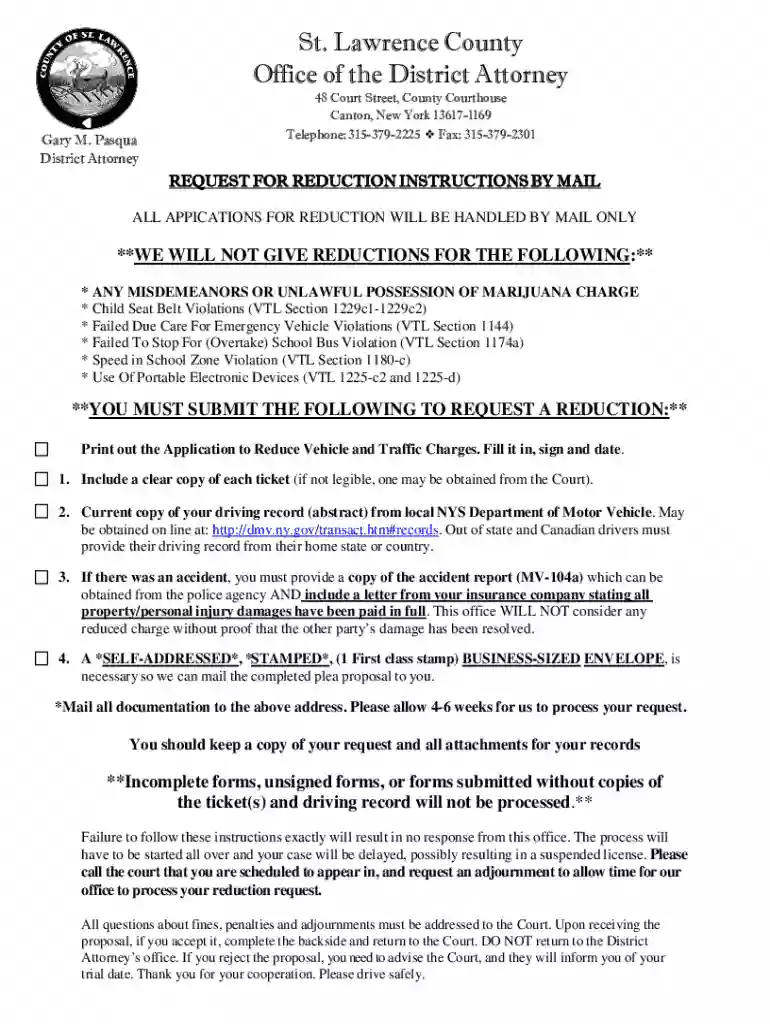
Type text, add images, blackout confidential details, add comments, highlights and more.

Draw your signature, type it, upload its image, or use your mobile device as a signature pad.

Send st lawrence county district attorney traffic reduction via email, link, or fax. You can also download it, export it or print it out.
The term "form online" refers to the digital format of a traditional form that can be accessed and completed through internet-based services. These forms are designed to simplify data entry, submission, and processing by eliminating the need for physical paperwork. The development and usage of these forms aim to improve efficiency, accuracy, and accessibility both for individuals and organizations. They are commonly used for various applications, registrations, surveys, and legal agreements, facilitating faster communication and record-keeping.
Online forms mitigate many challenges associated with paper forms, such as manual errors and delays in processing. They often include interactive features that guide users through the completion process, ensuring that all necessary information is collected. Integration with databases and software systems further enhances their functionality, allowing seamless data transfer and analysis.
Access the Form: Find the online form by visiting the relevant website or platform. Platforms like DocHub streamline this process by offering a user-friendly interface for locating forms within their database or uploading a form of your choice.
Verify Compatibility: Ensure your browser or device supports the online form platform. DocHub is compatible with various web browsers on both desktop and mobile devices, ensuring flexible accessibility.
Read Instructions: Before filling out the form, carefully read the instructions provided. Look for guidance on mandatory fields and submission procedures.
Input Information: Enter your information in the designated fields. Online forms often feature helpful prompts and error-checking capabilities to prevent incomplete or incorrect entries.
Review Before Submission: Double-check all details for accuracy and completeness. Many platforms allow you to save drafts and review your entries before finalizing them.
Submit the Form: Click the "Submit" button once you're satisfied with the information. Online submission ensures immediate transfer of data to the intended recipient or database, expediting processing times.
Fillable Fields: Interactive areas, such as text boxes, checkboxes, and dropdown menus, enhance user experience by simplifying data entry and error correction.
Instructions and Help Guides: Relevant instructions or tooltips accompany each section, offering guidance on how to fill out specific fields correctly.
Security Measures: Online forms employ encryption methods, such as SSL, to protect data during submission and storage. DocHub, for example, secures documents with 256-bit SSL encryption.
Validation Features: Built-in validation ensures that all required fields are completed and that the provided data adheres to specified formats, minimizing submission errors.
Automated Calculations: Some forms include computational features that automate calculations based on entered data, ensuring accurate results without manual intervention.
Online forms are legally equivalent to their paper counterparts when they meet compliance standards set by regulatory bodies. For electronic signatures, platforms like DocHub comply with the U.S. ESIGN Act, ensuring that digital signatures are legally binding. This involves providing clear consent for electronic transactions and maintaining an audit trail of signed documents for verification purposes.
Furthermore, online forms must adhere to privacy laws, such as the General Data Protection Regulation (GDPR) and the California Consumer Privacy Act (CCPA), if applicable, by implementing robust data protection measures. Consent for data collection should be transparently communicated to users, often through privacy policies.
Forms available online are often compatible with a range of software systems, including document editors, databases, and specialized applications like TurboTax or QuickBooks. This compatibility facilitates efficient data exchange and integration with existing workflows. DocHub, for instance, integrates seamlessly with Google Workspace, allowing users to open and modify documents directly from Google Drive or Gmail.
Compatibility with software varies depending on the form's design and the platform's capabilities, but neutral formats like PDF are widely compatible, ensuring broader accessibility across different systems.
Online forms serve a wide range of users, including:
Individuals: For personal tasks like submitting applications, completing surveys, or signing agreements.
Businesses: Companies utilize online forms for employee onboarding, client contracts, and customer feedback collection, among other processes.
Government Agencies: For processing applications, registrations, and other citizen services efficiently.
Educational Institutions: Schools and universities use forms for admissions, evaluations, and communication with students.
The versatility of online forms makes them an essential tool across various sectors, improving efficiency and reducing paper dependency.


Completing an online form might require supporting documents, such as identification proof, previous financial records, or other verification documents. It's vital to have these ready in digital formats such as PDFs or image files, as these can be easily uploaded during the form completion process.
DocHub supports direct import from cloud storage services like Google Drive and Dropbox, ensuring easy access to necessary documents when filling out forms. Always review the specific requirements for each form to ensure all necessary documents are included.
Different states may have distinct regulations regarding the submission and processing of particular forms. For instance, legal or tax-related forms may require compliance with state-specific guidelines. Users must verify that their online form submissions adhere to these local regulations, especially in areas like tax filings or legal documentation.
Platforms may offer region-specific versions of forms to accommodate these differences, ensuring that users remain compliant with local laws. Consulting local statutes or seeking legal advice can provide additional clarity on state-specific requirements.
We've got more versions of the st lawrence county reduction form form. Select the right st lawrence county reduction form version from the list and start editing it straight away!
At DocHub, your data security is our priority. We follow HIPAA, SOC2, GDPR, and other standards, so you can work on your documents with confidence.
(1) In an emergency situation, as defined in this subdivision, a practitioner may have a controlled substance administered by oral order provided thatRead more
CLEAR COPY OF YOUR TRAFFIC TICKET(S)- If you have already returned your ticket(s) to the Court, you must contact the Court to request a copy.Read more
Apr 1, 2025 The research revealed most cameras achieve their safety purpose within six months, with violations dropping and staying low showing driversRead more


