




01. Edit your form online
Type text, add images, blackout confidential details, add comments, highlights and more.

Type text, add images, blackout confidential details, add comments, highlights and more.

Draw your signature, type it, upload its image, or use your mobile device as a signature pad.

Send it via email, link, or fax. You can also download it, export it or print it out.
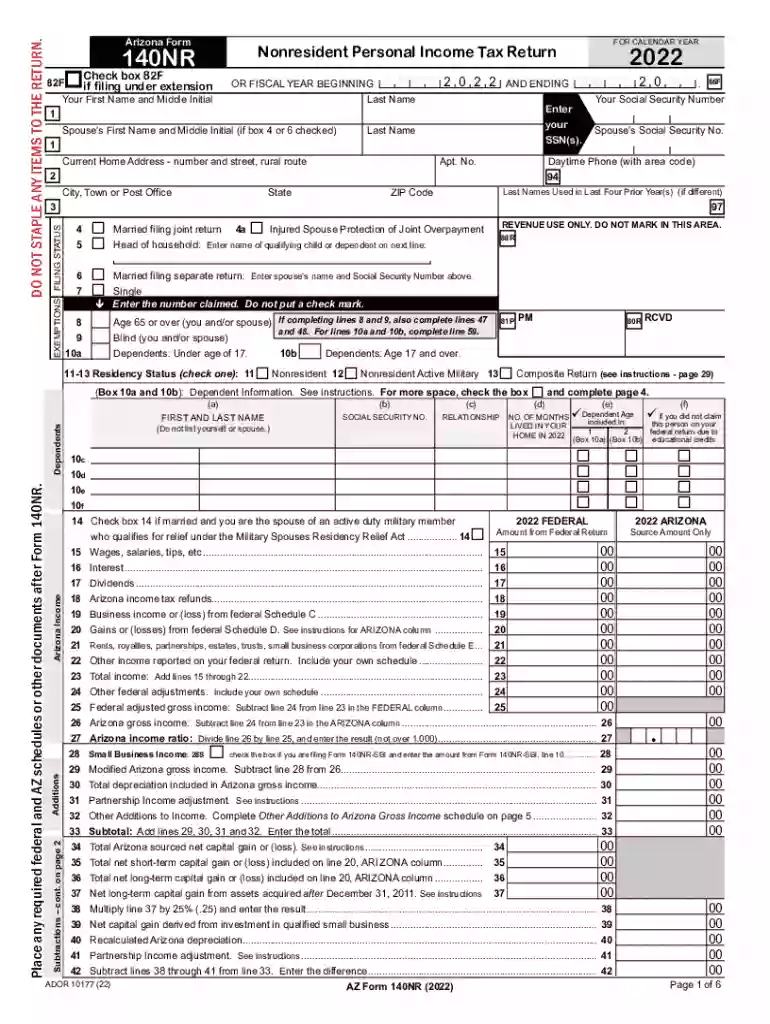
The phrase "FOR CALENDAR YEAR" refers to a specific time frame used predominantly in accounting and tax contexts, which covers a full twelve-month period from January 1 to December 31. This is often used when organizations and individuals need to report their financial or tax activities conducted during this period. Tax forms, such as the Form 140NR used in Arizona for nonresident personal income tax returns, utilize this term to specify the year the tax data pertains to. Understanding the definition is crucial for accurately aligning financial or tax records with the correct reporting period.
Using "FOR CALENDAR YEAR" on financial documents typically indicates that all data, income, or activities reported on the form are related to that specific calendar year. For example, when completing a tax form, entering financial information "FOR CALENDAR YEAR 2022" means all fiscal activities from January 1 to December 31, 2022 are being accounted for. It's essential to distinguish between calendar years and other fiscal years that might not align with the standard calendar.
Completing any form designated for a calendar year requires accuracy and attention to detail. Below are the essential steps typically involved:
Gather Required Personal Information: Collect all necessary information, such as Social Security numbers, full legal names, and addresses.
Compile Income and Financial Records: Ensure all sources of income within the designated year are documented, including wages, dividends, interest, and any other financial inputs.
Calculate Deductions and Credits: Identify eligible deductions and tax credits specific to the calendar year in order to lower taxable income.
Review Filing Status: Choose the correct filing status, which influences tax brackets and potential deductions.
Submit Documentation: Follow the specified submission methods, whether online, via mail, or in person, as guided by the form's instructions.
Keep Copies for Records: Retain copies of all submitted forms and associated documents for future reference or audits.
Using specific "FOR CALENDAR YEAR" forms ensures compliance with tax and financial reporting standards required by the IRS and other regulatory bodies. These forms facilitate:
Legally, the "FOR CALENDAR YEAR" designation mandates that all disclosed financial data pertains strictly to the identified period. It supports the legal framework for:
Awareness of related terminology is essential for correctly handling financial and tax forms:
Adhering to deadlines is critical to avoid late fees or penalties:
Failure to comply with proper filing or submission guidelines can result in various penalties:
We've got more versions of the FOR CALENDAR YEAR form. Select the right FOR CALENDAR YEAR version from the list and start editing it straight away!
| Versions | Form popularity | Fillable & printable |
|---|---|---|
| 2024 | 4.4 Satisfied (44 Votes) | |
| 2023 | 4.4 Satisfied (60 Votes) | |
| 2022 | 4.2 Satisfied (35 Votes) | |
| 2021 | 4.9 Satisfied (56 Votes) | |
| 2020 | 4.3 Satisfied (93 Votes) | |
| 2019 | 4.3 Satisfied (146 Votes) | |
| 2017 | 4.3 Satisfied (136 Votes) | |
| 2014 | 4 Satisfied (27 Votes) | |
| 2013 | 4.2 Satisfied (36 Votes) | |
| 2012 | 4 Satisfied (20 Votes) |
Signing paperwork on a mobile device is quick, simple, and doesn’t require software installation if you have an account with DocHub. Sign in from any browser, complete your blank fields with your data, and click on Sign → Create your signature. You can draw your eSignature just as you usually do on paper, add its image to your FOR CALENDAR YEAR, or type in your name and stylize its look. No matter what option you choose, your form will be valid.
In addition to an extensive toolset for editing PDFs on mobile devices, DocHub enables you to sign your FOR CALENDAR YEAR along the way. Open our editor in your web browser, make changes using DocHub’s toolset, and finish your editing by eSigning the finished form.
At DocHub, your data security is our priority. We follow HIPAA, SOC2, GDPR, and other standards, so you can work on your documents with confidence.
This calendar shows the day of the week for each date for the years from 1950 to 2060. Find the table for the date you are interested in.
Jan 27, 2026 Calendar year 12 consecutive months beginning January 1 and ending December 31. Fiscal year 12 consecutive months ending on the last day ofRead more


