Rpd 41375 2026

Get Form
rpd 41375 Preview on Page 1

Here's how it works

01. Edit your form online
Type text, add images, blackout confidential details, add comments, highlights and more.
02. Sign it in a few clicks
Draw your signature, type it, upload its image, or use your mobile device as a signature pad.
03. Share your form with others
Send it via email, link, or fax. You can also download it, export it or print it out.

How to use or fill out rpd 41375 with our platform

Form edit decoration
9.5
Ease of Setup
DocHub User Ratings on G2
9.0
Ease of Use
DocHub User Ratings on G2
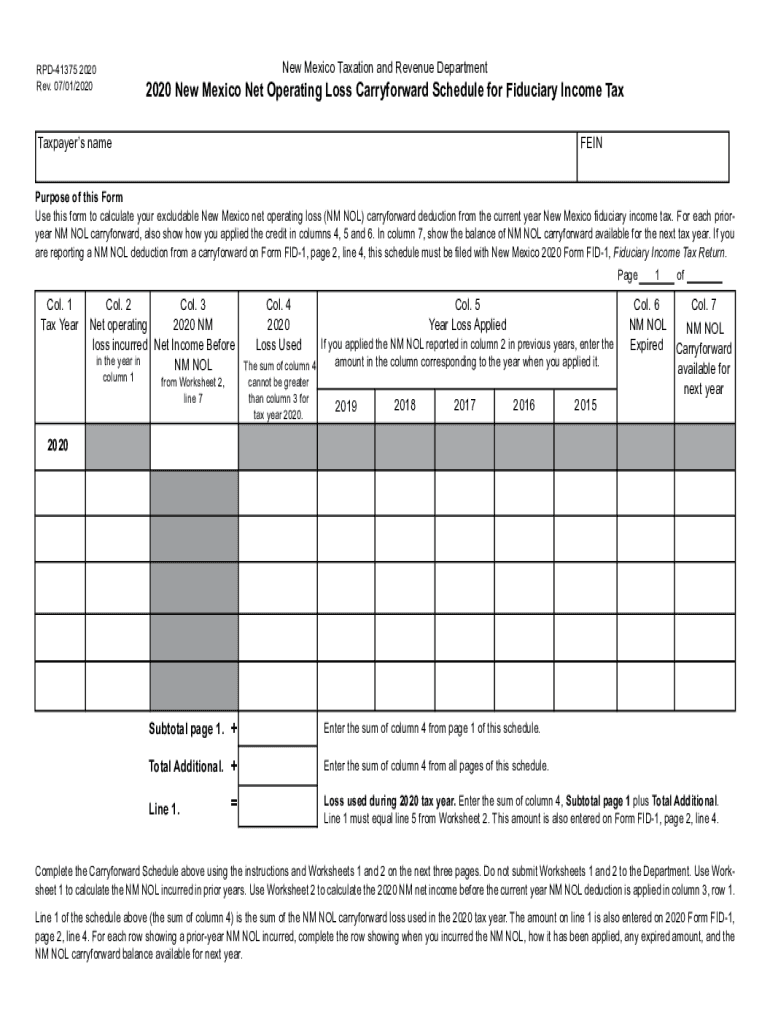
  1. Click ‘Get Form’ to open the RPD-41375 in the editor.
  2. Begin by entering the taxpayer’s name and FEIN at the top of the form. This information is crucial for identification.
  3. In Column 1, specify the tax year for which you are reporting the net operating loss (NOL). Use subsequent rows for prior-year NOLs.
  4. For Column 2, input the amount of NM NOL incurred during that tax year. Refer to Worksheet 1 if needed.
  5. In Column 3, enter your net income before applying any NOL deduction. This should be calculated using Worksheet 2.
  6. Complete Columns 4 through 7 by detailing how much of the NOL was used, when it was applied, any expired amounts, and what remains for next year.
  7. Review all entries for accuracy before saving your completed form. Ensure that totals match as required by the instructions.

Start filling out your RPD-41375 today on our platform for free!

See more rpd 41375 versions

We've got more versions of the rpd 41375 form. Select the right rpd 41375 version from the list and start editing it straight away!
Versions Form popularity Fillable & printable
2021 4.9 Satisfied (32 Votes)
2020 4.8 Satisfied (127 Votes)
2018 4.3 Satisfied (84 Votes)
2016 4.4 Satisfied (53 Votes)
2015 4.4 Satisfied (215 Votes)
2014 3.9 Satisfied (37 Votes)
be ready to get more

Complete this form in 5 minutes or less

Get form

Got questions?

We have answers to the most popular questions from our customers. If you can't find an answer to your question, please contact us.
Contact us
If youve processed payroll in New Mexico before, you can locate your NM Business Tax Identification Number (NMBTIN) (previously called the CRS Identification Number) by: Checking Form CRS-1 or other correspondence from the New Mexico Taxation Revenue Department. Calling the department at (505) 827-0700.
New Mexico Taxation and Revenue Department Annual Summary of Withholding Tax. Form RPD-41072 is an Annual Summary of Withholding Tax used to report the total income taxes withheld from employees and taxes remitted to the state. Its also used to claim an overpayment refund or pay if the taxes are underpaid.
An underpayment penalty is a charge the IRS imposes on taxpayers who did not pay all of their estimated income taxes for the year or paid their taxes late. Youll face an underpayment penalty if you: Didnt pay at least 90% of the tax on your current-year return or 100% of the tax shown on the prior years return.
A net operating loss (NOL) occurs when a companys deductions exceed its taxable income. NOLs can be carried forward indefinitely but are limited to offsetting 80% of taxable income.
What is Form 41071 in New Mexico? New Mexico residents may use a form RPD-41071 to apply for a refund on overpaid taxes by filing a form RPD-41071. Note that you may also do so using a letter of your own as long as it contains all the same information on this form.
be ready to get more

Complete this form in 5 minutes or less

Get form

People also ask

RPD-41272. Calculation of Estimated Personal Income Tax Underpayment Penalty.
The penalty is 2% of the tax due for each month or part of a month the return is not filed or the tax is not paid, to a maximum of 20%. This penalty applies when your failure to file or pay is because of negligence or disregard of the rules and regulations but without intent to defraud.
Complete form RPD-41071, Application for Tax Refund to request a refund. If it appears that the notice is not correct and an overpayment has not been made, or the amount of the overpayment in the notice is not correct, you should follow the instructions on the notice to make the correction.

Related links