




Here's how it works

01. Edit your form online
Type text, add images, blackout confidential details, add comments, highlights and more.

02. Sign it in a few clicks
Draw your signature, type it, upload its image, or use your mobile device as a signature pad.

03. Share your form with others
Send it via email, link, or fax. You can also download it, export it or print it out.
How to use or fill out nm rpd 41375 with our platform

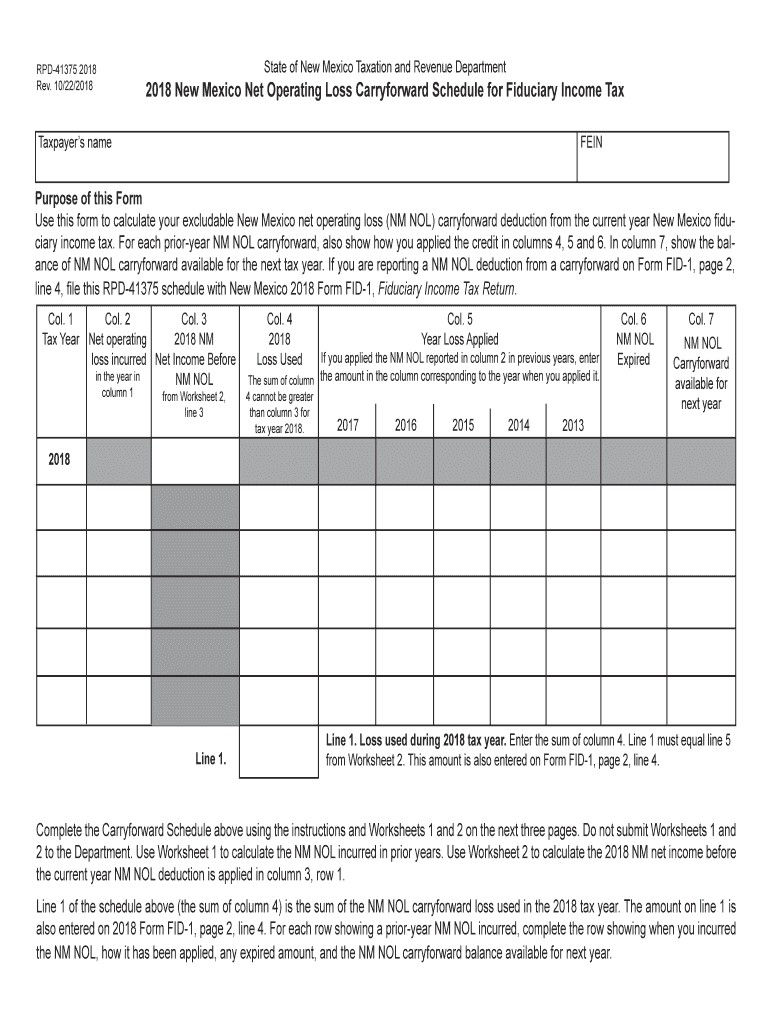
- Click ‘Get Form’ to open the nm rpd 41375 in the editor.
- Begin by entering your Taxpayer’s name and FEIN at the top of the form. This information is essential for identifying your tax records.
- In Column 1, specify the tax year when you incurred a NM NOL. Use subsequent rows for prior-year losses.
- For Column 2, input the amount of NM NOL incurred during that year. Refer to Worksheet 1 if needed.
- Column 3 requires you to enter your net income before applying any NM NOL deduction. Complete Worksheet 2 for accurate figures.
- In Column 4, indicate how much of the NM NOL was applied during the current tax year. Ensure this matches your calculations from Worksheet 2.
- Complete Columns 5, 6, and 7 by detailing how prior-year losses were applied, any expired amounts, and carryforward balances available for next year.
Start using our platform today to simplify your form completion process for free!
Fill out nm rpd 41375 online
It's free
It's free
See more nm rpd 41375 versions
We've got more versions of the nm rpd 41375 form. Select the right nm rpd 41375 version from the list and start editing it straight away!
Security and compliance
At DocHub, your data security is our priority. We follow HIPAA, SOC2, GDPR, and other standards, so you can work on your documents with confidence.
Learn more


Related forms

EST-1
The document is an application form (EST-1) from the Alabama Department of Revenue for requesting an estate tax waiver. ...
Att-1
The document is a Notice of Appeal form for the Alabama Tax Tribunal, allowing taxpayers to formally appeal disputes wit ...
Drake Tax - State e-File Mandates
The document is an Alabama Department of Revenue form that allows taxpayers to opt out of electronic filing for their in ...

1a Calendar Year (Taxable Year 2024 determination period beginning
The document is the Alabama Business Privilege Tax Return for the taxable year 2024, detailing the requirements for fili ...

Commercial FishingDepartment of Marine Resources
The document is an application form for marine harvesting licenses in Maine for the year 2024. It includes sections for ...

PRIVATE COMMITTEE REPORT - PASSING OF ACCOUNTS
The document is a Private Committee Report for the Passing of Accounts, required by the Public Guardian and Trustee in B ...

Maine 1099 State Reporting RulesE-File ME 1099 Forms
The document provides electronic filing specifications and instructions for Forms 1099 and W-2G for the tax year 2024, d ...
Az unemployment direct deposit form
The document provides information on how to set up direct deposit for weekly Unemployment Insurance payments through the ...