2018 form rpd 41375-2026

Get Form
2018 form rpd 41375 Preview on Page 1

Here's how it works

01. Edit your form online
Type text, add images, blackout confidential details, add comments, highlights and more.

02. Sign it in a few clicks
Draw your signature, type it, upload its image, or use your mobile device as a signature pad.

03. Share your form with others
Send it via email, link, or fax. You can also download it, export it or print it out.

How to use or fill out 2018 form rpd 41375 with our platform

Form edit decoration
9.5
Ease of Setup
DocHub User Ratings on G2
9.0
Ease of Use
DocHub User Ratings on G2
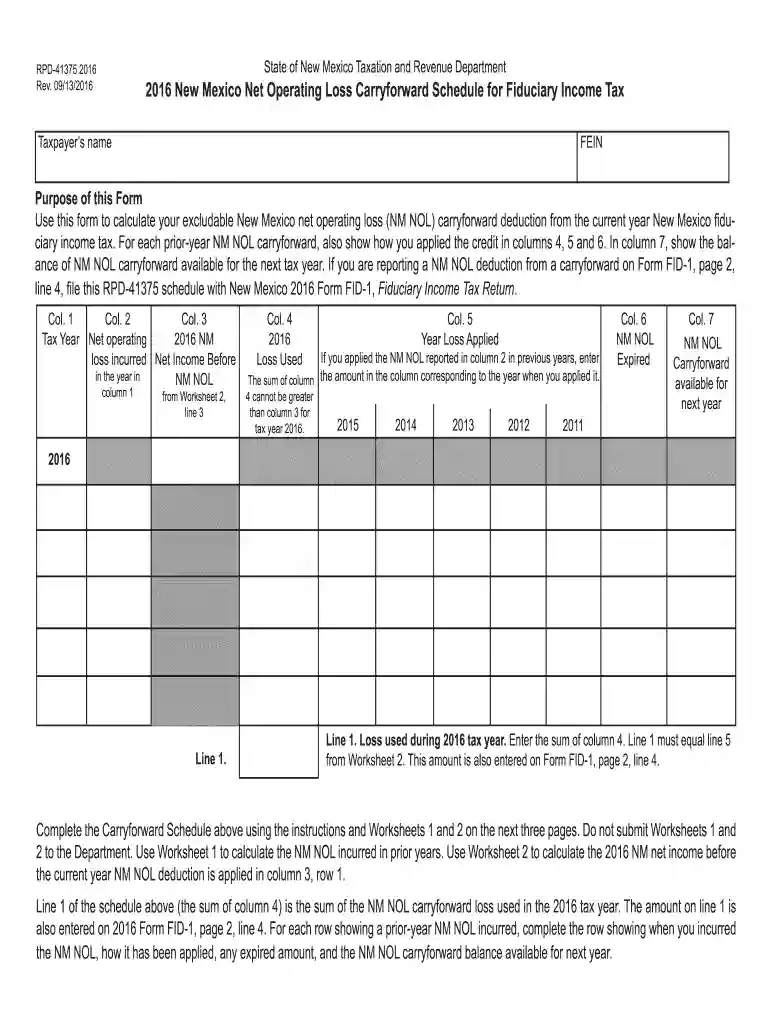
  1. Click ‘Get Form’ to open the 2018 form RPD-41375 in the editor.
  2. Begin by entering your Taxpayer’s name and FEIN in the designated fields at the top of the form.
  3. In Column 1, specify the tax year for which you are reporting the NM NOL. Use subsequent rows for prior-year NM NOLs.
  4. For Column 2, input the amount of NM NOL incurred during that tax year. Refer to Worksheet 1 if needed.
  5. In Column 3, enter your net income before applying any NM NOL deduction, as calculated from Worksheet 2.
  6. Complete Columns 4 through 7 by detailing how much of the NM NOL was applied, expired, and what remains for carryforward.
  7. Review all entries for accuracy and completeness before saving or exporting your completed form.

Start using our platform today to fill out your forms online for free!

See more 2018 form rpd 41375 versions

We've got more versions of the 2018 form rpd 41375 form. Select the right 2018 form rpd 41375 version from the list and start editing it straight away!
Versions Form popularity Fillable & printable
2021 4.9 Satisfied (32 Votes)
2020 4.8 Satisfied (127 Votes)
2018 4.3 Satisfied (84 Votes)
2016 4.4 Satisfied (53 Votes)
2015 4.4 Satisfied (215 Votes)
2014 3.9 Satisfied (37 Votes)
be ready to get more

Complete this form in 5 minutes or less

Get form

Got questions?

We have answers to the most popular questions from our customers. If you can't find an answer to your question, please contact us.
Contact us
If youve processed payroll in New Mexico before, you can locate your NM Business Tax Identification Number (NMBTIN) (previously called the CRS Identification Number) by: Checking Form CRS-1 or other correspondence from the New Mexico Taxation Revenue Department. Calling the department at (505) 827-0700.
You can also find printed forms: At your local District Office. See the CONTACT US link at the top of this page. At your local library. Over 100 libraries across the state have ordered supplies of personal income tax forms to make available to the public, or. You can call 1-866-285-2996 to order forms to be mailed.
Complete form RPD-41071, Application for Tax Refund to request a refund. If it appears that the notice is not correct and an overpayment has not been made, or the amount of the overpayment in the notice is not correct, you should follow the instructions on the notice to make the correction.
The New Mexico NOL deduction includes the 80% limitation to the deduction that may be taken from the taxpayers apportioned net income and does not allow for the carryback of an NOL deduction to prior years.
The agreement may be made by completing Form RPD-41353, Owners or Remittees Agreement to Pay Withholding On Behalf of a Pass-Through Entity or Remitter. Form RPD-41353 must be completed and on file with the PTE at the time it files its annual reports for the tax year to which the agreement pertains.

People also ask

Taxpayer Access Point (TAP) The TAP website at is a secure online resource that lets you electronically file your return for free.
To check the status of your refund for the current taxable year visit the Taxation and Revenue Departments online service the Taxpayer Access Point (TAP). Once you are on the TAP website go to the Personal Income tile and select the Wheres My Refund? link.

Related links