Ky assessment annual report 2026

Get Form
kentucky annual report filing Preview on Page 1

Here's how it works

01. Edit your kentucky annual report filing online
Type text, add images, blackout confidential details, add comments, highlights and more.

02. Sign it in a few clicks
Draw your signature, type it, upload its image, or use your mobile device as a signature pad.

03. Share your form with others
Send file annual report kentucky via email, link, or fax. You can also download it, export it or print it out.

How to use or fill out ky assessment annual report with our platform

Form edit decoration
9.5
Ease of Setup
DocHub User Ratings on G2
9.0
Ease of Use
DocHub User Ratings on G2
  1. Click ‘Get Form’ to open the ky assessment annual report in the editor.
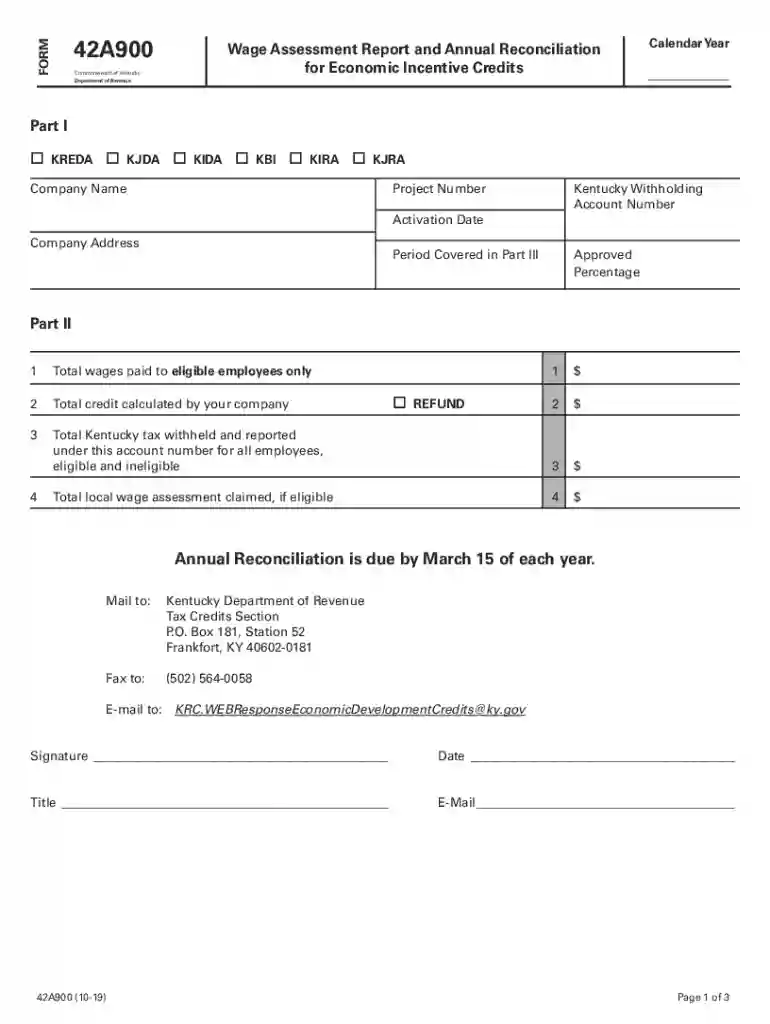
  2. In Part I, select the appropriate Economic Development Credit by checking the corresponding box. Fill in your company name, project number, Kentucky withholding account number, activation date, and company address.
  3. For Part II, enter the total wages paid to eligible employees in Line 1. In Line 2, input the total credit calculated by your company. If applicable, mark the refund request box.
  4. Complete Line 3 with the total Kentucky tax withheld for all employees under your account number. If eligible, enter the local wage assessment claimed in Line 4.
  5. Proceed to Part III and fill out employee details including names, Social Security numbers (last four digits), hire dates, and wages for the period. Ensure calculations are accurate as per instructions provided.
  6. Review all entries for accuracy before saving your document. Once completed, you can easily share or submit it directly from our platform.

Start using our platform today to streamline your ky assessment annual report process for free!

See more ky assessment annual report versions

We've got more versions of the ky assessment annual report form. Select the right ky assessment annual report version from the list and start editing it straight away!
Versions Form popularity Fillable & printable
2023 4.4 Satisfied (56 Votes)
2022 4.3 Satisfied (36 Votes)
2020 4.8 Satisfied (211 Votes)
2019 4.1 Satisfied (71 Votes)
2018 4.2 Satisfied (29 Votes)
2017 4.4 Satisfied (128 Votes)
2004 4.2 Satisfied (73 Votes)
be ready to get more

Complete this form in 5 minutes or less

Get form

Got questions?

We have answers to the most popular questions from our customers. If you can't find an answer to your question, please contact us.
Contact us
Annual reports are required by statute in nearly every state. They provide state agencies with updated information on the entities registered in their state. Your company is required to file annual reports to maintain good standing and continue operating. Failure to file annual reports on time can result in late fees.
The cost of forming an LLC in Kentucky is $40 to file the articles of organization. This makes Kentucky an extremely affordable place to start a business.
Can parents access their childs KSA test results? Yes, parents can access their childs KSA test results through the online portal provided by the Kentucky Department of Education (KDE). They can also request paper copies from the school.
ServiceFees RENEWAL OF A KENTUCKY REGISTRATION Filing Fees: Automobile: $20.00 Trucks (commercial/10,000 LB): $21.00 Motorcycle: $17.75 Weighted Trucks Trailers fees determined by weight and type. Mail-in Service: $2 postage and handling.11 more rows
Your annual report must be signed, dated and accompanied by a $15 filing fee.

Security and compliance

At DocHub, your data security is our priority. We follow HIPAA, SOC2, GDPR, and other standards, so you can work on your documents with confidence.

Learn more
ccpa2
pci-dss
gdpr-compliance
hipaa
soc-compliance