




Here's how it works

01. Edit your form online
Type text, add images, blackout confidential details, add comments, highlights and more.

02. Sign it in a few clicks
Draw your signature, type it, upload its image, or use your mobile device as a signature pad.

03. Share your form with others
Send it via email, link, or fax. You can also download it, export it or print it out.
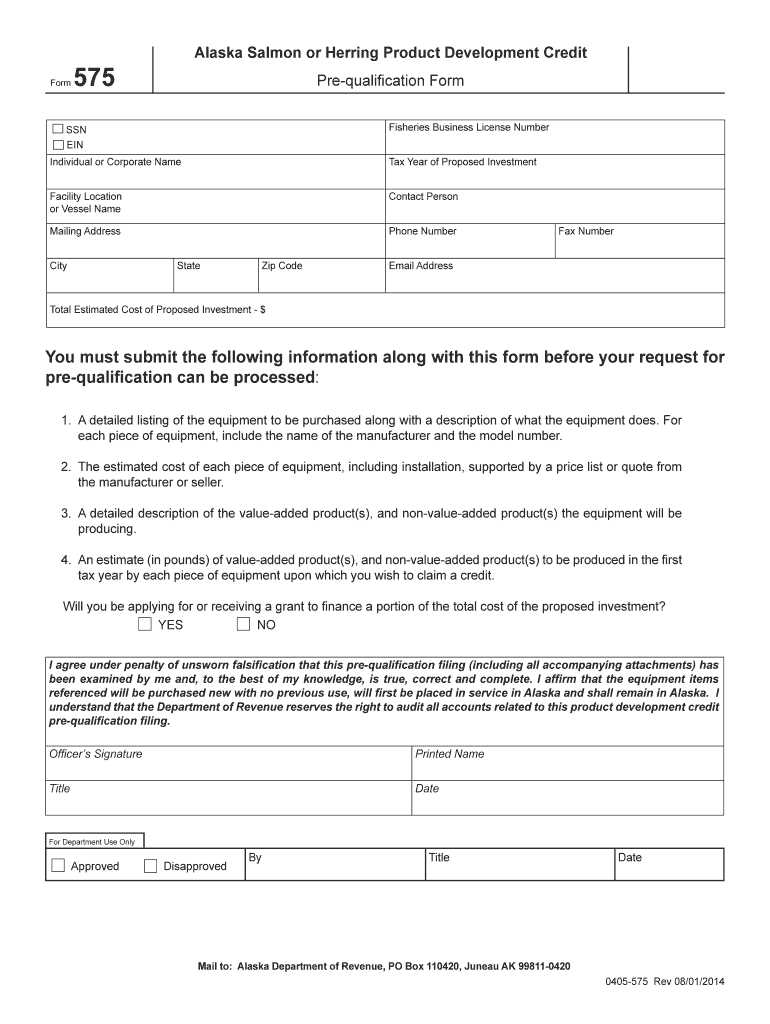
How to use or fill out ResetFormPrintAlaska Salmon or Herring Product

- Click ‘Get Form’ to open it in the editor.
- Begin by entering your Fisheries Business License Number, SSN, and EIN in the designated fields. Ensure accuracy as this information is crucial for processing.
- Fill in your Individual or Corporate Name, Tax Year of Proposed Investment, and Facility Location or Vessel Name. This helps identify your business and the context of your application.
- Provide contact details including Contact Person, Mailing Address, Phone Number, City, State, Zip Code, Fax Number, and Email Address. This ensures that the Department can reach you for any follow-up.
- Enter the Total Estimated Cost of Proposed Investment. Be sure to include all relevant costs associated with your investment.
- Attach a detailed listing of equipment to be purchased along with descriptions and estimated costs supported by quotes. This is essential for evaluating your pre-qualification request.
- Indicate whether you will be applying for or receiving a grant to finance part of the investment cost by selecting YES or NO.
- Finally, review the affirmation statement regarding the truthfulness of your submission before signing with your printed name, title, and date.
Start filling out your form today using our platform for free!
Fill out ResetFormPrintAlaska Salmon or Herring Product online
It's free
It's free
See more ResetFormPrintAlaska Salmon or Herring Product versions
We've got more versions of the ResetFormPrintAlaska Salmon or Herring Product form. Select the right ResetFormPrintAlaska Salmon or Herring Product version from the list and start editing it straight away!
Security and compliance
At DocHub, your data security is our priority. We follow HIPAA, SOC2, GDPR, and other standards, so you can work on your documents with confidence.
Learn more


Related forms

E-Certification for Washington State Educators - OSPI
The document is a verification form for master's degree program enrollment, specifically for applicants seeking conditio ...

Seattle DPD Form - OTC Electrical and Sign Permit Transfer Form
The document is an application form for transferring electrical or sign permits in Seattle, issued by the Department of ...
2020 camp application for enrollment - Windmill Day Camp
The document is a comprehensive application form for enrollment in the 2020 Windmill Day Camp, detailing necessary infor ...
P-F1 Tree Fund Payment Application - NYC Parks
The document outlines the P-F1 application process for the Tree Fund Payment in New York City, detailing conditions unde ...

National Grid ConnectsNew Upgraded Electric ServiceTools
The Residential Gas Service Agreement - 2019 outlines the terms and conditions for installing natural gas service by Nat ...

Residential Gas Service Agreement - 2018
The Residential Gas Service Agreement - 2018 outlines the terms and conditions for installing natural gas service by Nat ...
Mccmd
The document is a registration form for the 2010 Summer Camp at the Muslim Community Center in Silver Spring, MD. It inc ...
Easy pass application