Jdf121 2026

Get Form
jdf121 Preview on Page 1

Here's how it works

01. Edit your jdf121 online
Type text, add images, blackout confidential details, add comments, highlights and more.

02. Sign it in a few clicks
Draw your signature, type it, upload its image, or use your mobile device as a signature pad.

03. Share your form with others
Send jdf121 via email, link, or fax. You can also download it, export it or print it out.

How to use or fill out jdf121 with our platform

Form edit decoration
9.5
Ease of Setup
DocHub User Ratings on G2
9.0
Ease of Use
DocHub User Ratings on G2
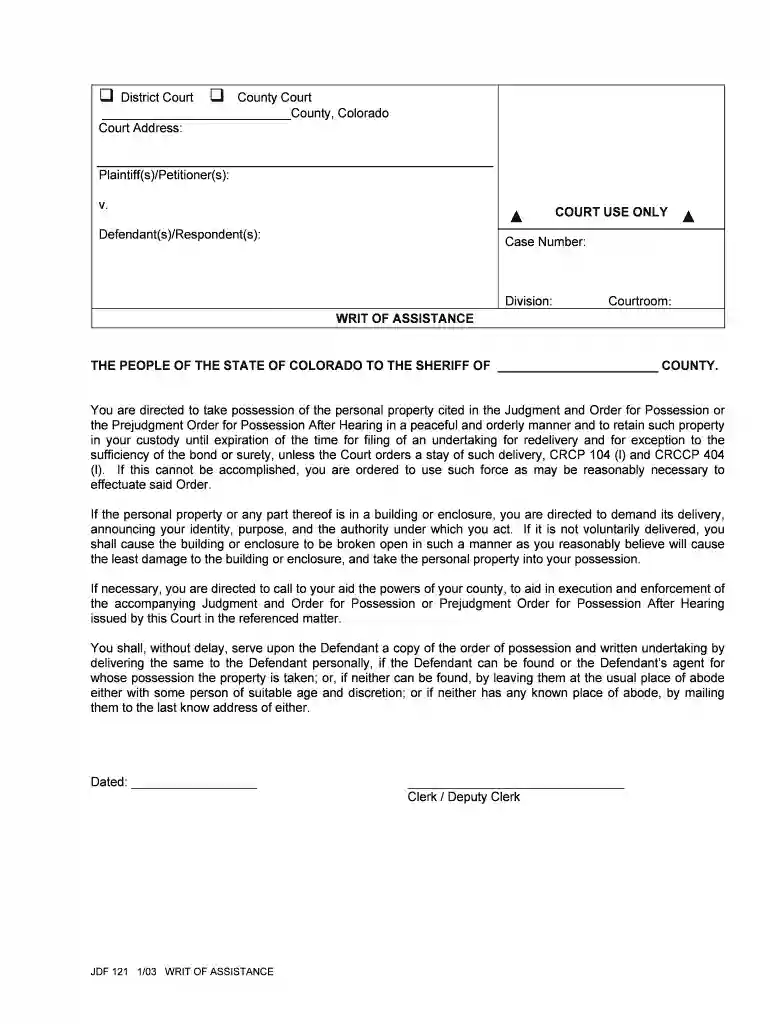
  1. Click ‘Get Form’ to open the jdf121 in the editor.
  2. Begin by entering the court address at the top of the form. This is essential for identifying the jurisdiction.
  3. Fill in the names of the Plaintiff(s)/Petitioner(s) and Defendant(s)/Respondent(s) in their respective fields. Ensure accuracy as this information is crucial for legal proceedings.
  4. Input the Case Number, Division, and Courtroom details as required. These identifiers help track your case within the court system.
  5. In the section regarding possession of personal property, ensure you clearly state any specific items mentioned in the Judgment and Order for Possession.
  6. Finally, sign and date the form at the bottom. This confirms your acknowledgment and compliance with the order.

Start using our platform today to fill out your jdf121 form online for free!

See more jdf121 versions

We've got more versions of the jdf121 form. Select the right jdf121 version from the list and start editing it straight away!
Versions Form popularity Fillable & printable
2003 4.8 Satisfied (61 Votes)
be ready to get more

Complete this form in 5 minutes or less

Get form

Got questions?

We have answers to the most popular questions from our customers. If you can't find an answer to your question, please contact us.
Contact us

Electronic document approval demands a software solution that works in compliance with data security and eSignature regulations. DocHub is a perfect tool for that, because it fulfills all the aforementioned requirements. Whatever method you like to sign your jdf121 in DocHub, your eSignature will be legally binding and court-admissible.

If you store your papers in Google Drive, there is no need to download your colorado jdf 121 on the computer and upload it back to our editor. A significantly simpler way is to set up a browser extension created by DocHub to simplify this flow. The extension allows editing PDFs right in your web browser. Alternatively, you may integrate your DocHub and Gmail accounts for more efficient modifying.

A Replevin case is a court action in which one person (the Plaintiff) seeks to recover possession of personal property wrongfully taken or detained by another (the Defendant), plus money damages (if any) for the Defendants unlawful possession of the property.
Proof of service shall be made as follows: (1) If served personally, by a statement, certified by the sheriff, marshal or similar governmental official, or a sworn or unsworn declaration by any other person completing the service as to date, place, and manner of service; (2) Repealed eff.
An affidavit may be sworn to either within or without this state before any officer authorized by law to take and docHub the acknowledgment of deeds conveying lands. When any rule of civil procedure requires an affidavit or other sworn declaration, an unsworn declaration under C.R.S. 13-27-101 et seq.

Security and compliance

At DocHub, your data security is our priority. We follow HIPAA, SOC2, GDPR, and other standards, so you can work on your documents with confidence.

Learn more
ccpa2
pci-dss
gdpr-compliance
hipaa
soc-compliance

People also ask

Generally, They cant leave the documents at your door, but if they have tried to deliver the documents directly to the person being sued; or have tried delivering the documents to a substitute person of suitable age and discretion at the place of business or the home of the person being sued, then the process server
Lastly, after service is performed by your chosen process server, you need to make sure that they fill out a form called a Return of Service or Affidavit of Service. This form must be signed in front of a notary unless the process server is a peace officer.
The purpose of a Motion for Clarification is to ask the Court to explain the provisions of a prior order of the Court that a party does not fully understand.
The individual accepting papers must be at least 18 years old and not a party to the case. He or she must also be authorized to accept such documents. A friend, relative, coworker, or other responsible adults may qualify. Be sure to consult a legal professional to ensure the service of process is legal and valid.
Simply fill out the response form, telling the court why you disagree with the other partys position. When you file the response, you will be asked to pay a filing fee. You do not need to prove your case in the response; you simply need to tell the court what you believe to be true.

co jdf 121