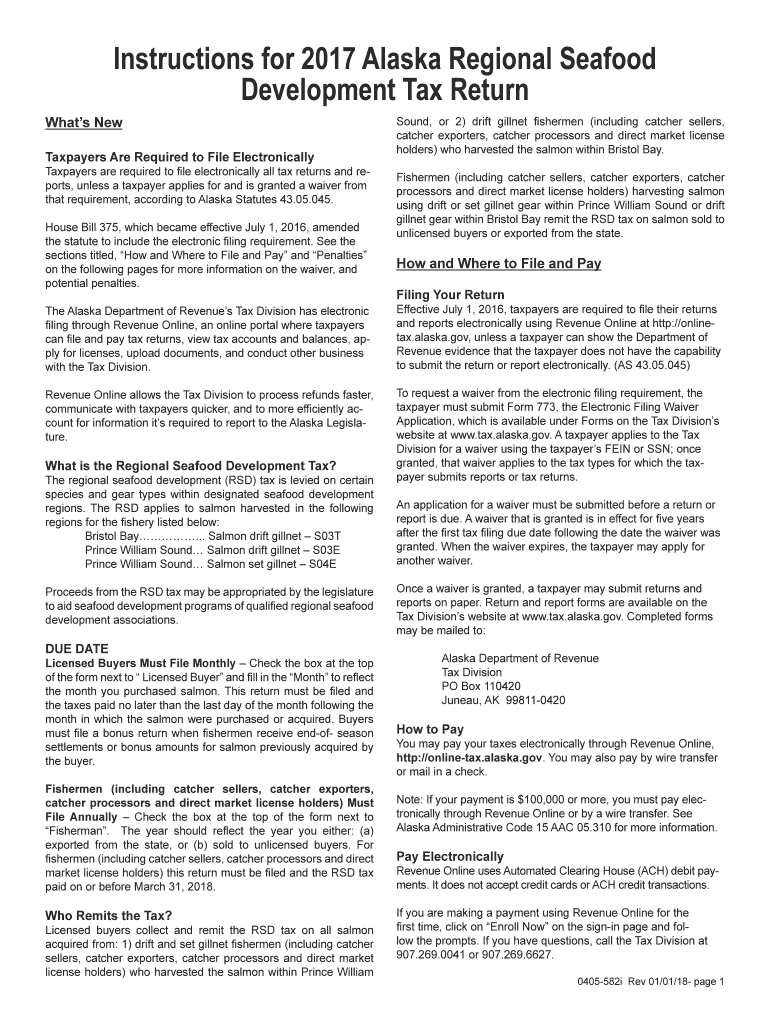
Instructions for 2017 Alaska Regional Seafood Development Tax Return-2026

Get Form
Instructions for 2017 Alaska Regional Seafood Development Tax Return Preview on Page 1

Here's how it works

01. Edit your form online
Type text, add images, blackout confidential details, add comments, highlights and more.
02. Sign it in a few clicks
Draw your signature, type it, upload its image, or use your mobile device as a signature pad.
03. Share your form with others
Send it via email, link, or fax. You can also download it, export it or print it out.

How to use or fill out Instructions for 2017 Alaska Regional Seafood Development Tax Return with our platform

Form edit decoration
9.5
Ease of Setup
DocHub User Ratings on G2
9.0
Ease of Use
DocHub User Ratings on G2
  1. Click ‘Get Form’ to open the Instructions for 2017 Alaska Regional Seafood Development Tax Return in the editor.
  2. Begin by reviewing the 'What’s New' section to understand the electronic filing requirements. Ensure you are prepared to file electronically unless you have a waiver.
  3. Identify your status as either a Licensed Buyer or Fisherman by checking the appropriate box at the top of the form. Fill in the month and year relevant to your tax obligations.
  4. Complete each section carefully, providing accurate values for resources acquired, including any bonus payments if applicable. Follow instructions on how to report these values.
  5. If necessary, check the 'Amended' return box and provide explanations for any corrections needed on previously filed returns.
  6. Once all fields are filled out correctly, save your document and proceed with electronic submission through Revenue Online or prepare it for mailing if you have a waiver.

Start using our platform today to streamline your tax return process for free!

See more Instructions for 2017 Alaska Regional Seafood Development Tax Return versions

We've got more versions of the Instructions for 2017 Alaska Regional Seafood Development Tax Return form. Select the right Instructions for 2017 Alaska Regional Seafood Development Tax Return version from the list and start editing it straight away!
Versions Form popularity Fillable & printable
2019 4.8 Satisfied (165 Votes)
2017 4.1 Satisfied (84 Votes)
2016 4.4 Satisfied (161 Votes)
be ready to get more

Complete this form in 5 minutes or less

Get form

Got questions?

We have answers to the most popular questions from our customers. If you can't find an answer to your question, please contact us.
Contact us

As outlined by eSignature laws, documents approved electronically have the same validity as traditionally approved ones. You can electronically sign almost any business and personal paperwork. Four types of documents still demand wet signatures only - wills and testamentary trusts, court orders and other court forms, state statutes governing divorce, adoption, or other family law, and notice of cancellation of utility services. If you follow the regulations and utilize a secure and compliant software solution, like DocHub, you can eSign your Instructions for 2017 Alaska Regional Seafood Development Tax Return without printing it.

In case your go-to email service is Gmail, you can easily incorporate your DocHub editor into your work. Edit your Instructions for 2017 Alaska Regional Seafood Development Tax Return with DocHub tools and attach it to your drafts in Gmail. See how easy it can be to exchange files and collaborate having a swift PDF editing solution at hand.

Form 04-611 is the standard Alaska Corporation Net Income Tax Return form designed to accommodate any taxpayer including the most complex filing under the waters edge method.
Alaska, Florida, Nevada, South Dakota, Tennessee, Texas, Washington, and Wyoming dont have income tax. If youre a resident of one of these states, you dont need to file a return in that state.
The tax is based on whether the fishery is established or developing. Established rates are 5% for floating facilities, 4.5% for Salmon Canneries and 3% for shore based facilities and 3% for developing resources from Floating facilities and 1% for shore-based developing resources.
be ready to get more

Complete this form in 5 minutes or less

Get form

People also ask

Alaska Permanent Fund Dividends and Resource Rebate payments are taxable to either an adult or a child recipient and must be reported on a federal income tax return. Include these amounts on line 8g of Schedule 1 (Form 1040) PDF and attach to Form 1040 or Form 1040-SR.

Related links