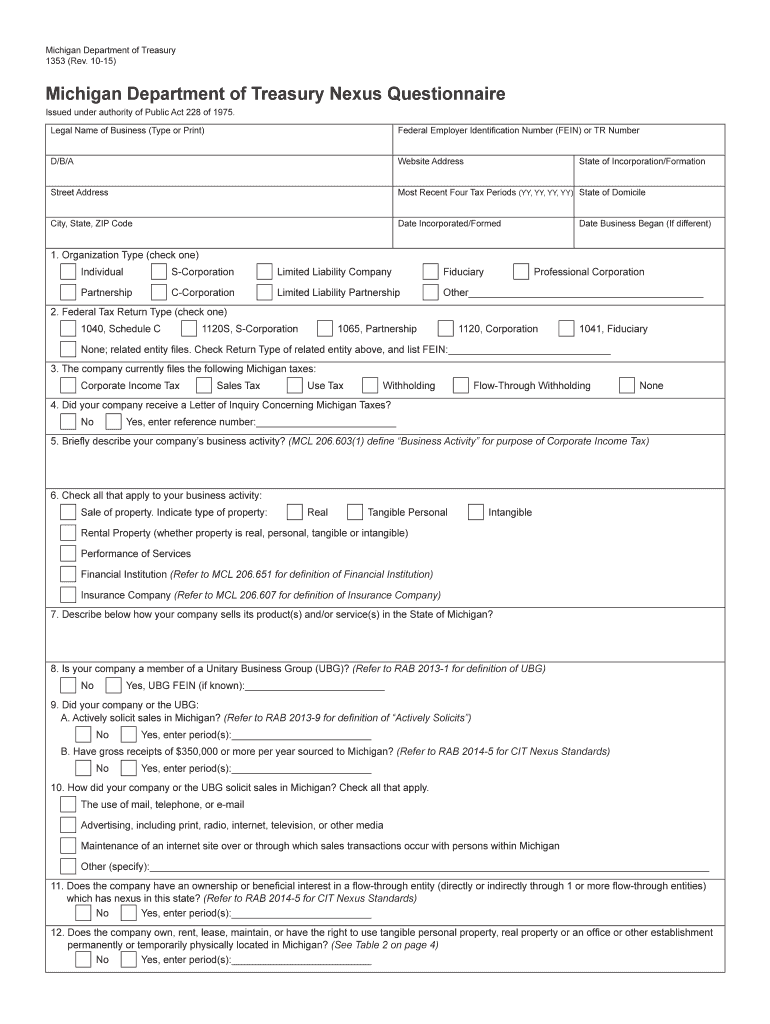
Form 1353-2026

Get Form
form 1353 Preview on Page 1

Here's how it works

01. Edit your form online
Type text, add images, blackout confidential details, add comments, highlights and more.
02. Sign it in a few clicks
Draw your signature, type it, upload its image, or use your mobile device as a signature pad.
03. Share your form with others
Send it via email, link, or fax. You can also download it, export it or print it out.

How to use or fill out form 1353 with our platform

Form edit decoration
9.5
Ease of Setup
DocHub User Ratings on G2
9.0
Ease of Use
DocHub User Ratings on G2
  1. Click ‘Get Form’ to open it in the editor.
  2. Begin by entering the Legal Name of your Business, along with your Federal Employer Identification Number (FEIN) or TR Number, and any 'Doing Business As' (D/B/A) names.
  3. Fill in your website address and street address, followed by the most recent four tax periods and state of domicile.
  4. Indicate the date your business was incorporated or formed, along with the state of incorporation. If applicable, provide the date your business began.
  5. Select your organization type from the provided options, ensuring you check only one box.
  6. Choose the type of federal tax return you file and indicate if your company currently files any Michigan taxes.
  7. Answer questions regarding inquiries about Michigan taxes and describe your company's business activity briefly.
  8. Complete sections regarding sales solicitation methods in Michigan and any ownership interests in flow-through entities.
  9. Finally, review all entries for accuracy before submitting through our platform for free.

Start using our platform today to streamline your form completion process!

See more form 1353 versions

We've got more versions of the form 1353 form. Select the right form 1353 version from the list and start editing it straight away!
Versions Form popularity Fillable & printable
2019 4.8 Satisfied (81 Votes)
2015 4.2 Satisfied (112 Votes)
2012 4.2 Satisfied (50 Votes)
be ready to get more

Complete this form in 5 minutes or less

Get form

Got questions?

We have answers to the most popular questions from our customers. If you can't find an answer to your question, please contact us.
Contact us
Use Form 2350 to ask for an extension of time to file your tax return only if you expect to file Form 2555 and you need the time to meet either the bona fide residence test or the physical presence test to qualify for the foreign earned income exclusion and/or the foreign housing exclusion or deduction.
You can get an automatic extension of time to file your tax return by filing Form 4868 electronically. Youll receive an electronic acknowledgment once you complete the transaction. Keep it with your records. Dont mail in Form 4868 if you file electronically, unless youre making a payment with a check or money order.
Youre not required to provide Form 9325 along with the rest of the tax return, but some taxpayers may request this form to prove their returns have been e-filed and accepted by the IRS.
OGE Form 1353: Semiannual Report of Payments Accepted from a Non-Federal Source. Agencies use this form to report, on a semiannual basis, payments for travel, subsistence, and related expenses received from non-Federal sources in connection with the attendance of employees at certain meetings or similar functions.
Individuals (IRS form 4868) can extend their tax due date to October 15, and businesses (IRS form 7004) can extend their tax due date to September 17. Find your deadline to file for an extension below.

Security and compliance

At DocHub, your data security is our priority. We follow HIPAA, SOC2, GDPR, and other standards, so you can work on your documents with confidence.

Learn more
ccpa2
pci-dss
gdpr-compliance
hipaa
soc-compliance

People also ask

Form 4868 is used to apply for a standard extension to October 15. Form 2350, on the other hand, is intended to help new expatriates qualify for the Foreign Earned Income Exclusion.

Related links