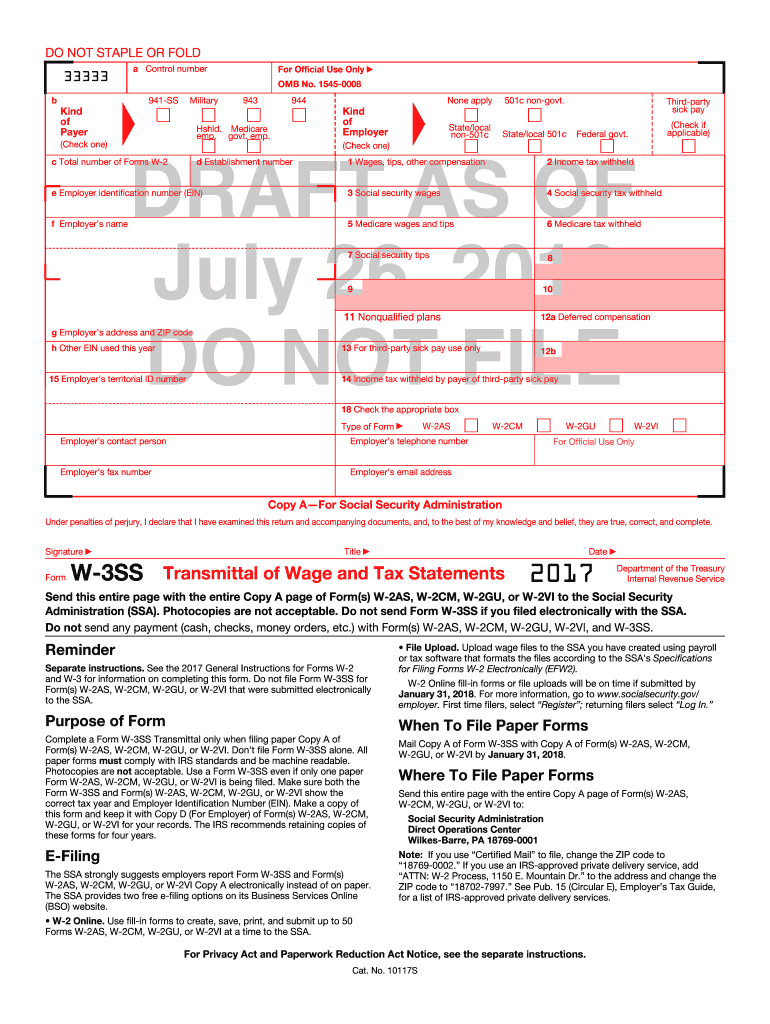
2013 w3-2026

Get Form
w3 pdf Preview on Page 1

Here's how it works

01. Edit your w3 pdf online
Type text, add images, blackout confidential details, add comments, highlights and more.
02. Sign it in a few clicks
Draw your signature, type it, upload its image, or use your mobile device as a signature pad.
03. Share your form with others
Send w3 underline via email, link, or fax. You can also download it, export it or print it out.

How to use or fill out 2013 W-3 with our platform

Form edit decoration
9.5
Ease of Setup
DocHub User Ratings on G2
9.0
Ease of Use
DocHub User Ratings on G2
  1. Click ‘Get Form’ to open the 2013 W-3 in the editor.
  2. Begin by entering your Employer Identification Number (EIN) in the designated field. This is crucial for accurate processing.
  3. Fill in your employer's name and address, ensuring all details are correct to avoid any delays.
  4. Complete the wage and tax information, including total wages, income tax withheld, and social security wages. Double-check these figures for accuracy.
  5. If applicable, check the box for third-party sick pay and provide any additional required information.
  6. Review all entries carefully before signing and dating the form at the bottom. Ensure that you have filled out all necessary fields.

Start using our platform today to fill out your 2013 W-3 easily and for free!

be ready to get more

Complete this form in 5 minutes or less

Get form

Got questions?

We have answers to the most popular questions from our customers. If you can't find an answer to your question, please contact us.
Contact us

Yes, you can utilize DocHub for signing any business and personal paperwork, including your what does a w3 look like. All electronic signatures you generate with our tool are legally binding and court-admissible, as DocHub complies with standards required by ESIGN and UETA. Save your accomplished form with a detailed Audit Trail if needed.

As a comprehensive document editing platform, DocHub is accessible on mobile phones. Open DocHub in your choice of mobile internet browser and employ our intelligent mobile-friendly toolset to complete your 2013 w3.

Here's how you can view and print the W-3 form: Click Taxes from the left menu, then select Payroll Tax. In the Forms section, select Annual Forms. Select W-3, and then View.
In a nutshell, Form W-3 is a document used by the IRS and the Social Security Administration (SSA) to summarize and transmit an employer's W-2 forms. The IRS and SSA use Form W-3 to track the wages, salary, commission, tips, and other compensation employers pay out throughout the year.
Form W-3 is a tax form used by employers to report combined employee income to the Internal Revenue Service (IRS) and the Social Security Administration. Employers who send out more than one Form W-2 to employees must complete and send this form to summarize their total salary payment and withholding amounts.

Security and compliance

At DocHub, your data security is our priority. We follow HIPAA, SOC2, GDPR, and other standards, so you can work on your documents with confidence.

Learn more

People also ask

Forms W-2 are sent to Social Security along with a Form W-3 (Transmittal of Income and Tax Statements). Employers are required to file a Form W-2 for wages paid to each employee from whom: Income, Social Security, or Medicare taxes were withheld, or.
To order official IRS information returns such as Forms W-2 and W-3, which include a scannable Copy A for filing, go to IRS' Online Ordering for Information Returns and Employer Returns page, or visit www.irs.gov/orderforms and click on Employer and Information returns.
The W-3 form, officially the Transmittal of Wage and Tax Statements, is a summary for the SSA of all the business' employee wages and contributions for the previous year. This summary document provides a quick overview of the W-2 forms that are attached and sent with the form every January.
If you file after 30 days but before August 1, the fine is $110 per form. If you don't file by August 1, the fine increases to $270 per W-2....What is the penalty for not filing W-2? Number of Days LateMinimum PenaltyMaximum PenaltyAfter August 1$270 per form$3,339,000 per year (1,113,000 for small businesses)2 more rows • Dec 13, 2021
Employers must file both W-2 and W-3 forms with the Social Security Administration by January 31 of every year.

Related links