Connecticut amended 2026

Get Form
connecticut amended Preview on Page 1

Here's how it works

01. Edit your form online
Type text, add images, blackout confidential details, add comments, highlights and more.

02. Sign it in a few clicks
Draw your signature, type it, upload its image, or use your mobile device as a signature pad.

03. Share your form with others
Send it via email, link, or fax. You can also download it, export it or print it out.

How to use or fill out Connecticut Amended with our platform

Form edit decoration
9.5
Ease of Setup
DocHub User Ratings on G2
9.0
Ease of Use
DocHub User Ratings on G2
  1. Click ‘Get Form’ to open the Connecticut Amended form in the editor.
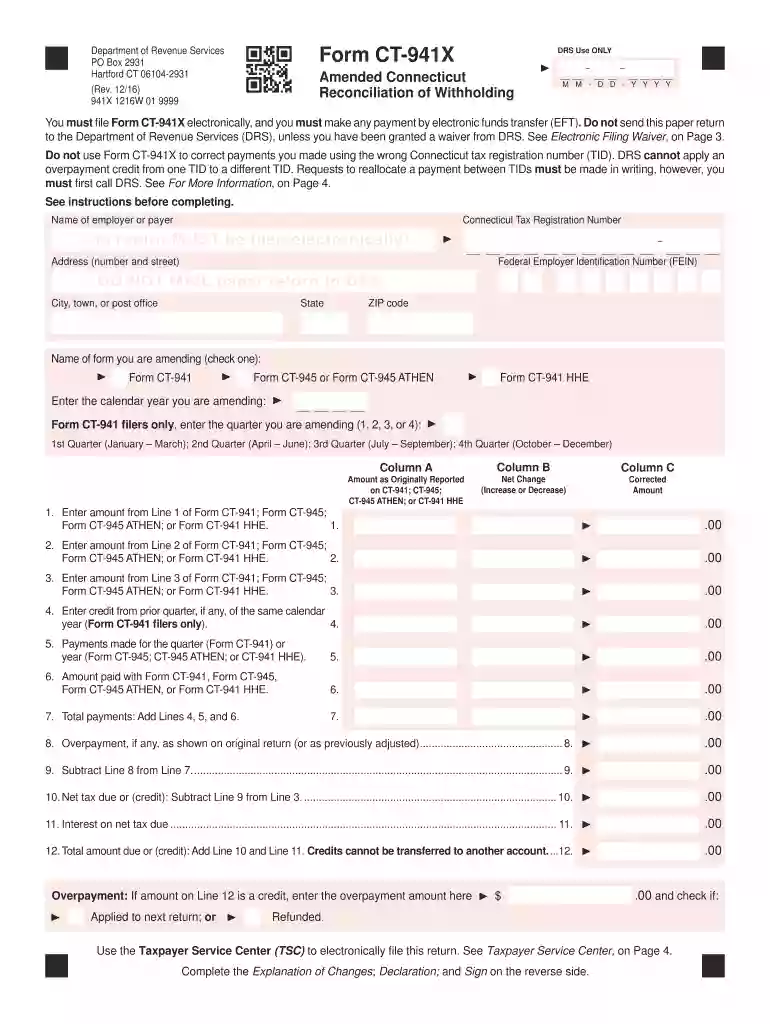
  2. Begin by entering your employer or payer name, Connecticut Tax Registration Number, and Federal Employer Identification Number (FEIN) in the designated fields.
  3. Select the type of form you are amending by checking the appropriate box. Enter the calendar year and, if applicable, the quarter you are amending.
  4. In Column A, input the amounts as originally reported. In Column B, indicate any net changes (increases or decreases). Finally, in Column C, enter the corrected amounts.
  5. Complete the Explanation of Changes section on Page 2 by detailing each change made and its reason.
  6. Sign and date the declaration section at the bottom of Page 2. Ensure that all required signatures are included before submission.

Start using our platform today for free to streamline your document editing and filing process!

See more connecticut amended versions

We've got more versions of the connecticut amended form. Select the right connecticut amended version from the list and start editing it straight away!
Versions Form popularity Fillable & printable
2021 4.5 Satisfied (45 Votes)
2020 4.8 Satisfied (57 Votes)
2017 4.3 Satisfied (43 Votes)
2016 4.3 Satisfied (97 Votes)
2015 4.4 Satisfied (237 Votes)
2013 4.3 Satisfied (43 Votes)
2012 4 Satisfied (48 Votes)
2010 4 Satisfied (38 Votes)
2009 4.2 Satisfied (58 Votes)
be ready to get more

Complete this form in 5 minutes or less

Get form

Got questions?

We have answers to the most popular questions from our customers. If you can't find an answer to your question, please contact us.
Contact us
Connecticut exempts from income tax Social Security income that the federal government exempts from the federal income tax as well as some or all of the Social Security income the federal government taxes, depending on the taxpayers filing status and AGI. For 2024, the law remains unchanged.
$3,000 IRS Tax Refund Schedule 2025: When to Expect Your Refund Based on Filing Type. The IRS will begin issuing tax refunds averaging ~$3,000 to eligible U.S. taxpayers who filed their 2024 federal income tax returns between May 1 and May 31, as part of the $3000 IRS tax refund schedule 2025.
Call our automated refund system 24 hours a day and check the status of your refund by calling 800-382-9463(Connecticut calls outside the Greater Hartford calling area only) or 860-297-5962(from anywhere).
Once youve filed your amended return, you can use the IRS Wheres My Amended Return page to see if it is pending, processing or approved. For more info, see our Tax Guide page on amending a tax return.
File and pay Form CT-1040X electronically using myconneCT at portal.ct.gov/DRS‑myconneCT. Continue on Page 3. Taxpayers must sign declaration on Page 1.

Security and compliance

At DocHub, your data security is our priority. We follow HIPAA, SOC2, GDPR, and other standards, so you can work on your documents with confidence.

Learn more
ccpa2
pci-dss
gdpr-compliance
hipaa
soc-compliance
be ready to get more

Complete this form in 5 minutes or less

Get form

People also ask

If the department needs to verify information reported on your return or request additional information, the process will take longer. Math errors in your return or other adjustments. You used more than one form type to complete your return. Your return was missing information or incomplete.
If you mailed the return more than 12 weeks ago and have not received your refund or any other correspondence from DRS about your return, please contact DRS during business hours at 860-297-5962.
How do I Amend a Connecticut State Return? Select 2024 Amended Return from the navigation bar. Pay for your amended return. Read the Filing an Amended Return page, then press continue. Select Amend State Return(s) Select +Amend State from within the white box.

Related links