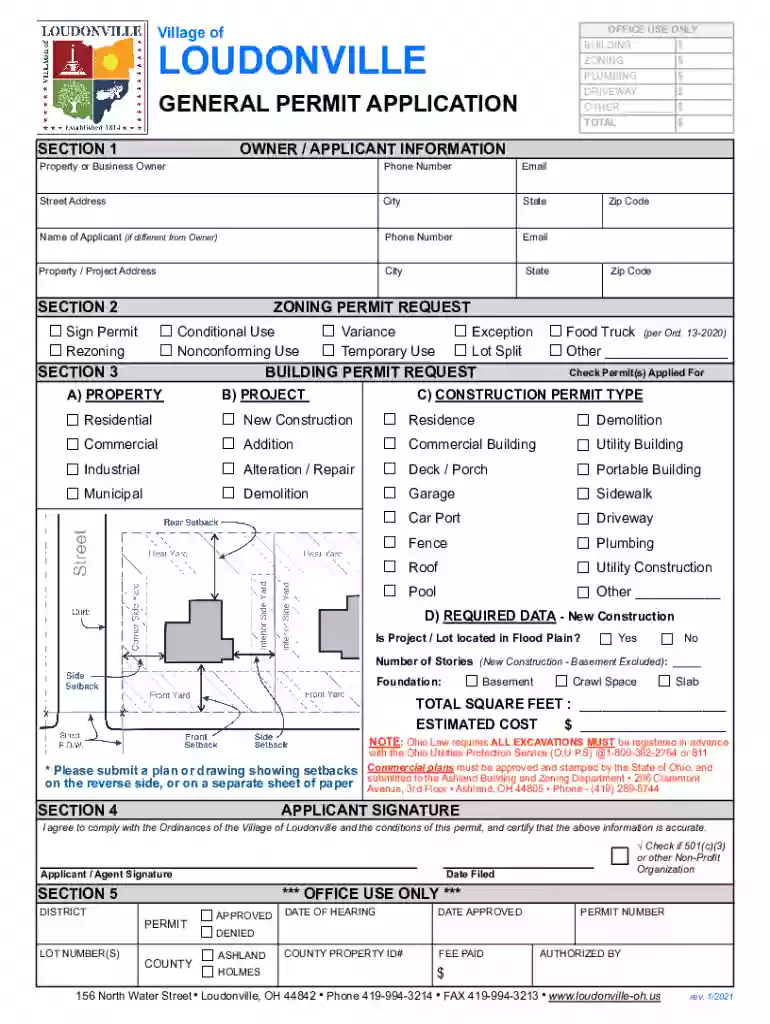
Loudonville General Permit Application rev. 1 2026

Get Form
Loudonville General Permit Application rev. 1 Preview on Page 1

Here's how it works

01. Edit your form online
Type text, add images, blackout confidential details, add comments, highlights and more.

02. Sign it in a few clicks
Draw your signature, type it, upload its image, or use your mobile device as a signature pad.

03. Share your form with others
Send it via email, link, or fax. You can also download it, export it or print it out.

How to use or fill out Loudonville General Permit Application rev. 1 with our platform

Form edit decoration
9.5
Ease of Setup
DocHub User Ratings on G2
9.0
Ease of Use
DocHub User Ratings on G2
  1. Click ‘Get Form’ to open the Loudonville General Permit Application rev. 1 in the editor.
  2. Begin by filling out Section 1, which includes Owner/Applicant Information. Enter the property or business owner's name, phone number, email, and address details.
  3. In Section 2, select the appropriate zoning permit request by checking the relevant boxes such as Sign Permit or Conditional Use.
  4. Proceed to Section 3 for Building Permit Requests. Indicate whether your project is Residential, Commercial, Industrial, or Municipal and check all applicable permits.
  5. Complete the required data for new construction if applicable. Answer questions regarding flood plain location and provide total square footage and estimated cost.
  6. Finally, sign in Section 4 to certify that all information is accurate and comply with local ordinances before submitting your application.

Start using our platform today to easily fill out your Loudonville General Permit Application for free!

See more Loudonville General Permit Application rev. 1 versions

We've got more versions of the Loudonville General Permit Application rev. 1 form. Select the right Loudonville General Permit Application rev. 1 version from the list and start editing it straight away!
Versions Form popularity Fillable & printable
2021 4.2 Satisfied (45 Votes)
be ready to get more

Complete this form in 5 minutes or less

Get form

Got questions?

We have answers to the most popular questions from our customers. If you can't find an answer to your question, please contact us.
Contact us
For a 1, 2, or 3 unit dwelling, the applicable building code is the Residential Code of Ohio. The RCO rules for storage sheds include: Limited to one story, unheated, accessory. Building permit required over 200 square feet.
Common work that does not require a building permit: One-story detached accessory structures used as tool and storage sheds, playhouses and similar uses, provided the floor area does not exceed one hundred twenty square feet and playground structures. Fences not over six feet (1829 mm) high.
The construction of any new addition, alteration and accessory structure to a commercial or mixed-use building requires a building permit. Additional permits, identified below, may also be required based on the scope of the project.
Construction and repairs for 1, 2, and 3 family dwellings are exempt from permit requirements as follows: Fences 6 feet or less in height (Historic) Repair and replacement of windows (no increase in opening size) or along fire escapes. Roof coverings (no more than two layers of roofing material)
Do I need a permit? Less than 10 square metres (108 square feet) Not attached to a house or any other building. Not connected to electricity, plumbing, or gas lines. Meets the following height and location criteria: Roof midpoint is no higher than 4.3 metres (14.1 feet)

Security and compliance

At DocHub, your data security is our priority. We follow HIPAA, SOC2, GDPR, and other standards, so you can work on your documents with confidence.

Learn more
ccpa2
pci-dss
gdpr-compliance
hipaa
soc-compliance
be ready to get more

Complete this form in 5 minutes or less

Get form