Name Affidavit of Seller - North Carolina 2026

Get Form
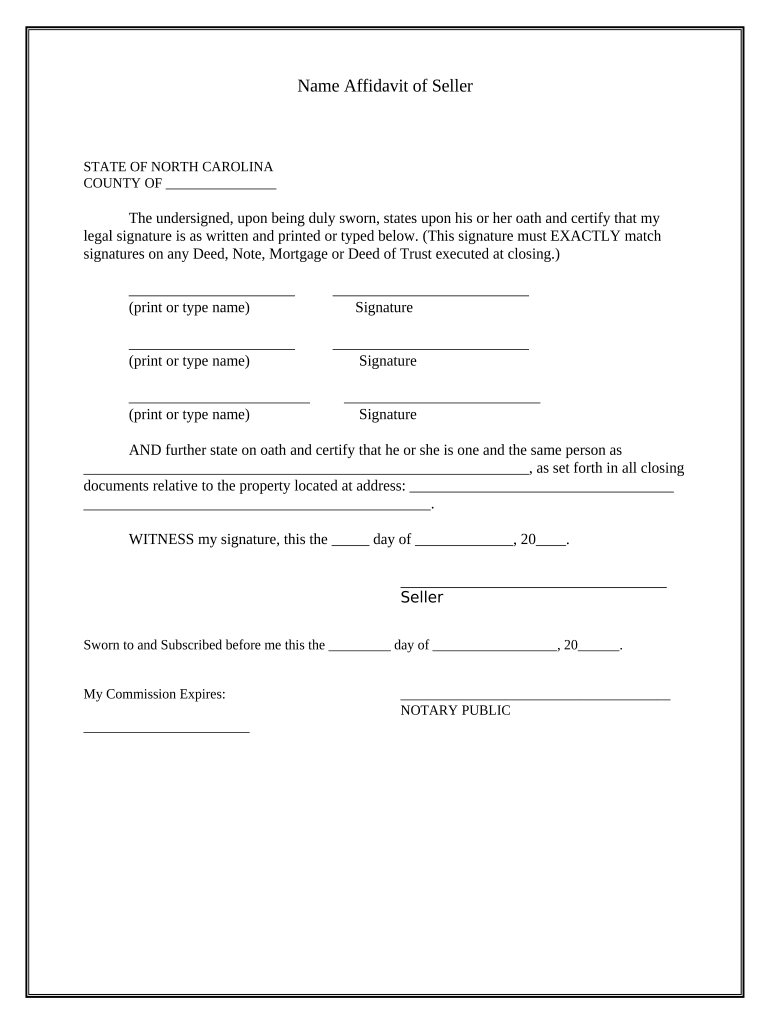
seller affidavit Preview on Page 1

Here's how it works

01. Edit your seller affidavit online
Type text, add images, blackout confidential details, add comments, highlights and more.
02. Sign it in a few clicks
Draw your signature, type it, upload its image, or use your mobile device as a signature pad.
03. Share your form with others
Send it via email, link, or fax. You can also download it, export it or print it out.

How to use or fill out Name Affidavit of Seller - North Carolina with our platform

Form edit decoration
9.5
Ease of Setup
DocHub User Ratings on G2
9.0
Ease of Use
DocHub User Ratings on G2
  1. Click ‘Get Form’ to open the Name Affidavit of Seller in the editor.
  2. Begin by entering the county name in the designated field at the top of the form.
  3. In the first section, print or type your full legal name exactly as it appears on any related documents. This is crucial for consistency.
  4. Next, provide your signature in the space provided. Ensure that this signature matches those on any Deed, Note, Mortgage, or Deed of Trust executed at closing.
  5. Repeat steps 3 and 4 for each additional seller listed on the affidavit, ensuring all signatures are consistent.
  6. In the following section, state your full name again and confirm that you are one and the same person as mentioned in all closing documents related to the property.
  7. Fill in the property address where indicated to complete this section accurately.
  8. Finally, date and sign at the bottom of the form before a Notary Public who will also need to sign and provide their commission expiration date.

Start using our platform today to easily fill out your Name Affidavit of Seller for free!

be ready to get more

Complete this form in 5 minutes or less

Get form

Got questions?

We have answers to the most popular questions from our customers. If you can't find an answer to your question, please contact us.
Contact us
The affidavit is a sworn statement of fact that specifies the seller of a property holds the title to it. In other words, its proof that the seller owns the property.
How to Write an Affidavit Step 1: Writing the Title of the Affidavit. Step 2: Providing Personal Background Information. Step 3: Opening Sentence in First Person Tense. Step 4: Stating the Facts of the Case. Step 5: Including One Fact Per Paragraph. Step 6: Including Exhibits. Step 7: Confirming the Truth.
Find a qualified notary public. Notaries authenticate affidavits, enhancing their legal standing. Schedule an appointment and bring ID proof. Ensure the document is complete before notarization, as alterations can void it.
A title and deed are similar in that they both involve property ownership, but they differ in their appearance, overall intent and how they come into play during the closing process. A title is a concept used to discuss ownership of a home, whereas a deed is a physical document proving the ownership or the title.
It is fast and easy to get what you need using a free Affidavit of Ownership template from Rocket Lawyer: Make your Affidavit - Answer a few questions and we will do the rest. Send or share - Look over it with an attorney, if desired.

Security and compliance

At DocHub, your data security is our priority. We follow HIPAA, SOC2, GDPR, and other standards, so you can work on your documents with confidence.

Learn more
ccpa2
pci-dss
gdpr-compliance
hipaa
soc-compliance
be ready to get more

Complete this form in 5 minutes or less

Get form

People also ask

An Affidavit of Ownership is a legal document that you can use to prove that you own a piece of real estate or a vehicle. Often used as proof of ownership when a Deed or Certificate of Title arent enough, an Affidavit of Ownership can make clear how you purchased or inherited the property.

Related links