Ct seller 2026

Get Form
ctseller Preview on Page 1

Here's how it works

01. Edit your ctseller online
Type text, add images, blackout confidential details, add comments, highlights and more.
02. Sign it in a few clicks
Draw your signature, type it, upload its image, or use your mobile device as a signature pad.
03. Share your form with others
Send ct bids login via email, link, or fax. You can also download it, export it or print it out.

How to use or fill out ct seller with our platform

Form edit decoration
9.5
Ease of Setup
DocHub User Ratings on G2
9.0
Ease of Use
DocHub User Ratings on G2
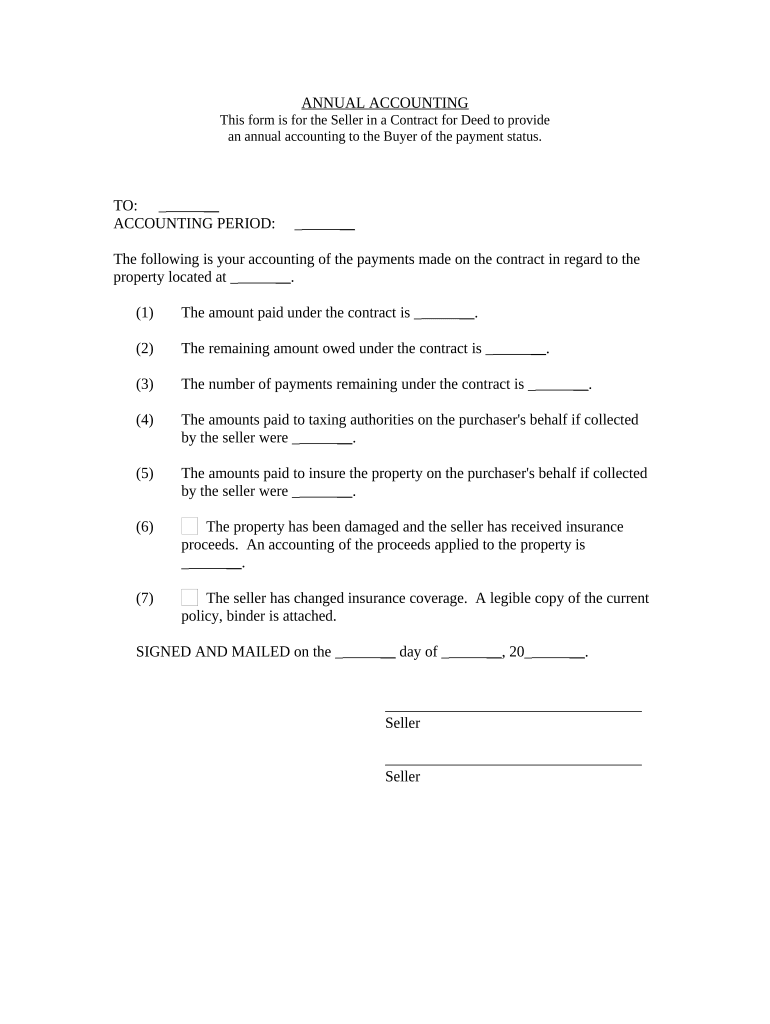
  1. Click ‘Get Form’ to open the ct seller document in the editor.
  2. Begin by entering the recipient's name in the 'TO' field, ensuring it is accurate for proper identification.
  3. Specify the 'ACCOUNTING PERIOD' for which you are providing the annual accounting. This helps clarify the timeframe of your report.
  4. In section (1), input the total amount paid under the contract. This figure should reflect all payments made up to this point.
  5. For section (2), indicate the remaining amount owed under the contract, giving a clear picture of outstanding obligations.
  6. In section (3), note the number of payments that are still due, which assists both parties in tracking payment schedules.
  7. Sections (4) and (5) require you to detail any amounts paid on behalf of the purchaser for taxes and insurance, respectively. Fill these out accurately to maintain transparency.
  8. If applicable, provide an accounting of any insurance proceeds received due to property damage in section (6).
  9. Finally, ensure you sign and date the document at the bottom before sending it off to complete your obligations.

Start using our platform today for free to streamline your document editing and signing process!

be ready to get more

Complete this form in 5 minutes or less

Get form

Got questions?

We have answers to the most popular questions from our customers. If you can't find an answer to your question, please contact us.
Contact us
Avoids Technical Issues If youre participating in an online auction, bidding early ensures that you dont miss out due to last-minute internet connectivity problems or system glitches. Ensure your internet speed is reliable using this speed test tool.
Question: How do I delete my account with CTBids? Answer: If you wish to have your account deleted, please email CTBidsHelp@CaringTransitions.com to take care of this for you.
Most auctioneers have a starting price for the lot. The aim here is to attract initial bids from which the price can be driven up. If there is only one bidder, unless the starting price is the same as the reserve, theres a fair chance that the property will not sell.
The best online auction platforms eBay. Touted as the best platform for auctions and online charity stores, eBay makes sense for all charities. Superstars. Easy Live Auction. Jumblebee. Auctria. GiveFundraising. Givergy. Blue Monday Silent Auctions.
CTBids is powered by Caring Transitions as part of a total solution for our clients. Caring Transitions owners are the sellers, working with local clients who have a need to downsize, liquidate and sell treasures they no longer have use for. Bidding starts at $1, and most sales run for 7 to 14 days.

Security and compliance

At DocHub, your data security is our priority. We follow HIPAA, SOC2, GDPR, and other standards, so you can work on your documents with confidence.

Learn more
ccpa2
pci-dss
gdpr-compliance
hipaa
soc-compliance
be ready to get more

Complete this form in 5 minutes or less

Get form