In amendment agreement 2026

Get Form
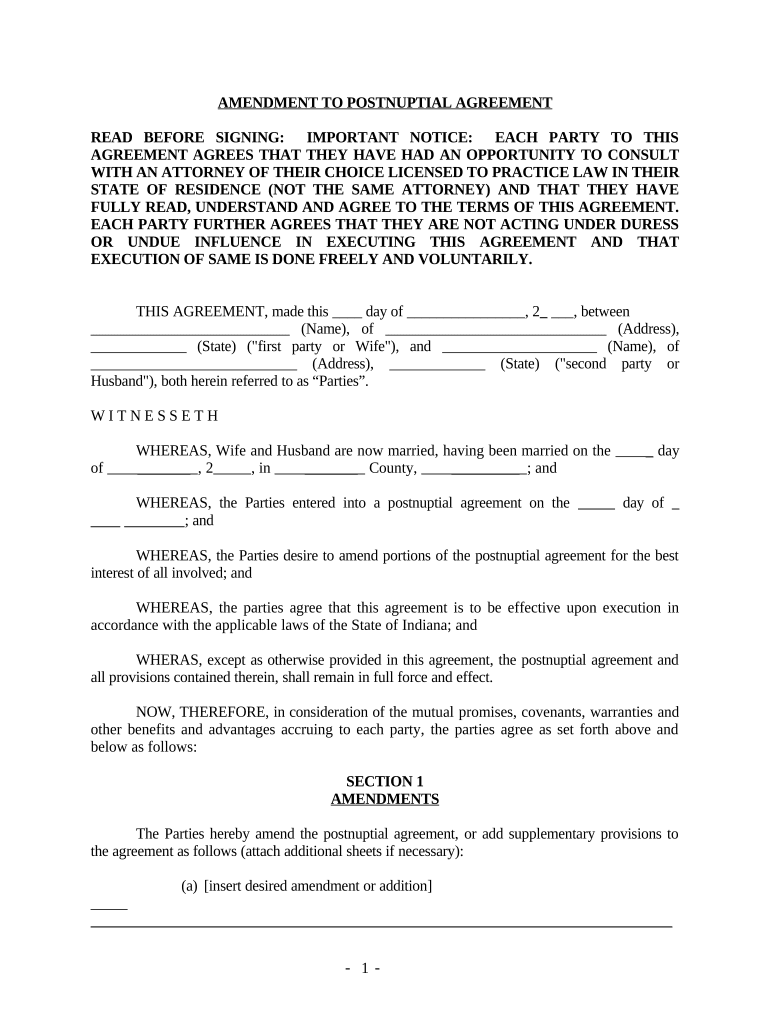
in amendment agreement Preview on Page 1

Here's how it works

01. Edit your form online
Type text, add images, blackout confidential details, add comments, highlights and more.
02. Sign it in a few clicks
Draw your signature, type it, upload its image, or use your mobile device as a signature pad.
03. Share your form with others
Send it via email, link, or fax. You can also download it, export it or print it out.

How to use or fill out in amendment agreement with our platform

Form edit decoration
9.5
Ease of Setup
DocHub User Ratings on G2
9.0
Ease of Use
DocHub User Ratings on G2
  1. Click ‘Get Form’ to open the in amendment agreement in the editor.
  2. Begin by filling in the date at the top of the document, specifying the day and month when the agreement is being executed.
  3. Enter the names and addresses of both parties involved in the agreement. Ensure that you accurately represent each party as 'Wife' and 'Husband'.
  4. In Section 1, clearly outline any amendments or additions to the postnuptial agreement. Use additional sheets if necessary to provide detailed descriptions.
  5. Review Sections 2 through 7 carefully, ensuring all parties understand their rights and obligations. Make any necessary adjustments directly within the editor.
  6. Once completed, both parties should sign at the designated areas. Don’t forget to have this document notarized as required.

Start using our platform today for free to streamline your document editing and signing process!

be ready to get more

Complete this form in 5 minutes or less

Get form

Got questions?

We have answers to the most popular questions from our customers. If you can't find an answer to your question, please contact us.
Contact us
Amendment deeds and amendment and restatement deeds are different ways of making changes to existing contracts. An amendment and restatement deed adds information and detail to an entire agreement. Yet, an amendment deed simply amends the existing content.
A contract amendment is a change, correction, clarification, or deletion to an agreement you have already signed. An amendment leaves your original agreement substantially intact.
How to create a contract amendment Pinpoint what you want to change or add. Look at your contract and write down the parts you need to change. Date and title the new amendment. Next, add the current date and the title and date of the original agreement to the document. Draft and describe the changes. Finalize the changes.

Security and compliance

At DocHub, your data security is our priority. We follow HIPAA, SOC2, GDPR, and other standards, so you can work on your documents with confidence.

Learn more
ccpa2
pci-dss
gdpr-compliance
hipaa
soc-compliance