






How to Obtain the Form IT-217 Fillable Claim for Farmers' School Tax Credit
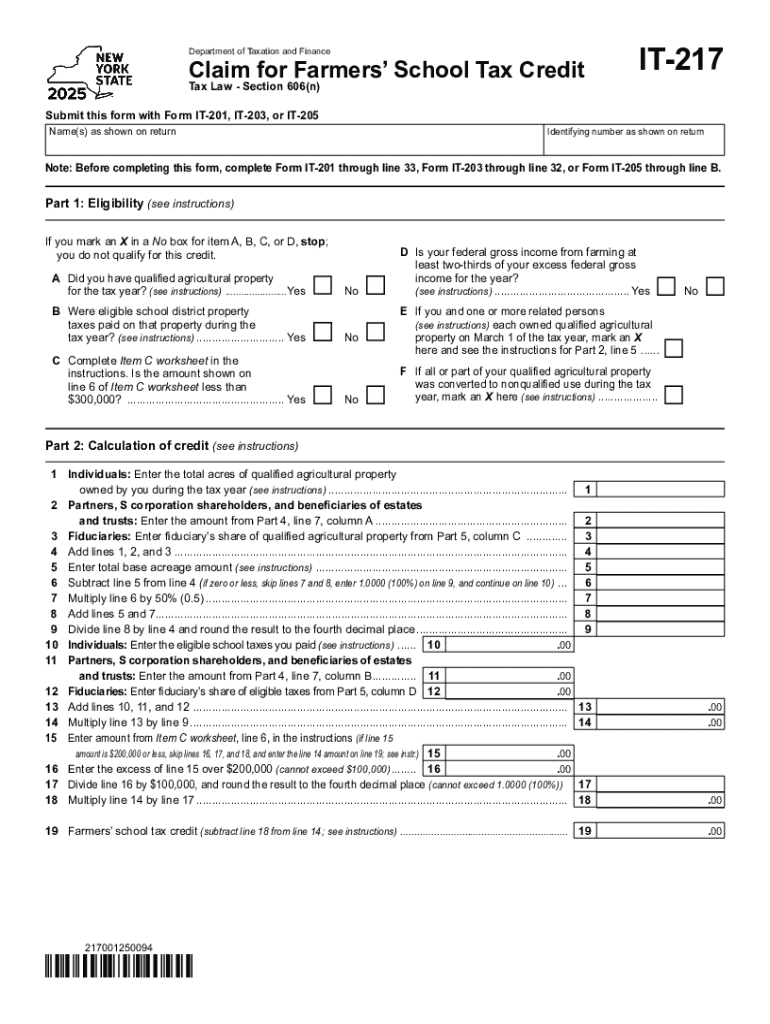
To access the Form IT-217, which is essential for claiming the Farmers' School Tax Credit, several methods are available. The New York State Department of Taxation and Finance provides this form on its official website. You can download it directly in a fillable PDF format. The platform you choose should support PDF files for a seamless process. Alternatively, you can obtain a physical copy from local tax offices or request one via mail from New York's taxation department, ensuring you allow enough time for postal delivery. Choose the method that best suits your needs, taking into account your preference for digital or paper-based filing.
Steps to Complete the Form IT-217 Fillable Claim for Farmers' School Tax Credit
Completing Form IT-217 requires careful attention to detail to ensure accuracy and compliance.
-
Gather Required Information: Collect personal identification details, including your name, address, and Social Security number. Gather any income-related information and documentation that will support your tax credit claim.
-
Review Eligibility Requirements: Confirm your eligibility based on factors such as farm income and residency. New York State specifics require adherence to certain agricultural production criteria.
-
Fill Out the Form: Enter your details into the appropriate sections:
- Taxpayer identification and contact information
- Specific farm income details
- Calculation of the credit amount
-
Attach Supporting Documents: Include any necessary supplementary documents that substantiate your claim, such as proof of farm income.
-
Double-Check Information: Review all entered information to ensure accuracy. Errors can delay processing or result in denial of the credit.
-
Submit the Form: File the completed form with your state tax return. Ensure you meet any specified submission deadlines to avoid penalties.
Each step involves precise data entry and requires supporting documentation to validate the credit claim.
Important Terms Related to Form IT-217 Fillable Claim for Farmers' School Tax Credit
Understanding key terminology associated with Form IT-217 is essential:
- Farm Income: Revenue generated specifically from farming activities, which is used to determine eligibility and credit amounts.
- Tax Credit: A reduction in the tax owed based on eligible expenses related to maintaining and operating a school property.
- Eligible Farmland: Land used primarily for commercial agriculture, meeting New York’s criteria for the school tax credit.
These terms help clarify the requirements and computations within Form IT-217.
Eligibility Criteria
Eligibility for the Farmers' School Tax Credit hinges on various factors:
- Residency: You must be a resident of New York State.
- Income: A specified percentage of your total income must come from qualified farming activities.
- Property: The land used for farming must meet New York State’s specifications for agricultural production.
Reviewing these criteria ensures eligibility, facilitating a valid claim for the credit.


Key Elements of the Form IT-217 Fillable Claim for Farmers' School Tax Credit
Form IT-217 encompasses specific sections vital for processing your claim:
- Personal Information Section: Collects your identifying details.
- Farm Income Calculation: Determines the credit amount based on farm-derived revenue.
- Certification: Requires your signature to verify the truthfulness of the provided information.
Each segment plays a pivotal role in ensuring accurate submission and claim validation.
Required Documents
Submitting Form IT-217 necessitates various supporting documents:
- Proof of Farm Income: Tax records or financial statements corroborating farm income.
- Residency Documentation: Proof of New York residency, such as a driver’s license or utility bill.
- Property Details: Documents describing land eligibility and usage aligned with state criteria.
These documents substantiate your claim, enhancing its credibility.
Software Compatibility
Working with Form IT-217 in digital format requires compatible software. Ensure your platform supports PDF files, as common software like Adobe Acrobat Reader is often employed for viewing, filling, and signing forms. Tax preparation software such as TurboTax or QuickBooks may offer features for filing. Confirm software compatibility in advance to streamline the process and prevent technical issues.
Penalties for Non-Compliance
Failure to properly complete or file Form IT-217 can result in penalties:
- Late Filing Penalties: Delays in submission can trigger financial penalties and interest accrual.
- Inaccurate Information Penalties: Material errors may lead to fines and the denial of the tax credit.
Staying informed about compliance requirements mitigates potential legal and financial repercussions.