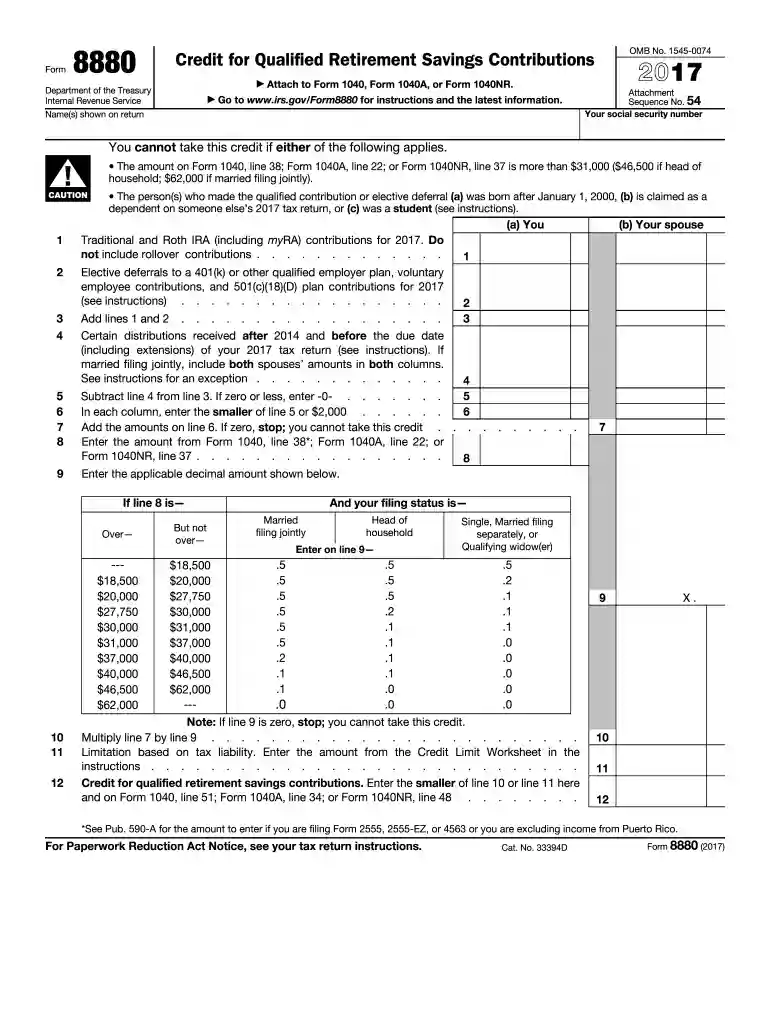
8880 form 2017-2025

Get Form
8880 form Preview on Page 1

Here's how it works

01. Edit your 8880 form online
Type text, add images, blackout confidential details, add comments, highlights and more.

02. Sign it in a few clicks
Draw your signature, type it, upload its image, or use your mobile device as a signature pad.

03. Share your form with others
Send example of completed form 8880 via email, link, or fax. You can also download it, export it or print it out.

How to use or fill out 8880 form 2017 with DocHub

Form edit decoration
9.5
Ease of Setup
DocHub User Ratings on G2
9.0
Ease of Use
DocHub User Ratings on G2
  1. Click ‘Get Form’ to open the 8880 form in our editor.
  2. Begin by entering your social security number and the names shown on your tax return at the top of the form.
  3. In Section (a), report your Traditional and Roth IRA contributions for 2017 in line 1, excluding rollover contributions.
  4. Next, enter any elective deferrals to a qualified employer plan in line 2. Add these amounts together in line 3.
  5. If applicable, include certain distributions received after 2014 before the due date of your return in line 4.
  6. Subtract line 4 from line 3 in line 5. If this amount is zero or less, enter -0-.
  7. In line 6, enter the smaller of line 5 or $2,000. Then add these amounts for both you and your spouse if filing jointly.
  8. Complete lines related to your filing status and calculate the credit based on provided tables and instructions.

Start using our platform today to fill out your forms online for free!

See more 8880 form 2017 versions

We've got more versions of the 8880 form 2017 form. Select the right 8880 form 2017 version from the list and start editing it straight away!
Versions Form popularity Fillable & printable
2023 4.2 Satisfied (22 Votes)
2022 4.5 Satisfied (32 Votes)
2021 4.8 Satisfied (105 Votes)
2020 4.2 Satisfied (62 Votes)
2019 4.2 Satisfied (132 Votes)
2018 4.2 Satisfied (154 Votes)
2017 4.2 Satisfied (108 Votes)
2016 4.3 Satisfied (189 Votes)
2015 4.3 Satisfied (40 Votes)
2013 4 Satisfied (46 Votes)
2003 4.3 Satisfied (36 Votes)
be ready to get more

Complete this form in 5 minutes or less

Get form

Got questions?

We have answers to the most popular questions from our customers. If you can't find an answer to your question, please contact us.
Contact us
Form 8888 is now only used to split your direct deposit refund between two or more accounts or to split your refund between a direct deposit and a paper check. For more information, go to faq-irs-tax-feature/.
Do I need to file Form 8880? Yes, if you have made eligible contributions to your retirement savings account and you meet the income and other eligibility criteria, you should file Form 8880 to claim the Savers Credit.
How do I claim the Savers Credit? To claim the credit, use Form 8880, Credit for Qualified Retirement Savings Contributions as an addition to your Form 1040. Let a local tax expert matched to your unique situation get your taxes done 100% right with TurboTax Live Full Service.
Eligibility requirements for the Savers Credit To qualify, you must be 18 or older, not a full-time student, and not claimed as a dependent on someone elses tax return.
Use Form 8880 to figure the amount, if any, of your retirement savings contributions credit (also known as the savers credit). The maximum amount of the credit is $1,000 ($2,000 if married filing jointly). claimed on Schedule 1 (Form 1040), line 20.

People also ask

Download Form 8880 from the IRS website. Fill in your name, Social Security number, and filing status. On line 1, enter the total contributions you made to qualifying retirement accounts in 2025. On lines 2 and 3, report any retirement account withdrawals or distributions from the past two years.
The Savers Credit has income limits based on a taxpayers adjusted gross income and their marital or filing status. 2023 income limits are: Married couples filing jointly with adjusted gross incomes up to $73,000. Heads of household with adjusted gross incomes up to $54,750.

form 8880 2021