Fee protection agreement in word 2026

Get Form
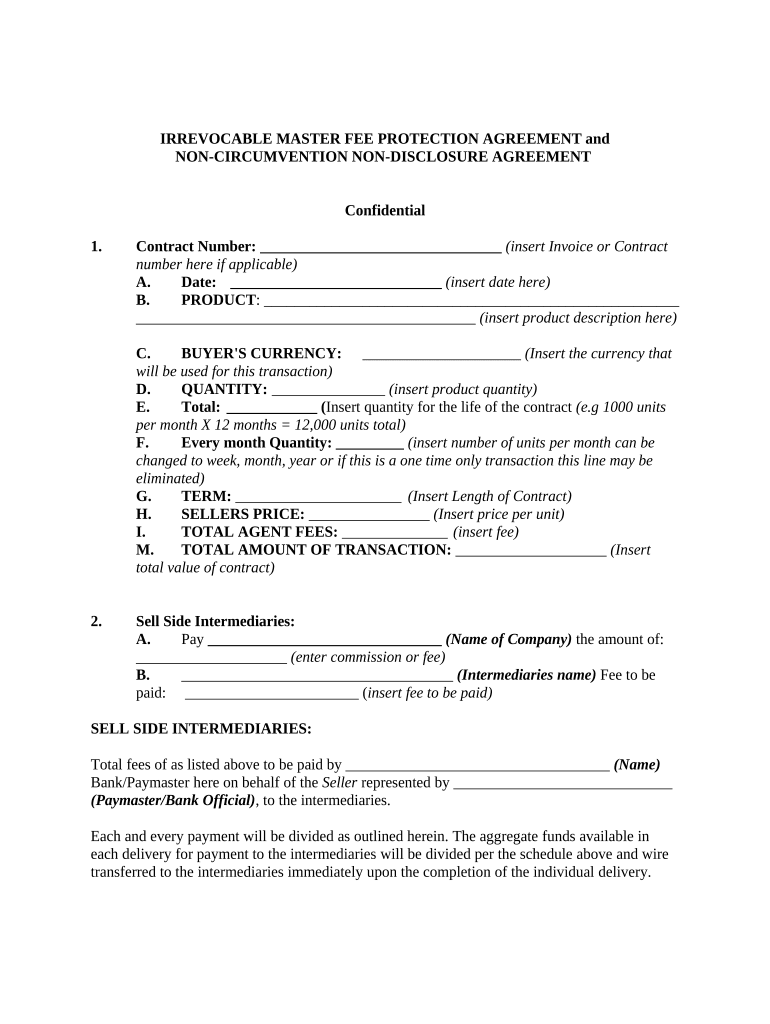
fee protection agreement in word Preview on Page 1

Here's how it works

01. Edit your fee protection agreement in word online
Type text, add images, blackout confidential details, add comments, highlights and more.
02. Sign it in a few clicks
Draw your signature, type it, upload its image, or use your mobile device as a signature pad.
03. Share your form with others
Send master fee protection agreement template word via email, link, or fax. You can also download it, export it or print it out.

How to use or fill out fee protection agreement in word with our platform

Form edit decoration
9.5
Ease of Setup
DocHub User Ratings on G2
9.0
Ease of Use
DocHub User Ratings on G2
  1. Click ‘Get Form’ to open the fee protection agreement in the editor.
  2. Begin by entering the Contract Number at the top of the form. This is essential for tracking your agreement.
  3. Fill in the Date field with the current date to establish when this agreement is effective.
  4. In the PRODUCT section, provide a detailed description of the product involved in this transaction.
  5. Specify the BUYER'S CURRENCY to clarify which currency will be used for payments.
  6. Enter the QUANTITY of products being transacted and calculate the TOTAL AMOUNT OF TRANSACTION based on unit price and quantity.
  7. Complete all sections regarding fees, including TOTAL AGENT FEES and SELLERS PRICE, ensuring accuracy for all parties involved.
  8. Review all entries for completeness and correctness before finalizing your document.

Start using our platform today to streamline your fee protection agreement process for free!

See more fee protection agreement in word versions

We've got more versions of the fee protection agreement in word form. Select the right fee protection agreement in word version from the list and start editing it straight away!
Versions Form popularity Fillable & printable
2022 4.8 Satisfied (113 Votes)
2020 4.2 Satisfied (42 Votes)
2020 4.8 Satisfied (60 Votes)
2019 4.2 Satisfied (58 Votes)
2018 4.8 Satisfied (111 Votes)
2017 4.5 Satisfied (25 Votes)
2017 4.7 Satisfied (37 Votes)
2014 4 Satisfied (29 Votes)
2013 4 Satisfied (52 Votes)
2012 4 Satisfied (30 Votes)
2011 3.9 Satisfied (26 Votes)
2010 4 Satisfied (31 Votes)
be ready to get more

Complete this form in 5 minutes or less

Get form

Got questions?

We have answers to the most popular questions from our customers. If you can't find an answer to your question, please contact us.
Contact us

Most eSignature services require users to have a paid subscription. With DocHub, there are two options for you to add an electronic signature to your master fee protection agreement free of charge:

  • You can do it during a 7-day trial period;
  • You can subscribe to a free plan.

The second option, however, has limitations on the number of signatures, sign requests, emails, and documents for adjusting available per month. You can check for full information here.

You need only an internet connection and a browser to complete your irrevocable master fee protection agreement template by using an iOS phone. Open the DocHub website and authenticate. Then, add your document or choose it from the list in your dashboard. Then use our editing tools to complete your form and preserve all your changes. You can also send it to a dedicated recipient straight away.

An Indonesian law-governed agreement establishing fee protection mechanisms for international business transactions, including security arrangements and payment terms.
It is an irrevocable and binding legal agreement between a buyer, a seller and a business broker. In an IFPA, the objective is to docHub a private agreement for the placement or purchase of a commodity or other piece of merchandise that has been clearly identified and negotiated in bulk.
The IMFPA (Irrevocable Master Fee Protection Agreement) is a type of contract used in international trade to protect the fee (commission) of the intermediary (broker) who mediates in transactions, mainly for the purchase of commodities or merchandise negotiated in bulk such as food, raw materials, minerals, etc.

Security and compliance

At DocHub, your data security is our priority. We follow HIPAA, SOC2, GDPR, and other standards, so you can work on your documents with confidence.

Learn more
ccpa2
pci-dss
gdpr-compliance
hipaa
soc-compliance

People also ask

Fee Protection: The IMFPA ensures that intermediaries receive their commission or fees for their services during the transaction. It stipulates that the fees due to the intermediary are protected, and neither the buyer nor the seller can refuse to pay.
How to draft a contract in 13 simple steps Start with a contract template. Understand the purpose and requirements. Identify all parties involved. Outline key terms and conditions. Define deliverables and milestones. Establish payment terms. Add termination conditions. Incorporate dispute resolution.
The IMFPA is a legal and binding agreement that outlines the obligations and responsibilities of intermediaries, typically brokers or facilitators, in financial transactions.
Schedule above referred to. IN WITNESS WHEREOF the parties have set their hands to this Agreement on the day and year first hereinabove written. Signed and delivered by Shri/Smt. Seller. Signed and delivered by Shri/Smt.. .. Buyer. WITNESSES;
Hello, I have a question regarding IMPFA (irrevocable master fee protection agreement) due to an ongoing deal that I am a part of.

master fee protection agreement sample