Type text, add images, blackout confidential details, add comments, highlights and more.

02. Sign it in a few clicks
Draw your signature, type it, upload its image, or use your mobile device as a signature pad.

03. Share your form with others
Send omni 457 via email, link, or fax. You can also download it, export it or print it out.

How to use or fill out omni 457 with our platform
Ease of Setup
DocHub User Ratings on G2
Ease of Use
DocHub User Ratings on G2
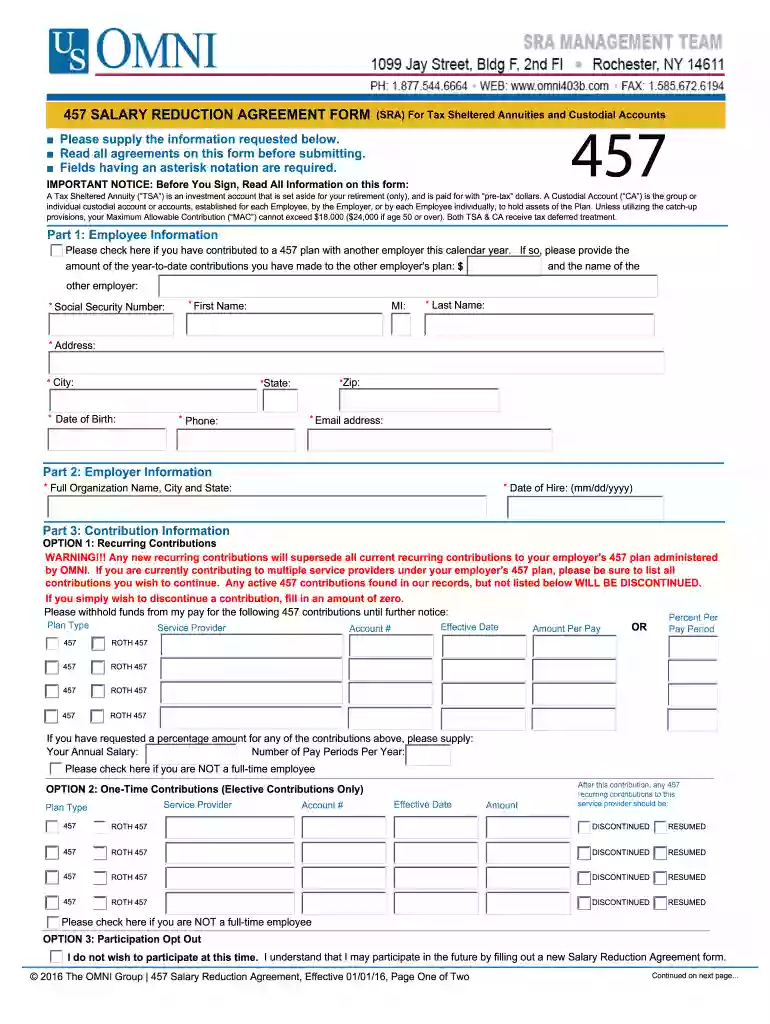
Click ‘Get Form’ to open the omni 457 in the editor.
Begin with Part 1: Employee Information. Fill in your Social Security Number, First Name, Middle Initial, Last Name, Address, City, State, Zip Code, Date of Birth, Phone Number, and Email address. Fields marked with an asterisk are required.
Proceed to Part 2: Employer Information. Enter the Full Organization Name along with the City and State where your employer is located. Also include your Date of Hire.
In Part 3: Contribution Information, choose between Recurring Contributions or One-Time Contributions. For recurring contributions, specify the percentage or amount per pay period for each plan type and service provider.
Review Part 4: Agreements and Acknowledgements carefully before signing. Ensure you understand all terms related to your salary reduction agreement.
Finally, complete Part 5 by signing and dating the form to certify that you have read and understood the agreement.
Start using our platform today for free to streamline your omni 457 form completion!
OMNI/TSACG monitors 457(b) plan contributions and notifies the employer in the event of an excess contribution. THE BASIC CONTRIBUTION LIMIT FOR 2026 IS $24,500Read more
Cookie consent notice
This site uses cookies to enhance site navigation and personalize your experience.
By using this site you agree to our use of cookies as described in our Privacy Notice.
You can modify your selections by visiting our Cookie and Advertising Notice.