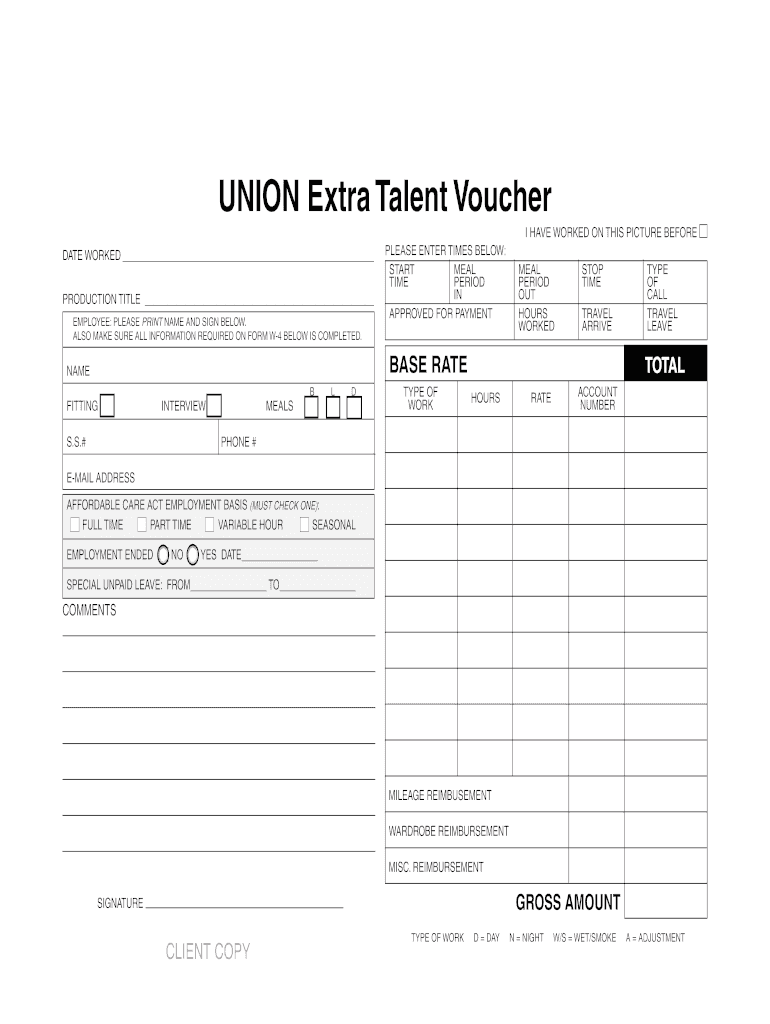
UNION Extra Talent Voucher - Media Services Payroll 2026

Get Form
union voucher Preview on Page 1

Here's how it works

01. Edit your union voucher online
Type text, add images, blackout confidential details, add comments, highlights and more.
02. Sign it in a few clicks
Draw your signature, type it, upload its image, or use your mobile device as a signature pad.
03. Share your form with others
Send it via email, link, or fax. You can also download it, export it or print it out.

How to use or fill out UNION Extra Talent Voucher - Media Services Payroll with our platform

Form edit decoration
9.5
Ease of Setup
DocHub User Ratings on G2
9.0
Ease of Use
DocHub User Ratings on G2
  1. Click ‘Get Form’ to open the UNION Extra Talent Voucher in the editor.
  2. Begin by entering the 'DATE WORKED' at the top of the form. This is crucial for record-keeping.
  3. Fill in the 'PRODUCTION TITLE' to specify which project you are working on.
  4. In the 'EMPLOYEE' section, print your name clearly and provide your signature below.
  5. Complete all required information on Form W-4 as indicated, ensuring tax details are accurate.
  6. Record your work hours by filling in the 'START TIME', 'STOP TIME', and meal periods accurately.
  7. Indicate your base rate and any reimbursements for mileage or wardrobe in their respective sections.
  8. Check one box under 'AFFORDABLE CARE ACT EMPLOYMENT BASIS' to clarify your employment status.
  9. Finally, review all entries for accuracy before signing at the bottom of the form.

Start using our platform today to streamline your document editing and ensure a hassle-free experience!

be ready to get more

Complete this form in 5 minutes or less

Get form

Got questions?

We have answers to the most popular questions from our customers. If you can't find an answer to your question, please contact us.
Contact us
The Payroll Check Voucher report provides an alternative check stub for employees. This report may be used if the gross wage information does not all fit on the check stub, or if you are using a check format that does not have stubs (i.e. the Quicken checks format which lacks a stub.)
Payroll vouchers, also referred to as pay stubs, usually list payroll deductions for taxes, insurance premiums, and other withholding items. This information can help employees better understand their pre- and post-tax income, and the breakdown of deductions.
Payroll Vouchers are used to record the Payroll related data for Employees and Employers contribution. You can enter separate vouchers for each day or a single voucher for a given pay period, say a month, with aggregated values. You can also enter data for one or more or all employees.
In other words, a voucher is a supporting document for an invoice received by the company. Once the voucher is issued, it means that the invoices been checked, and its been confirmed that it needs to be paid. The voucher authorizes the payment of the invoice in one lump-sum that will be written on the balance sheet.
If the box marked Non-Union is checked you are a non-union hire and the voucher is simply a receipt for the job.

Security and compliance

At DocHub, your data security is our priority. We follow HIPAA, SOC2, GDPR, and other standards, so you can work on your documents with confidence.

Learn more
ccpa2
pci-dss
gdpr-compliance
hipaa
soc-compliance

People also ask

Payment vouchers can be used to record payments of cash or cheques. A voucher check or check payment voucher is a combination of a check and a voucher. It includes important information about each party involved in a transaction and creates an auditable paper trail about that checks payment.

Related links