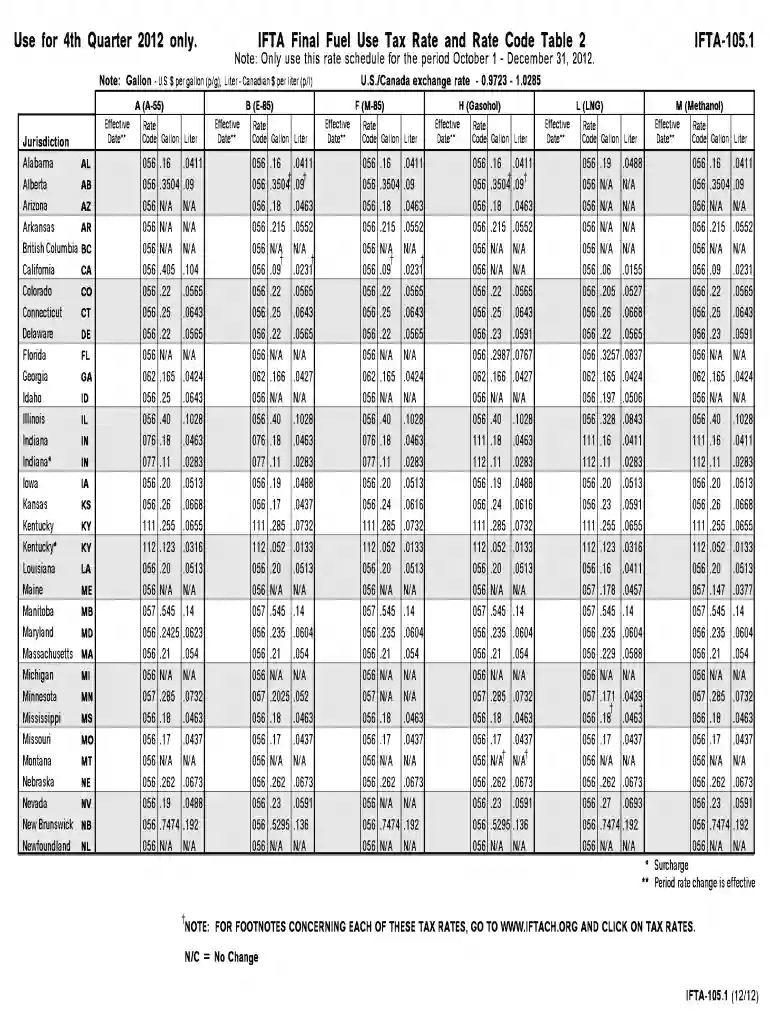
Ifta 1051 form 1st quarter only 2012-2026

Get Form
nebraska ifta online Preview on Page 1

Here's how it works

01. Edit your nebraska ifta online online
Type text, add images, blackout confidential details, add comments, highlights and more.

02. Sign it in a few clicks
Draw your signature, type it, upload its image, or use your mobile device as a signature pad.

03. Share your form with others
Send it via email, link, or fax. You can also download it, export it or print it out.

How to use or fill out IFTA 1051 form 1st quarter only 2012 with our platform

Form edit decoration
9.5
Ease of Setup
DocHub User Ratings on G2
9.0
Ease of Use
DocHub User Ratings on G2
  1. Click ‘Get Form’ to open the IFTA 1051 form in the editor.
  2. Begin by entering your business information in the designated fields, including your name, address, and account number. Ensure all details are accurate for proper processing.
  3. Next, navigate to the fuel usage section. Here, you will input the total gallons of fuel consumed in each jurisdiction during the first quarter of 2012. Refer to the rate tables provided for accurate calculations.
  4. Complete the tax calculation section by applying the appropriate rates from the IFTA Final Fuel Use Tax Rate Table. This will help determine your total tax liability.
  5. Finally, review all entries for accuracy before submitting. Utilize our platform’s features to save and share your completed form easily.

Start using our platform today to fill out your IFTA forms online for free!

See more ifta 1051 form 1st quarter only 2012 versions

We've got more versions of the ifta 1051 form 1st quarter only 2012 form. Select the right ifta 1051 form 1st quarter only 2012 version from the list and start editing it straight away!
Versions Form popularity Fillable & printable
2023 4.4 Satisfied (29 Votes)
2022 4.2 Satisfied (52 Votes)
2021 4.8 Satisfied (76 Votes)
2020 4.4 Satisfied (239 Votes)
2019 4.3 Satisfied (125 Votes)
2019 4.3 Satisfied (83 Votes)
2018 4.2 Satisfied (72 Votes)
2015 4.3 Satisfied (182 Votes)
2013 4.2 Satisfied (53 Votes)
2012 4.2 Satisfied (58 Votes)
be ready to get more

Complete this form in 5 minutes or less

Get form

Got questions?

We have answers to the most popular questions from our customers. If you can't find an answer to your question, please contact us.
Contact us
Information Required for IFTA Reporting IFTA details - Country, base jurisdiction, and the IFTA Account Number need to be submitted. Vehicle Data - Details about the vehicle, such as the truck/unit number, gross vehicle type, fleet name, fleet number, make, and model may need to be provided.
IFTA Jurisdictions Alabama. Arizona. Arkansas. California. Colorado. Connecticut. Delaware. Florida.
The process for applying for an IFTA license may vary from state to state. Some states require the truckers to submit an online application (Eg: California), whereas other states accept both e-filing and paper filing for IFTA License applications (Eg: Texas).
IFTA Account Registration USDOT # Legal Name. (Legal name must match FMCSA USDOT record.) Tax Identification Number. (Provide FEIN or SSN if a sole proprietor. It must match FMCSA USDOT record.) Number of Additional Decals. IRP Account. (Must have an IRP Account prior to filing for the IFTA account.
IFTA is the vehicle through which member jurisdictions act cooperatively to collect and administer taxes for motor fuel use. IFTA was created in 1983 by Arizona, Iowa, and Washington with the idea of a broader application for the cooperative concept of RFTA (Regional Fuel Tax Agreement).

Security and compliance

At DocHub, your data security is our priority. We follow HIPAA, SOC2, GDPR, and other standards, so you can work on your documents with confidence.

Learn more
ccpa2
pci-dss
gdpr-compliance
hipaa
soc-compliance

People also ask

How can I apply for an IFTA license and decals? Complete the Motor Carrier Application located at .modot.org/mcs. How long are an IFTA license and decals valid? The IFTA license and decals are valid for a calendar year, January 1 to December 31.
You can also file online at mcs.modot.mo.gov/portal/wps/myportal if you are comfortable doing IFTA calculations on your own. You can also request a paper tax return and the current tax rate chart by calling Motor Carrier Services at 1-866-831-6277.

Related links