




Here's how it works

01. Edit your american samoa tax office online
Type text, add images, blackout confidential details, add comments, highlights and more.

02. Sign it in a few clicks
Draw your signature, type it, upload its image, or use your mobile device as a signature pad.

03. Share your form with others
Send tax office american samoa via email, link, or fax. You can also download it, export it or print it out.
How to use or fill out tax office American Samoa with our platform

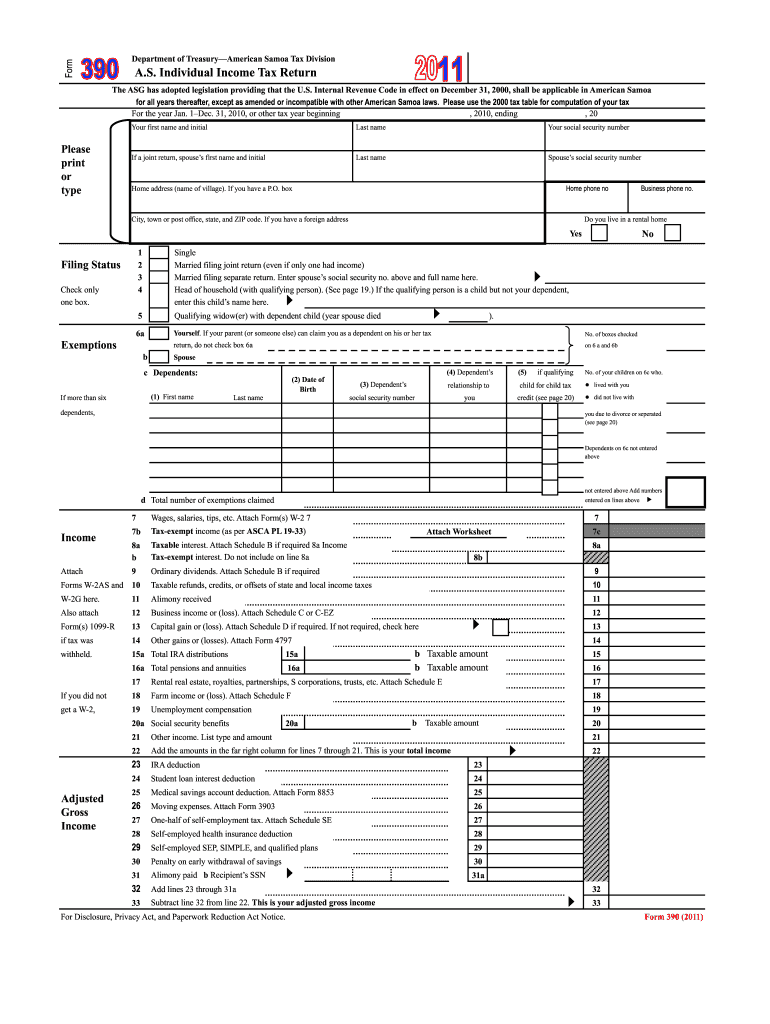
- Click ‘Get Form’ to open the A.S. Individual Income Tax Return in the editor.
- Begin by entering your first name, last name, and social security number in the designated fields. If filing jointly, include your spouse's information as well.
- Indicate your home address and contact details. Ensure accuracy for any correspondence from the tax office.
- Select your filing status by checking one of the provided boxes. This is crucial for determining your tax obligations.
- Fill out the exemptions section by listing dependents and their details, including names and social security numbers.
- Proceed to report your income sources, such as wages and dividends, ensuring you attach necessary forms like W-2s where required.
- Complete deductions and credits sections accurately to optimize your tax return. Review all entries before submission.
Start using our platform today for free to simplify your tax filing process!
Fill out tax office american samoa online
It's free
It's free
See more tax office american samoa versions
We've got more versions of the tax office american samoa form. Select the right tax office american samoa version from the list and start editing it straight away!
| Versions | Form popularity | Fillable & printable |
|---|---|---|
| 2011 | 4.9 Satisfied (41 Votes) |
Security and compliance
At DocHub, your data security is our priority. We follow HIPAA, SOC2, GDPR, and other standards, so you can work on your documents with confidence.
Learn more


Related forms
South coast psychiatry
The document is a Consent to Treatment Form that authorizes a specified provider to deliver evaluation and treatment ser ...

Provider Dispute Resolution Form - Sharp Health Plan
The document is a Provider Dispute Resolution Request form designed for healthcare providers to formally dispute claims ...

Peace dollar checklist
The document is a collector checklist for Peace Dollars, provided by Littleton Coin Company. It guides collectors on how ...

Transcript Request Form
The document is a Transcript Request Form for Columbia Southern University, requiring students to provide personal infor ...

XAPP524 (v1 1) Serial LVDS High-Speed ADC Interface
The document provides detailed instructions for applying for child support services through the Utah Department of Human ...

Form 13 amendment of lease
The document is a Form 13 used for amending instruments or documents related to land titles in Queensland, governed by t ...

SAMPLE INVITATION LETTER FOR YOUR FAMILY AND
The document is a sample invitation letter from an F-1 or J-1 student at Teachers College, Columbia University, addresse ...

Sacramento County Sheriff s Office, Instructions for Unlawful Detainer
The document provides instructions from the Sacramento County Sheriff’s Office regarding the process for unlawful detain ...