




Here's how it works



How to use or fill out NP-20 Indiana Nonprofit Organization's Annual Report - Law Latte with DocHub

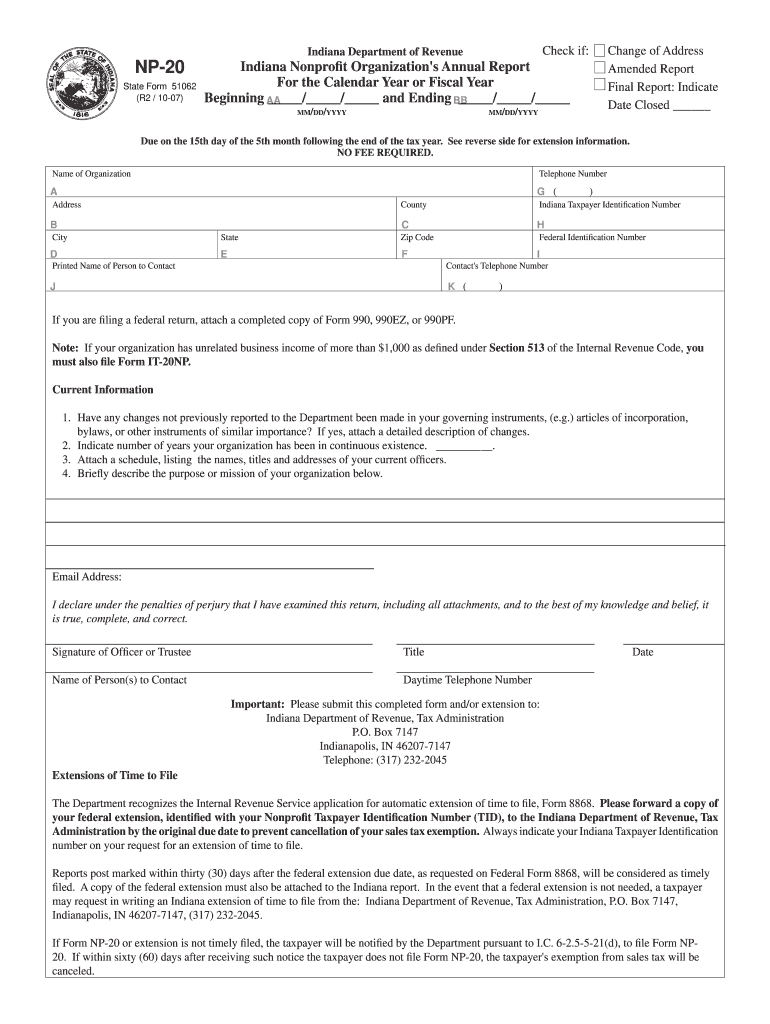
- Click ‘Get Form’ to open the NP-20 form in our editor.
- Begin by entering your organization’s name and contact information in sections A through F. Ensure accuracy as this information is crucial for identification.
- Indicate the reporting period by filling in the beginning and ending dates (AA and BB) in MM/DD/YYYY format. This helps establish your organization’s fiscal timeline.
- In section 1, answer whether there have been any changes to your governing instruments. If yes, attach a detailed description of these changes.
- Complete section 2 by indicating how many years your organization has been continuously active.
- Attach a schedule listing current officers' names, titles, and addresses as required in section 3.
- Briefly describe your organization's mission in the designated area. This provides context for your nonprofit's activities.
- Finally, ensure that an authorized officer signs the form, providing their title and contact number before submission.
Start using our platform today to easily complete and submit your NP-20 form online for free!
It's free
See more NP-20 Indiana Nonprofit Organization's Annual Report - Law Latte versions
Got questions?
Can I complete and sign my NP-20 Indiana Nonprofit Organization's Annual Report - Law Latte online?
Sure, and it’s really easy! DocHub is a web-based PDF editor with advanced document management capabilities that allow you rapidly modify your documents, fill out empty fields and add new ones for others to fill out, and create electronic signatures in several ways. Import your NP-20 Indiana Nonprofit Organization's Annual Report - Law Latte, provide information as requested, and decide how you want to eSign your document - by typing your name, drawing your signature, uploading its image, or using a QR code.
How to fill out and sign NP-20 Indiana Nonprofit Organization's Annual Report - Law Latte online?
You can easily complete, edit, and even eSign your NP-20 Indiana Nonprofit Organization's Annual Report - Law Latte utilizing DocHub. Create a new profile and begin your free trial. After that, you may upload the document with the form and simply make all the required edits. No need to print on paper or use a third-party application to sign it, as you can place your electronic signature on your document faster via DocHub.
What is state of Indiana Form NP-20?
Where do I file an Indiana NP-20 form?
How do I get tax exempt status in Indiana?
Security and compliance
At DocHub, your data security is our priority. We follow HIPAA, SOC2, GDPR, and other standards, so you can work on your documents with confidence.
Learn more




