Type text, add images, blackout confidential details, add comments, highlights and more.
02. Sign it in a few clicks
Draw your signature, type it, upload its image, or use your mobile device as a signature pad.
03. Share your form with others
Send np form via email, link, or fax. You can also download it, export it or print it out.
How to use or fill out Indiana Tax NP with our platform
Ease of Setup
DocHub User Ratings on G2
Ease of Use
DocHub User Ratings on G2
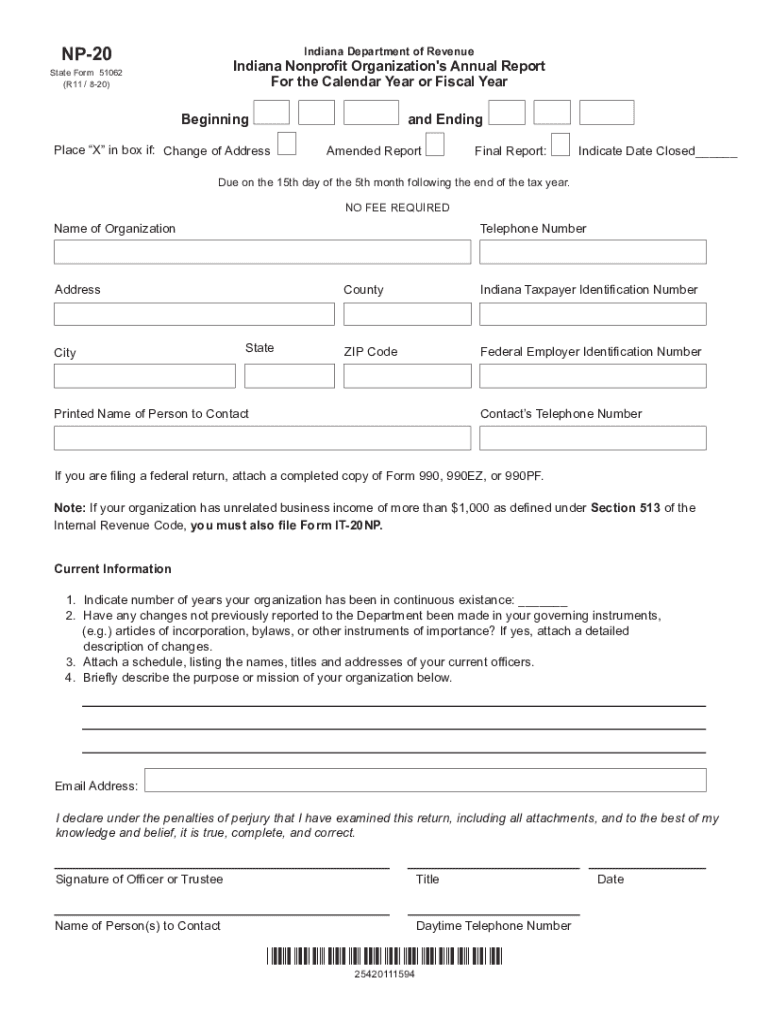
Click ‘Get Form’ to open the Indiana Nonprofit Organization's Annual Report in the editor.
Begin by filling in the organization’s name, telephone number, and address. Ensure all details are accurate for proper identification.
Indicate if there is a change of address, an amended report, or if this is a final report by placing an 'X' in the appropriate box.
Provide your Indiana Taxpayer Identification Number and Federal Employer Identification Number. These are crucial for tax processing.
In the 'Current Information' section, indicate how many years your organization has been in continuous existence and note any changes to governing instruments.
Attach a schedule listing current officers' names, titles, and addresses as required.
Briefly describe your organization's purpose or mission in the designated area.
Finally, ensure that the form is signed by an officer or trustee along with their title and contact information before submission.
Start using our platform today to fill out your Indiana Tax NP form easily and for free!
Access essential tax forms for nonprofit businesses. Read about important changes and announcements for nonprofits from the Indiana Department of Revenue.
Aug 13, 2025 Note: This exemption certificate may not be issued by the nonprofit for the purchase of utilities, vehicles, watercraft, aircraft, or.Read more
Cookie consent notice
This site uses cookies to enhance site navigation and personalize your experience.
By using this site you agree to our use of cookies as described in our Privacy Notice.
You can modify your selections by visiting our Cookie and Advertising Notice.