
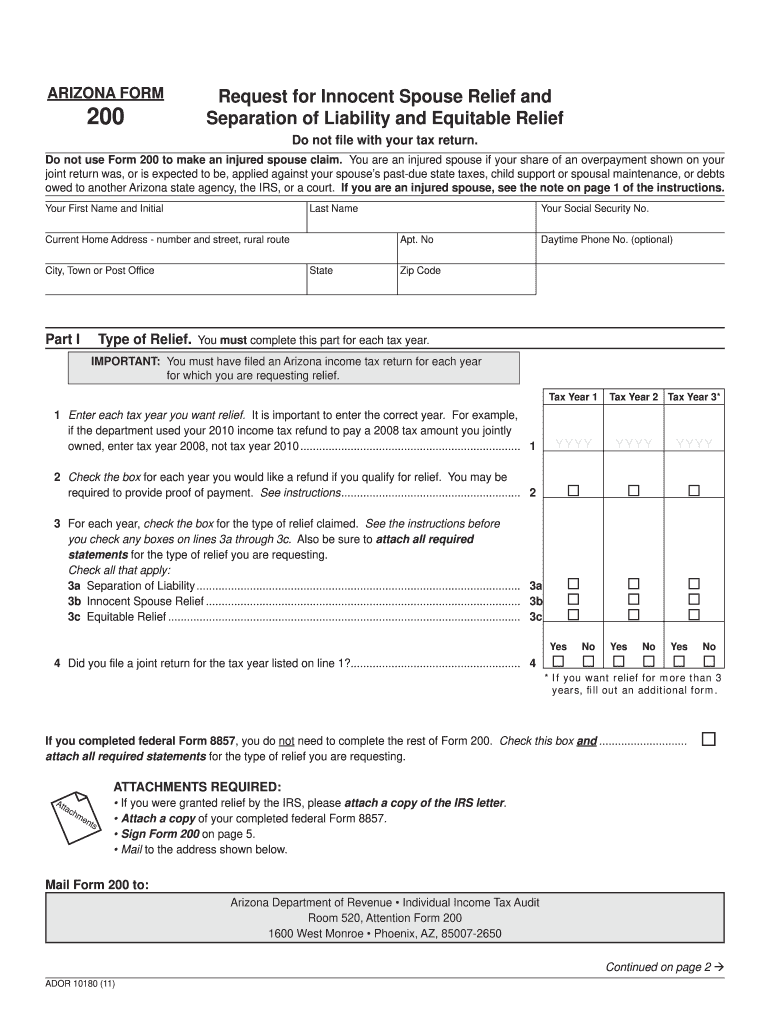





Arizona Form 200 - Find Laws 2026

Get Form
Arizona Form 200 - Find Laws Preview on Page 1

Here's how it works

01. Edit your form online
Type text, add images, blackout confidential details, add comments, highlights and more.
02. Sign it in a few clicks
Draw your signature, type it, upload its image, or use your mobile device as a signature pad.
03. Share your form with others
Send it via email, link, or fax. You can also download it, export it or print it out.

How to use or fill out Arizona Form 200 - Find Laws with our platform

Form edit decoration
9.5
Ease of Setup
DocHub User Ratings on G2
9.0
Ease of Use
DocHub User Ratings on G2
  1. Click ‘Get Form’ to open Arizona Form 200 in the editor.
  2. Begin by entering your first name, last name, and current home address in the designated fields. Ensure accuracy as this information is crucial for processing.
  3. In Part I, provide your Social Security Number and daytime phone number (optional). Then, specify the tax years for which you are requesting relief by entering them in the provided fields.
  4. Check the appropriate boxes for each tax year regarding refunds and types of relief claimed. Make sure to attach any required statements as indicated.
  5. Complete Part II by providing information about your spouse or former spouse, including their name, Social Security Number, and current address.
  6. Continue filling out Parts III and IV by answering questions related to your financial situation and involvement in preparing tax returns. Attach additional pages if necessary.
  7. Finally, review all entries for accuracy before signing at the bottom of the form. Once completed, save your document and follow instructions for mailing it to the Arizona Department of Revenue.

Start using our platform today to fill out Arizona Form 200 easily and for free!

See more Arizona Form 200 - Find Laws versions

We've got more versions of the Arizona Form 200 - Find Laws form. Select the right Arizona Form 200 - Find Laws version from the list and start editing it straight away!
Versions Form popularity Fillable & printable
2023 4.5 Satisfied (39 Votes)
2022 4.8 Satisfied (50 Votes)
2021 4.8 Satisfied (52 Votes)
2020 3.9 Satisfied (29 Votes)
2019 4.3 Satisfied (58 Votes)
2017 4.3 Satisfied (52 Votes)
2011 4.4 Satisfied (406 Votes)
be ready to get more

Complete this form in 5 minutes or less

Get form

Got questions?

We have answers to the most popular questions from our customers. If you can't find an answer to your question, please contact us.
Contact us

A lot of software applications are available on the market for document modifying and signing. DocHub is one of the most popular online solutions that comply with all security and compliance requirements and guarantees your electronically signed documentation is legally enforceable. All you need to try it out is to sign up for an account, upload your Arizona Form 200 - Find Laws, fill out the required details, and click Sign. Generate your electronic signature by typing, drawing it, uploading its picture to your form, or scanning a unique QR code.

It is a no-brainer on a computer or via a mobile device to fill out a Arizona Form 200 - Find Laws with DocHub. All you need to do is open any installed web browser on your smartphone and go to the DocHub site. Once authenticated, add your document and open it in editing mode. Use our toolbar to make your edits and save changes. Optionally, keep your file in your files or send it to a recipient immediately.

Arizona Tax Rates, Collections, and Burdens Arizona also has a 5.6 percent state sales tax rate and an average combined state and local sales tax rate of 8.38 percent. Arizona has a 0.45 percent effective property tax rate on owner-occupied housing value. Arizona does not have an estate tax or inheritance tax.
Form 1040 and Schedules 1, 2, 3, A, and D Form 1040 has just two pages and contains the final numbers that are used to calculate your tax liability. The Schedules that come after the 1040 contain supplemental data and calculations that feed into the 1040.
To request a copy of a tax return or other documents that you filed (individual income tax, corporate income tax, transaction privilege use tax, withholding, bonds), please complete Arizona Form 450. To request a copy of any other ADOR public record, please complete Arizona Form 460.

Security and compliance

At DocHub, your data security is our priority. We follow HIPAA, SOC2, GDPR, and other standards, so you can work on your documents with confidence.

Learn more
ccpa2
pci-dss
gdpr-compliance
hipaa
soc-compliance
be ready to get more

Complete this form in 5 minutes or less

Get form

People also ask

Step 1: Go to the e-Filing portal homepage. Step 2: Click Income Tax Return (ITR) Status. Step 3: On the Income Tax Return (ITR) Status page, enter your acknowledgement number and a valid mobile number and click Continue.
Your liability can be found on Line 48 of your Arizona Form 140 and Line 58 for both your Arizona 140PY (Part Year Resident) and Arizona 140NR (Non-Resident) forms. If your income is the same or similar as the previous year, this will give you a good indication of what your liability will be for this year.
How to request relief. To request injured spouse relief, file Form 8379, Injured Spouse Allocation. You can file it with your tax return by mail or electronically. You can also mail it separately when you receive notice that your refund was applied to an outstanding debt.
Youll have some tax liability if you earn income. Add all your income and subtract your standard deduction to figure out your taxable income. Then refer to the IRS tax brackets to find your tax liability.

Related links

