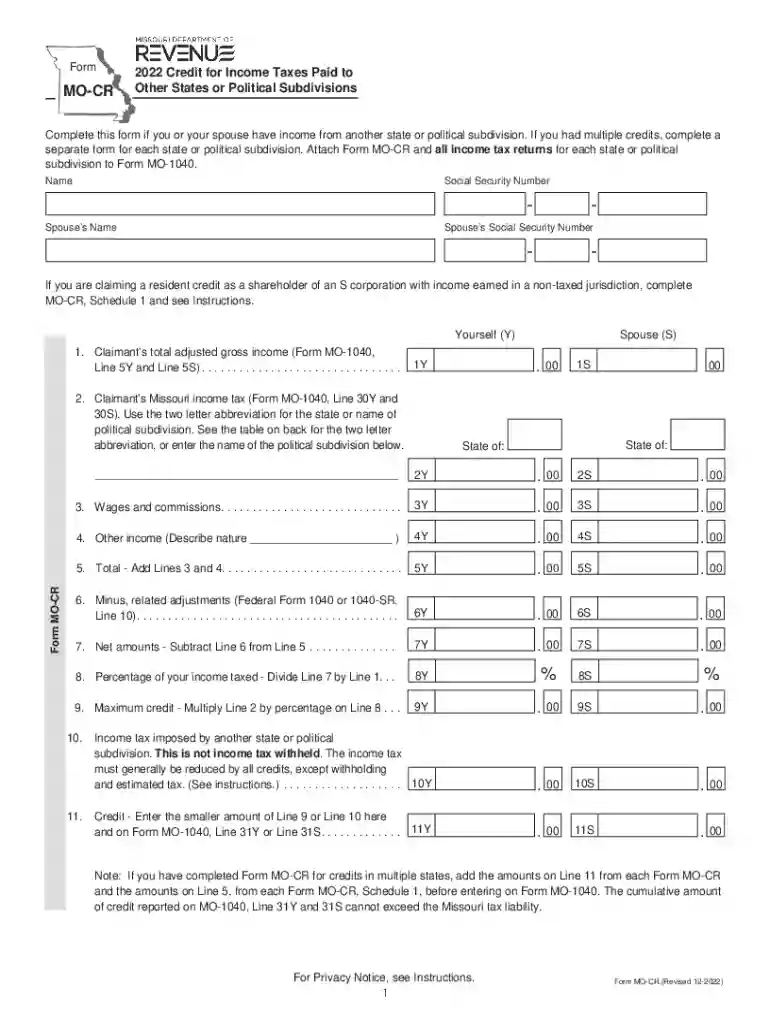
Form MO-CR - 2022 Credit for Income Taxes Paid to Other States or Political Subdivisions-2026

Get Form
Form MO-CR - 2022 Credit for Income Taxes Paid to Other States or Political Subdivisions Preview on Page 1

Here's how it works

01. Edit your form online
Type text, add images, blackout confidential details, add comments, highlights and more.

02. Sign it in a few clicks
Draw your signature, type it, upload its image, or use your mobile device as a signature pad.

03. Share your form with others
Send it via email, link, or fax. You can also download it, export it or print it out.

How to use or fill out Form MO-CR - 2022 Credit for Income Taxes Paid to Other States or Political Subdivisions with DocHub

Form edit decoration
9.5
Ease of Setup
DocHub User Ratings on G2
9.0
Ease of Use
DocHub User Ratings on G2
  1. Click ‘Get Form’ to open it in the editor.
  2. Begin by entering your name and Social Security Number at the top of the form. If applicable, include your spouse’s information.
  3. For Line 1, input your total adjusted gross income from Form MO-1040, Lines 5Y and 5S.
  4. On Line 2, enter your Missouri income tax from Form MO-1040, Lines 30Y and 30S. Use the state abbreviation or name of the political subdivision as needed.
  5. Complete Lines 3 and 4 by detailing wages, commissions, and any other income received from other states. Add these amounts together for Line 5.
  6. Follow through with calculations on Lines 6 to 11 as instructed, ensuring accuracy in each step to determine your credit amount.

Start using our platform today to fill out Form MO-CR easily and for free!

be ready to get more

Complete this form in 5 minutes or less

Get form

Got questions?

We have answers to the most popular questions from our customers. If you can't find an answer to your question, please contact us.
Contact us
Use Form MO-PTC, Property Tax Credit Claim, call (800) 877-6881 or download the form from the Missouri Department of Revenue: Property Tax Credit Claim.
The credit for taxes paid to another state is automatically calculated in your account when you add a Nonresident return to your already created Resident Missouri return if you pay taxes to both Missouri and another state.
Taxes Paid to Another State: To qualify for the credit, you must have actually paid income taxes to another state. This is typically documented through the states tax return or tax payment records. If you havent paid taxes to another state, theres no need to file Form IT-112-R.
When more than one state taxes the same income, you can claim a credit for taxes paid to the other state. The other state is usually the nonresident state. When you create a Resident state return and a Non-Resident state return, the program will calculate the credit for taxes paid to another state, if applicable.

Security and compliance

At DocHub, your data security is our priority. We follow HIPAA, SOC2, GDPR, and other standards, so you can work on your documents with confidence.

Learn more
ccpa2
pci-dss
gdpr-compliance
hipaa
soc-compliance