Az department revenue form 140 ia 2026

Get Form
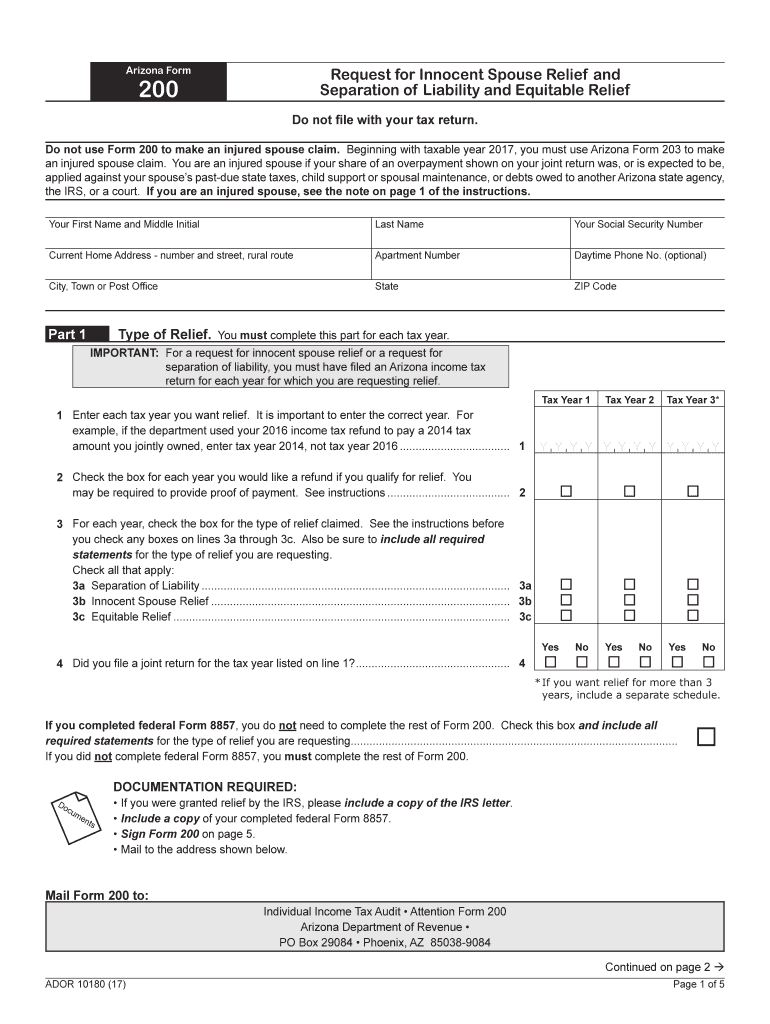
az department revenue form 140 ia Preview on Page 1

Here's how it works

01. Edit your form online
Type text, add images, blackout confidential details, add comments, highlights and more.
02. Sign it in a few clicks
Draw your signature, type it, upload its image, or use your mobile device as a signature pad.
03. Share your form with others
Send it via email, link, or fax. You can also download it, export it or print it out.

How to use or fill out az department revenue form 140 ia with our platform

Form edit decoration
9.5
Ease of Setup
DocHub User Ratings on G2
9.0
Ease of Use
DocHub User Ratings on G2
  1. Click ‘Get Form’ to open the Arizona Department Revenue Form 140 IA in the editor.
  2. Begin by entering your personal information, including your first name, last name, and Social Security Number. Ensure that your current home address is accurate.
  3. In Part 1, specify the tax years for which you are requesting relief. Enter each year carefully and check the appropriate boxes for refunds and types of relief claimed.
  4. Proceed to Part 2 to provide information about you and your spouse. Fill in their current name, Social Security Number, and address. Indicate your marital status by checking the relevant box.
  5. Continue through Parts 3 and 4, detailing your financial situation and involvement in preparing returns. Be thorough in explaining any circumstances that may affect your claim.
  6. Finally, review all entries for accuracy before signing the form electronically within our platform. Once completed, save and download your form for submission.

Start using our platform today to fill out your AZ Department Revenue Form 140 IA easily and for free!

See more az department revenue form 140 ia versions

We've got more versions of the az department revenue form 140 ia form. Select the right az department revenue form 140 ia version from the list and start editing it straight away!
Versions Form popularity Fillable & printable
2023 4.5 Satisfied (39 Votes)
2022 4.8 Satisfied (50 Votes)
2021 4.8 Satisfied (52 Votes)
2020 3.9 Satisfied (29 Votes)
2019 4.3 Satisfied (58 Votes)
2017 4.3 Satisfied (52 Votes)
2011 4.4 Satisfied (406 Votes)
be ready to get more

Complete this form in 5 minutes or less

Get form

Got questions?

We have answers to the most popular questions from our customers. If you can't find an answer to your question, please contact us.
Contact us
Where to mail your income tax return Arizona Form 140 Resident Personal Income Tax Return Receiving a Refund Making a Payment Arizona Department of Revenue P.O. Box 52138 Phoenix, AZ 85072 Arizona Department of Revenue P.O. Box 52016 Phoenix, AZ 85072
If you are trying to locate, download, or print Arizona state tax forms, you can do so on the state of Arizona Department of Revenue, at . Commonly used Arizona state tax forms are also available at offices, public libraries, post offices, and other county offices.
Personal income tax return filed by resident taxpayers. You may file Form 140 only if you (and your spouse, if married filing a joint return) are full year residents of Arizona.
Income Tax Withholding Arizona applies a flat 2.5% income tax rate on employee wages. While the rate itself is fixed, employees control their withholding percentage by submitting Form A-4, which allows them to choose a rate between 0.5% and 3.5% of their gross wages.

Security and compliance

At DocHub, your data security is our priority. We follow HIPAA, SOC2, GDPR, and other standards, so you can work on your documents with confidence.

Learn more
be ready to get more

Complete this form in 5 minutes or less

Get form