Ct2412012pdf form 2026

Get Form
form 15108 Preview on Page 1

Here's how it works

01. Edit your form 15108 online
Type text, add images, blackout confidential details, add comments, highlights and more.
02. Sign it in a few clicks
Draw your signature, type it, upload its image, or use your mobile device as a signature pad.
03. Share your form with others
Send form 15108 pdf via email, link, or fax. You can also download it, export it or print it out.

How to use or fill out ct2412012pdf form with our platform

Form edit decoration
9.5
Ease of Setup
DocHub User Ratings on G2
9.0
Ease of Use
DocHub User Ratings on G2
  1. Click ‘Get Form’ to open the ct2412012pdf in the editor.
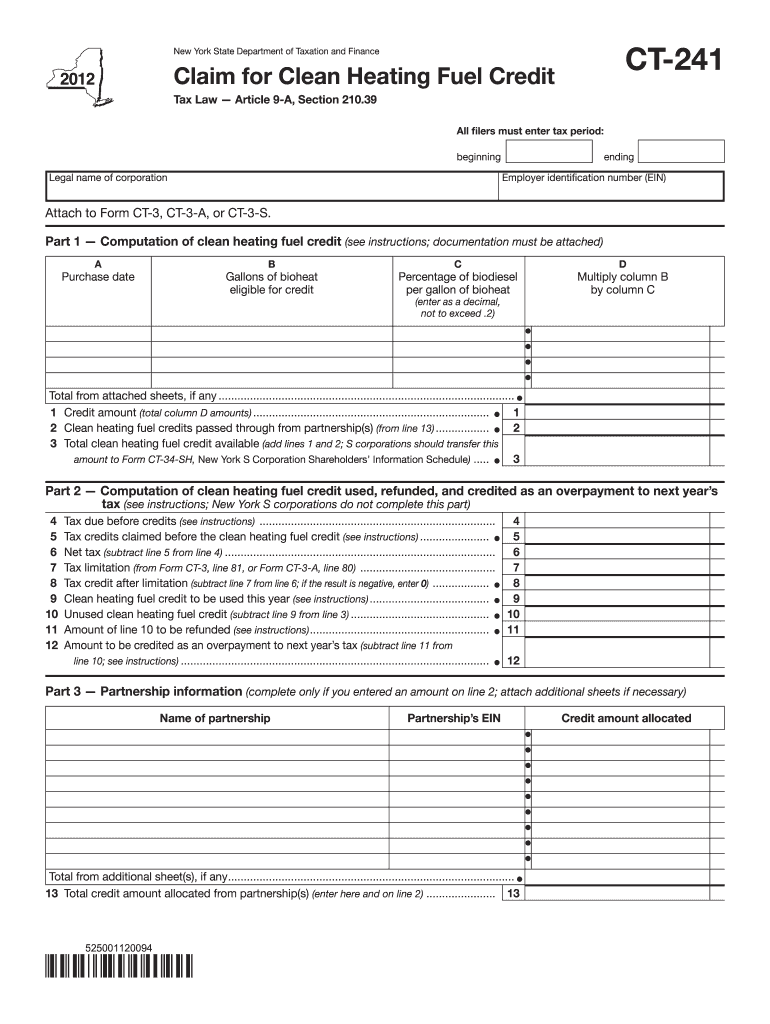
  2. Begin by entering the tax period at the top of the form, specifying both the beginning and ending dates.
  3. In Part 1, list each purchase of bioheat. For each entry, fill in the purchase date in Column A, followed by the gallons of bioheat eligible for credit in Column B.
  4. Next, enter the percentage of biodiesel per gallon in Column C as a decimal (not exceeding .2). Multiply Column B by Column C and record this in Column D.
  5. Sum all amounts from Column D and enter this total on Line 1. If applicable, include any clean heating fuel credits passed through from partnerships on Line 2.
  6. Proceed to Part 2 to compute credits used and any overpayments. Follow instructions carefully for Lines 4 through 12 to ensure accurate reporting.
  7. If you have partnership information, complete Part 3 with necessary details and attach additional sheets if required.

Start using our platform today for free to simplify your form completion process!

See more ct2412012pdf form versions

We've got more versions of the ct2412012pdf form form. Select the right ct2412012pdf form version from the list and start editing it straight away!
Versions Form popularity Fillable & printable
2023 4.3 Satisfied (34 Votes)
2022 4.7 Satisfied (24 Votes)
2021 4.9 Satisfied (58 Votes)
2020 4.3 Satisfied (194 Votes)
2019 4.1 Satisfied (49 Votes)
2018 4.4 Satisfied (151 Votes)
2017 4.3 Satisfied (38 Votes)
2016 4.2 Satisfied (73 Votes)
2014 4 Satisfied (44 Votes)
2013 4 Satisfied (59 Votes)
2012 4 Satisfied (59 Votes)
be ready to get more

Complete this form in 5 minutes or less

Get form

Got questions?

We have answers to the most popular questions from our customers. If you can't find an answer to your question, please contact us.
Contact us
S Corp Approval Letter (CP261 Notice) The CP261 Notice officially confirms that your S Corporation has been established. Going forward, your S Corporations business activity will be reported on the 1120s Business Tax Return.
A domestic corporation must file Form 1120, U.S. Corporation Income Tax Return, whether it has taxable income or not, unless its exempt from filing under section 501.
The Business Entity Tax is required to be paid to the Department of Revenue Services (DRS) by a business entity subject to the tax on or before the fifteenth day of the fourth month following the close of each taxable year of the entity.
Purpose of Form Use Form 1120, U.S. Corporation Income Tax Return, to report the income, gains, losses, deductions, credits, and to figure the income tax liability of a corporation.
Form RI-706 - Estate Tax Return.

Security and compliance

At DocHub, your data security is our priority. We follow HIPAA, SOC2, GDPR, and other standards, so you can work on your documents with confidence.

Learn more
ccpa2
pci-dss
gdpr-compliance
hipaa
soc-compliance
be ready to get more

Complete this form in 5 minutes or less

Get form

People also ask

Form CT-1120, Corporation Business Tax Return, is used to compute tax both on a net income basis and on a capital stock basis. Tax is paid on the basis that yields the higher tax. The minimum tax is $250.
Type of Federal Return Filed An S corporation should file Form CT-1065/CT-1120SI, Connecticut Pass‑Through Entity Tax Return. A limited liability company (LLC) should file Form CT‑1120 only if the company elects to be taxed as a corporation for federal income tax purposes.
Form CT-1120 can be filed electronically through myconneCT. DRS myconneCT allows taxpayers to electronically file, pay, and manage state tax responsibilities. If you file electronically you are expected to pay electronically at the time of filing.