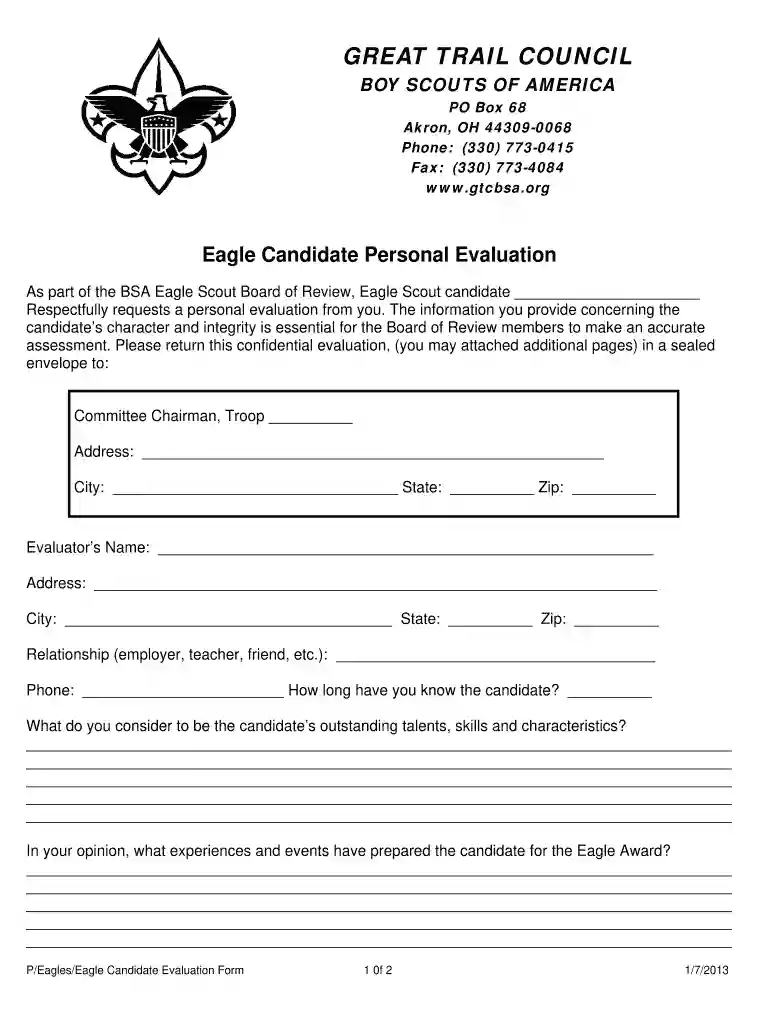
candidate personal form Preview on Page 1

Candidate personal evaluation 2026

Here's how it works

  • 01. Edit your candidate personal form online

    Type text, add images, blackout confidential details, add comments, highlights and more.

  • 02. Sign it in a few clicks

    Draw your signature, type it, upload its image, or use your mobile device as a signature pad.

  • 03. Share your form with others

    Send candidate evaluation via email, link, or fax. You can also download it, export it or print it out.

How to use or fill out candidate personal evaluation with our platform

Form edit decoration
9.5
Ease of Setup
DocHub User Ratings on G2
9.0
Ease of Use
DocHub User Ratings on G2
  1. Click ‘Get Form’ to open the candidate personal evaluation in the editor.
  2. Begin by entering the candidate's name at the top of the form. This identifies who the evaluation is for.
  3. Fill in your details as the evaluator, including your name, address, and relationship to the candidate. This information helps provide context for your evaluation.
  4. In the section regarding outstanding talents and skills, provide detailed insights about the candidate’s strengths. Use specific examples to illustrate your points.
  5. Next, describe experiences that have prepared the candidate for the Eagle Award. Highlight significant events or achievements that showcase their readiness.
  6. Rate the candidate on various qualities such as leadership skills and dependability using the provided scale from Excellent to Poor.
  7. Add any additional comments that may support your evaluation in the designated section at the end of the form.
  8. Finally, sign and date your evaluation before submitting it in a sealed envelope as instructed.

Start filling out your candidate personal evaluation today for free using our platform!

See more candidate personal form versions

We've got more versions of the candidate personal form form. Select the right candidate personal form version from the list and start editing it straight away!

VersionsForm popularityFillable & printable
20134.9 Satisfied (453 Votes)
20054 Satisfied (46 Votes)

be ready to get more

Complete this form in 5 minutes or less

Security and compliance

At DocHub, your data security is our priority. We follow HIPAA, SOC2, GDPR, and other standards, so you can work on your documents with confidence.

Related links

Candidate evaluation tips and guidelines - Total Talent

Feb 11, 2026 Interviewers should complete a candidate evaluation form to assess and score the candidates overall qualifications for the position to which they have applied.Read more

Learn more
Individual Assessment

Assessments, which are systematic approaches for evaluating individuals talents and capabilities, can be used to make a wide variety of decisions aboutRead more

Learn more
If you believe that this page should be taken down, please follow our DMCA take down process here