




Here's how it works

01. Edit your form online
Type text, add images, blackout confidential details, add comments, highlights and more.

02. Sign it in a few clicks
Draw your signature, type it, upload its image, or use your mobile device as a signature pad.

03. Share your form with others
Send it via email, link, or fax. You can also download it, export it or print it out.
How to use or fill out waiver withdrawal with our platform

- Click ‘Get Form’ to open the waiver withdrawal document in the editor.
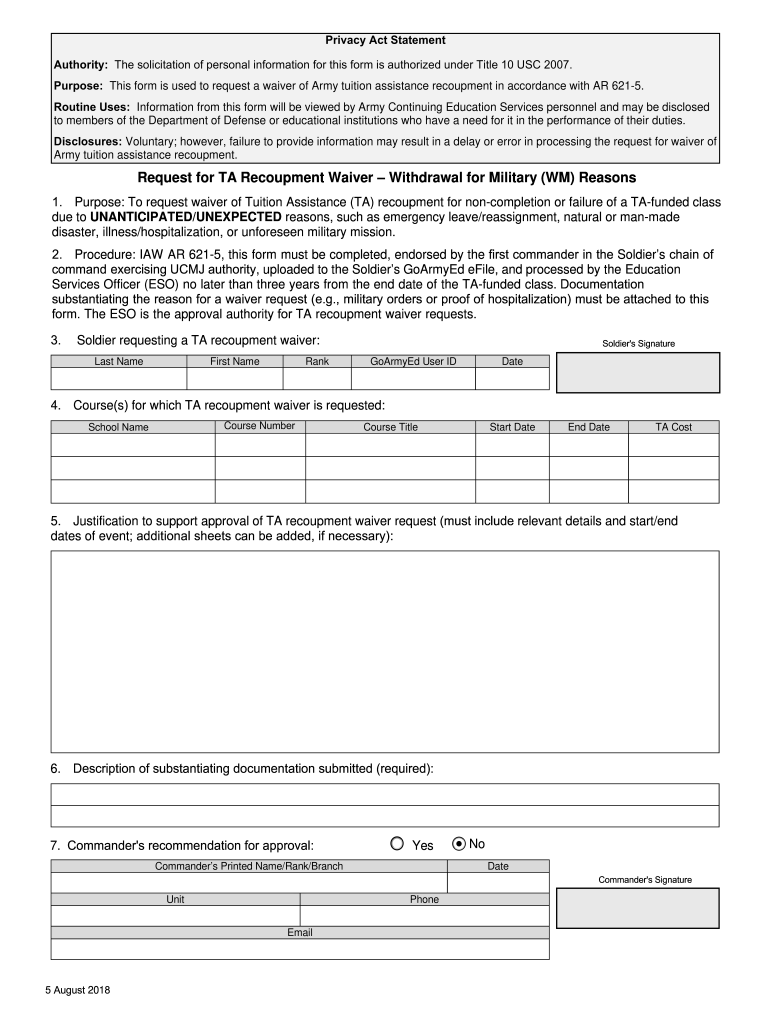
- Begin by entering your personal information in the Soldier requesting a TA recoupment waiver section. Fill in your Last Name, First Name, Rank, GoArmyEd User ID, and Date. Ensure accuracy as this information is crucial for processing.
- Next, provide details about the course(s) for which you are requesting a TA recoupment waiver. Include the School Name, Course Number, Course Title, Start Date, End Date, and TA Cost. This section helps clarify which classes are affected.
- In the Justification section, clearly explain the reasons for your request. Include relevant details and dates of any unforeseen events that impacted your ability to complete the course.
- Describe any substantiating documentation you are submitting with this form. This could include military orders or proof of hospitalization.
- Finally, ensure that your commander reviews and signs off on your request. They will need to provide their Printed Name/Rank/Branch and indicate their recommendation for approval.
Start using our platform today to streamline your waiver withdrawal process effortlessly!
Fill out waiver withdrawal online
It's free
It's free
See more waiver withdrawal versions
We've got more versions of the waiver withdrawal form. Select the right waiver withdrawal version from the list and start editing it straight away!
| Versions | Form popularity | Fillable & printable |
|---|---|---|
| 2025 | 4.6 Satisfied (36 Votes) | |
| 2024 | 4.8 Satisfied (57 Votes) | |
| 2024 | 4.5 Satisfied (54 Votes) | |
| 2024 | 4.6 Satisfied (24 Votes) | |
| 2024 | 4.2 Satisfied (22 Votes) | |
| 2024 | 4.9 Satisfied (39 Votes) | |
| 2023 | 4.6 Satisfied (29 Votes) | |
| 2023 | 4.2 Satisfied (33 Votes) | |
| 2023 | 4.8 Satisfied (51 Votes) | |
| 2023 | 4.3 Satisfied (30 Votes) | |
| 2023 | 4.4 Satisfied (43 Votes) | |
| 2023 | 4.1 Satisfied (50 Votes) | |
| 2023 | 4.8 Satisfied (43 Votes) | |
| 2023 | 4.3 Satisfied (48 Votes) | |
| 2022 | 4.8 Satisfied (52 Votes) |
Security and compliance
At DocHub, your data security is our priority. We follow HIPAA, SOC2, GDPR, and other standards, so you can work on your documents with confidence.
Learn more


