





Return form 2026

Get Form
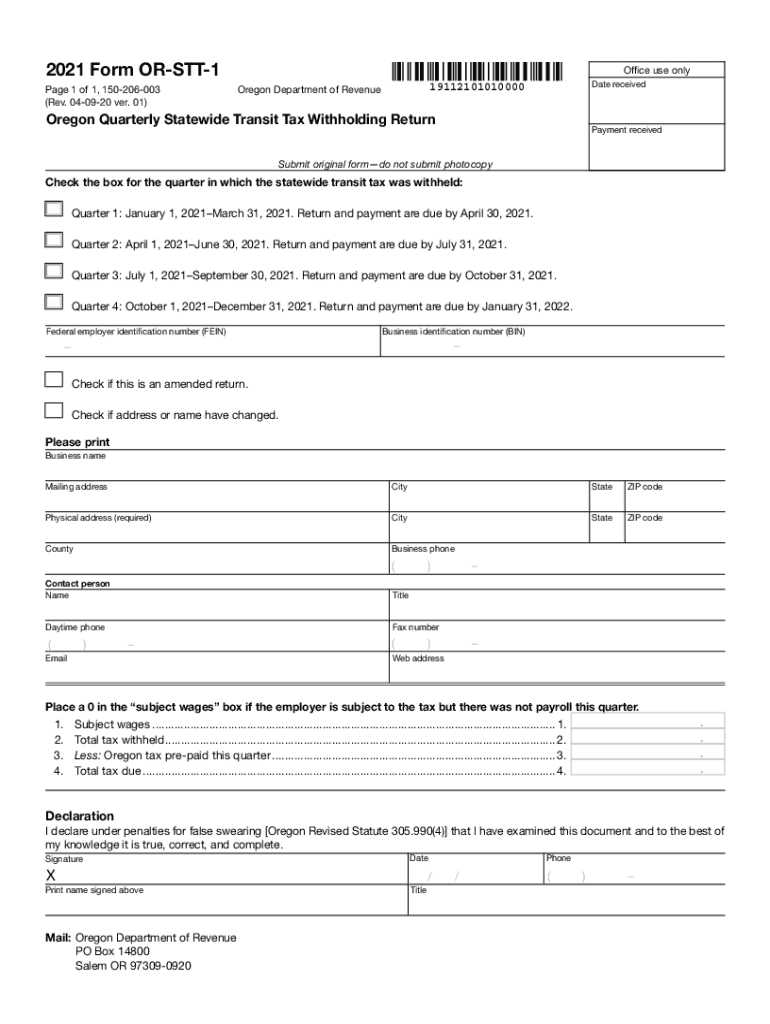
or stt 1 Preview on Page 1

Here's how it works

01. Edit your or stt 1 online
Type text, add images, blackout confidential details, add comments, highlights and more.
02. Sign it in a few clicks
Draw your signature, type it, upload its image, or use your mobile device as a signature pad.
03. Share your form with others
Send or transit tax via email, link, or fax. You can also download it, export it or print it out.

How to use or fill out the return form with our platform

Form edit decoration
9.5
Ease of Setup
DocHub User Ratings on G2
9.0
Ease of Use
DocHub User Ratings on G2
  1. Click ‘Get Form’ to open the return form in the editor.
  2. Select the appropriate quarter for which you are filing by checking the corresponding box. Ensure you are aware of the due dates for each quarter.
  3. Enter your Federal Employer Identification Number (FEIN) and Business Identification Number (BIN) in the designated fields.
  4. Indicate if this is an amended return or if there have been changes to your address or name by checking the relevant boxes.
  5. Fill in your business name, mailing address, physical address, and contact information accurately. This ensures that all correspondence reaches you without delay.
  6. Complete the financial sections by entering subject wages, total tax withheld, any pre-paid Oregon tax, and calculate the total tax due.
  7. Review your entries for accuracy before signing. Once satisfied, sign and date the declaration section at the bottom of the form.

Start using our platform today to fill out your return form easily and efficiently!

See more return form versions

We've got more versions of the return form form. Select the right return form version from the list and start editing it straight away!
Versions Form popularity Fillable & printable
2022 4.9 Satisfied (35 Votes)
2021 4.8 Satisfied (93 Votes)
2020 4.3 Satisfied (63 Votes)
2019 4.3 Satisfied (71 Votes)
2018 3.8 Satisfied (37 Votes)
be ready to get more

Complete this form in 5 minutes or less

Get form

Got questions?

We have answers to the most popular questions from our customers. If you can't find an answer to your question, please contact us.
Contact us

You need to use only trustworthy software solutions with strong data protection compliance to sign your paperwork electronically. DocHub is just the type of service you need! It stores data on Amazon Web Servers and complies with all necessary security criteria and eSignature laws, so it’s a trustworthy way to eSign your oregon statewide transit tax form or other paperwork using this tool.

You may complete and sign your oregon stt on the internet, even on a tight deadline. All you need to access top-notch editing tools on any device is a DocHub profile, that you can register in just a few moments. When you sign up, upload your document or find what you are searching for in our catalog, complete it using the editing tools you want, and put your electronic signature on it at the end.

return to form (plural returns to form) (idiomatic) A return to a former state of success or brilliance. This album marks a return to form for the band which has not had a successful hit since 1995.
For the purpose of income tax, there are mainly three types of returns which can be filed: Original. Revised. Belated. Updated.
A tax return is a form filed with a tax authority that reports a taxpayers income, expenses, and other pertinent information. It allows a taxpayer to calculate their tax liability so they may either schedule a payment or request a refund.

Security and compliance

At DocHub, your data security is our priority. We follow HIPAA, SOC2, GDPR, and other standards, so you can work on your documents with confidence.

Learn more
ccpa2
pci-dss
gdpr-compliance
hipaa
soc-compliance
be ready to get more

Complete this form in 5 minutes or less

Get form

People also ask

Form 1040 is used by U.S. taxpayers to file an annual income tax return.
Form 1040 is used by U.S. taxpayers to file an annual income tax return. Form 1040-SR is available as an optional alternative to using Form 1040 for taxpayers who are age 65 or older. Form 1040-SR uses the same schedules and instructions as Form 1040 does.
Which ITR Form to File When Filing Income Tax Return? ITR FormApplicableToBusiness Income ITR 1 Sahaj Resident Individuals and HUFs No ITR 2 Individuals and HUFs No ITR 3 Individual, HUF, or Partner in a firm Yes ITR 4 Individual, HUF, and Firms Presumptive Business Income3 more rows
Is Form 1040 the Same As a W-2? Form 1040 is different from a W-2. A W-2 is a wage and tax statement that an employee receives from a company they worked for during the tax year. The information listed on the W-2 is used to fill out Form 1040.

Related links

