Az form 5005-2026

Get Form
az form 5005 Preview on Page 1

Here's how it works

01. Edit your az form 5005 online
Type text, add images, blackout confidential details, add comments, highlights and more.

02. Sign it in a few clicks
Draw your signature, type it, upload its image, or use your mobile device as a signature pad.

03. Share your form with others
Send form 5005 via email, link, or fax. You can also download it, export it or print it out.

How to use or fill out az form 5005 with our platform

Form edit decoration
9.5
Ease of Setup
DocHub User Ratings on G2
9.0
Ease of Use
DocHub User Ratings on G2
  1. Click ‘Get Form’ to open it in the editor.
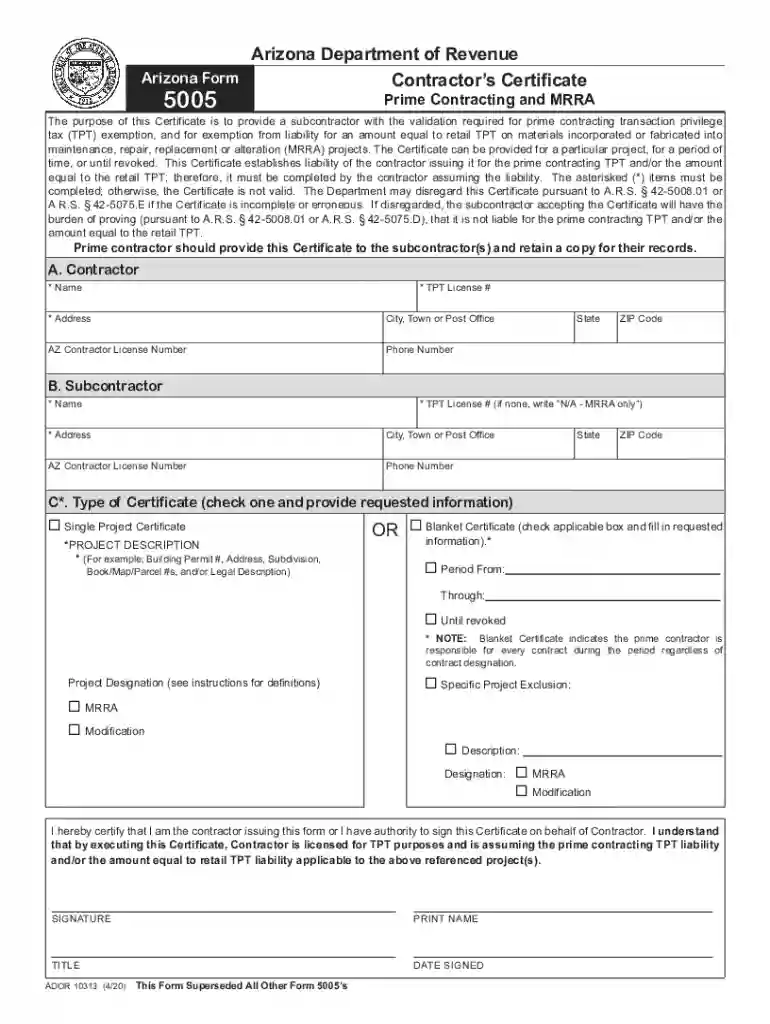
  2. Begin with Section A for the Contractor. Fill in your name, TPT License Number, address, city, state, and ZIP code. Ensure all fields marked with an asterisk (*) are completed.
  3. Proceed to Section B for the Subcontractor. Again, complete all required fields including name, TPT License Number (if applicable), address, city, state, and ZIP code.
  4. In Section C, select either the ‘Single Project Certificate’ or ‘Blanket Certificate’. If you choose ‘Single Project’, provide a detailed project description. For ‘Blanket Certificate’, specify the duration by checking either 'From: Through:' or 'Until revoked'.
  5. Complete the Signature section by providing your signature, printed name, title, and date signed. Remember that incomplete forms may be disregarded.

Start using our platform today to fill out your az form 5005 easily and for free!

See more az form 5005 versions

We've got more versions of the az form 5005 form. Select the right az form 5005 version from the list and start editing it straight away!
Versions Form popularity Fillable & printable
2021 4.8 Satisfied (65 Votes)
2020 4.3 Satisfied (234 Votes)
2015 4.2 Satisfied (99 Votes)
2002 4 Satisfied (59 Votes)
be ready to get more

Complete this form in 5 minutes or less

Get form

Got questions?

We have answers to the most popular questions from our customers. If you can't find an answer to your question, please contact us.
Contact us
Although commonly referred to as sales tax, TPT is differentiated from sales tax in most states in that it is a tax imposed on the seller, rather than on the purchaser. Therefore, it is ultimately the vendor, not the customer, who is liable to ADOR for TPT associated with taxable sales made in Arizona.
Nonprofit organizations, including those with501(c)(3), 501(c)(4), and 501(c)(6) statuses, can purchase goods tax-free if they meet certain qualifications. The following are key points to note regarding this exemption: Applicable To: 501(c)(3), 501(c)(4), and 501(c)(6) organizations.
Known as the Contractors Certificate, Form 5005 relates directly to TPT. It addresses who is liable for paying the tax. Contractors must provide this form to both the Arizona Department of Revenue and all subcontractors. The form establishes that subcontractors are exempt from taxes.
Arizona Form 5000A is used to claim Arizona TPT (sales tax) exemptions from a vendor when making purchases for resale.
Form 5005 Contractor Certificate. Prime Contractor. All Subcontractors under the control of the prime contractor. For a subcontractors records to demonstrate they are not liable for the tax due on a modification or MRRA project. This certificate should not be provided to a materials vendor in order to purchase exempt.

Security and compliance

At DocHub, your data security is our priority. We follow HIPAA, SOC2, GDPR, and other standards, so you can work on your documents with confidence.

Learn more
ccpa2
pci-dss
gdpr-compliance
hipaa
soc-compliance
be ready to get more

Complete this form in 5 minutes or less

Get form

People also ask

Arizona Form 5000 is used to claim Arizona TPT (sales tax) exemptions from a vendor. The Certificate must be provided to the vendor in order for the vendor to document why sales tax is not charged to the University in these cases, or for the vendor to refund the sales tax already billed to the University.

5005 form